Buying a printer should feel simple, but it rarely does. You start with one basic need, then you see inkjet printers, laser printers, ink tank models, photo printers, all-in-one machines, wireless printing, mobile apps, duplex printing, toner prices, and subscription plans.
That is where it is easy to make the wrong choice. The cheapest printer on sale can turn out to have costly ink. A large office printer can take up half the desk and sound too loud for a small room.
The right printer is not the most expensive one. It is the one that fits how you print most of the time. A student, a family, a photographer, and a small business owner do not need the same machine.
This guide will help you choose the right printer for home, office, schoolwork, photos, labels, and everyday documents. It also covers the small problems people notice after buying, such as dried ink, weak Wi-Fi, slow first-page printing, paper jams, and costly replacement supplies.
Start With What You Print Most
Before you compare brands, think about your usual print jobs. This one step can save you from buying a printer that looks good on paper but feels wrong at home.
Light home use means return labels, recipes, school forms, tickets, receipts, and the odd document. A compact all-in-one inkjet or ink tank printer usually works well for this type of use.
For work-from-home use, text quality and speed matter more. You probably need sharp documents, automatic double-sided printing, a scanner, and stable Wi-Fi. A laser printer or a business inkjet is often the better fit.
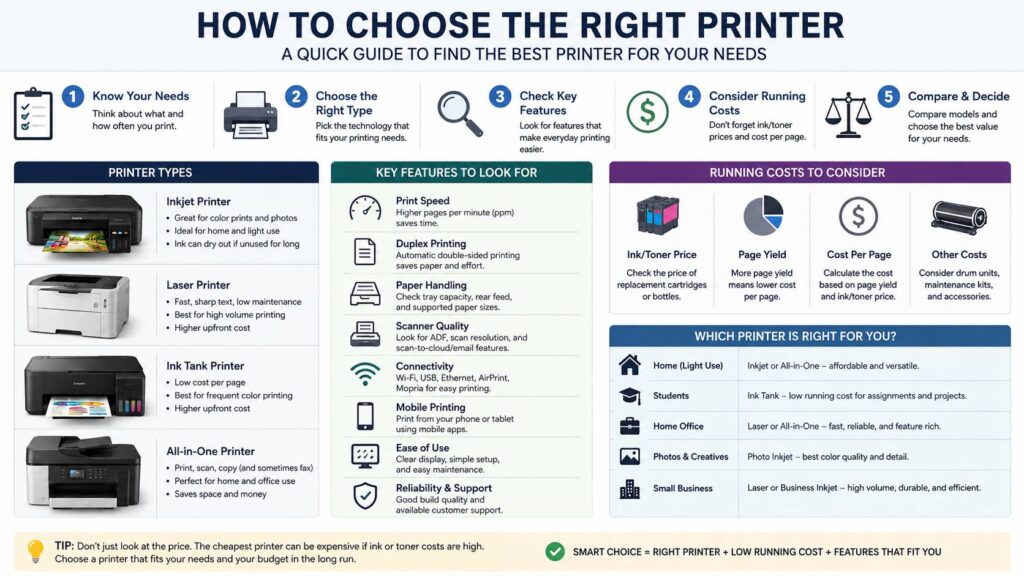
For students, running cost is a big deal. A cheap printer can look friendly at checkout, but small cartridges run out fast. An ink tank printer costs more at first, yet it can print many more pages from one refill set.
For photos, a standard office printer will not always give you rich color or smooth detail. A photo-focused inkjet is a smarter choice, mainly if you print family pictures, creative work, or small portfolio samples.
For small offices, durability matters. You need fast output, a larger paper tray, high-yield ink or toner, and a printer that does not struggle under daily use.
Inkjet vs Laser Printer: Choose the Right Printing Style
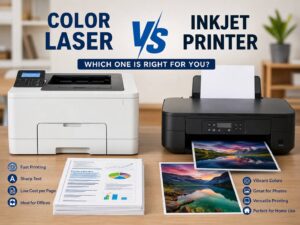
The biggest decision is usually inkjet vs laser. Both can be good, but they suit different users.
Inkjet printers use liquid ink. They are strong for color documents, photos, school projects, crafts, and mixed home printing. They can print on many paper types, including glossy photo paper and thicker creative paper.
Laser printers use toner powder. They shine with sharp text, fast document printing, and higher page volume. Toner does not dry out like ink, so a laser printer is a strong option for people who print only from time to time.
Here is the simple split:
- Choose an inkjet printer for color pages, photos, crafts, and mixed home use.
- Choose a laser printer for text documents, forms, invoices, contracts, and office printing.
- Choose a monochrome laser printer if you only need black-and-white pages.
- Choose a color laser printer for charts, reports, and business graphics.
- Choose a photo inkjet if image quality matters more than speed.
My honest view: many people who only print basic documents should buy a monochrome laser printer. It is not exciting, but it works. It prints clean text, toner lasts a long time, and you do not deal with dried ink after leaving it unused for a few weeks.
For a deeper comparison, this guide on inkjet vs laser printer explains the real differences in cost, print quality, speed, and daily use.
Ink Tank Printers Are Great for Regular Color Printing
Ink tank printers are popular for a good reason. They use refillable tanks instead of small cartridges. That means lower running costs and fewer trips to buy ink.
Families often like ink tank printers. They handle homework, coloring pages, forms, tickets, labels, and recipes without making every color page feel expensive. Students can benefit too, mainly if they print notes, worksheets, and assignments often.
Small home offices can save money with ink tank models as well. If you print color documents each week, the long-term savings can be clear.
There is one catch. Ink tank printers still use liquid ink. If the printer sits unused for months, printhead clogs can happen. Cleaning cycles can fix some clogs, but they waste ink and time. So, an ink tank printer is best for regular use, not rare emergency printing.
Buy an ink tank printer if you print often and want lower ink costs. Skip it if you print three pages every few months and only need black text.
All-in-One Printer or Print-Only Printer?
Most homes should choose an all-in-one printer. It gives you printing, scanning, and copying in one device. Some models include fax too, but you may not need that feature.
The scanner is more useful than it seems. You can scan IDs, school documents, tax papers, receipts, signed forms, and old photos. Even if you scan only a few times a year, it is nice to have the option ready.
A print-only printer still makes sense for simple needs. Many compact laser printers focus only on printing. They are often smaller, faster, and easier to maintain.
Look for these scanner features if you handle paperwork:
- Flatbed scanner for IDs, books, receipts, and delicate papers
- Automatic document feeder for multi-page scans
- Duplex scanning for double-sided documents
- Scan-to-email or scan-to-cloud support for office use
- Clear scan settings in the mobile or desktop app
Here is a real-world issue: many cheap all-in-one printers include a scanner but no automatic document feeder. That sounds fine until you need to scan 25 pages by hand. If you work with forms often, pay extra for the feeder.
Check the Real Cost of Ink or Toner
Printer price matters, but supply cost matters more. A low-cost printer can turn into a bad deal after the first cartridge replacement.
Cost per page tells you how much each printed page costs based on ink or toner yield. You do not need to calculate it perfectly, but you should compare replacement supply prices before you buy.
Check these details:
- Price of black ink or toner
- Price of color ink or toner
- Page yield for each cartridge, bottle, or toner
- High-yield cartridge support
- Separate color cartridges
- Replacement drum cost for some laser printers
- Maintenance box cost for some inkjet models
Separate color cartridges are better than one combined tri-color cartridge in many cases. If one color runs out in a tri-color cartridge, you often replace the whole cartridge. That feels wasteful, and it costs more over time.
Subscription ink plans can help, but read the rules carefully. They work best if your print volume stays steady. If your printing changes often, the plan may feel restrictive.
Print Speed and First-Page Time Matter
Print speed is listed in pages per minute. For casual home printing, speed is not the main concern. For work, school projects, or office use, slow printing gets annoying fast.
Do not look only at the advertised speed. Many printer speed ratings use simple black text pages. Color pages, graphics, high-quality settings, and duplex printing take longer.
First-page time matters too. Some printers take a while to wake up before printing the first page. That small delay becomes annoying if you print quick one-page documents all day.
For light use, a moderate speed is fine. For business use, choose a printer that can handle daily jobs without long pauses.
Paper Handling Is More Important Than It Looks
Paper handling sounds boring, but it can change the whole experience.
A small paper tray means you refill paper all the time. A weak output tray can scatter pages. A printer without automatic duplex printing forces you to flip pages by hand. That gets old quickly.
Look for these paper features:
- Automatic double-sided printing
- Paper tray capacity
- Rear paper feed
- Envelope support
- Label sheet support
- Card stock support
- Photo paper support
- Borderless printing for photos
- Easy paper jam access
If you print shipping labels, check compatibility before buying. Laser printers need laser-safe labels. Inkjet printers need inkjet-safe labels. Mixing the wrong paper type with the wrong printer can lead to smudges, curling, or jams.
Wireless Printing Should Not Be a Headache
A modern printer should connect easily and stay connected. Sadly, Wi-Fi problems are one of the most common printer complaints.
Some printers work fine for a week, then show as offline. Others lose connection after a router restart. A few apps make setup feel harder than it should.
Good connectivity features include:
- Wi-Fi
- USB
- Ethernet
- AirPrint for Apple devices
- Mopria support for Android and Windows devices
- Wi-Fi Direct
- A clear mobile app
For home use, Wi-Fi is usually enough. For a small office, Ethernet is better. A wired connection gives you more stability, mainly if several people share the same printer.
Apple users should look for AirPrint support. Android users should check for Mopria support. These features make mobile printing easier and reduce driver headaches.
Photo Printing Needs More Than Color Ink
Many printers can print in color. That does not mean they are good photo printers.
Photo printing needs strong color control, smooth gradients, good black levels, proper photo paper support, and borderless printing. A basic office inkjet can print pictures, but the results may look flat or slightly dull.
Choose a photo printer if you print:
- Family photos
- Product images
- Art prints
- Design samples
- Photography work
- Color test pages
Color accuracy matters more for creative work. If you edit photos or design content before printing, your monitor quality matters too. This guide on the best color gamut for editing work can help if you want colors on screen to look closer to the final print.
A small opinion from real use: do not expect cheap copy paper to show what a photo printer can do. Good photo paper makes a huge difference. The wrong paper can make even a decent printer look average.
Size, Noise, and Desk Space Matter
Printers often look smaller in product photos than they feel in real life. Check the full dimensions with trays open. A printer can fit on a shelf when closed, then need much more room during printing.
Noise matters too. Laser printers can sound loud during startup and printing. Some inkjet printers shake a bit during heavy jobs. If your printer sits near your desk, bedroom, or video call setup, check reviews for noise complaints.
Build quality matters in daily use. A printer with a flimsy paper tray or awkward ink access can become annoying.
Look for:
- Solid paper tray
- Easy ink or toner access
- Clear display
- Simple buttons
- Strong scanner lid
- Easy jam removal
- Stable output tray
- Good cable placement
Touchscreens can help, but only if the menu is clear. A cheap touchscreen with slow response feels worse than good physical buttons.
Best Printer Types by User
The best printer depends on your routine. Here are simple matches that work for most buyers.
Best printer for occasional black-and-white printing:
Choose a monochrome laser printer. It is simple, sharp, and low-maintenance.
Best printer for families:
Choose an all-in-one ink tank printer. It handles schoolwork, forms, color pages, and scanning at a lower running cost.
Best printer for students:
Choose an ink tank printer for regular color printing. Choose a monochrome laser printer for essays, notes, and forms.
Best printer for home office:
Choose a laser all-in-one or business inkjet with duplex printing, an automatic document feeder, and reliable network support.
Best printer for photos:
Choose a photo-focused inkjet with borderless printing and strong photo paper support.
Best printer for small business:
Choose a business-class laser or inkjet with high-yield supplies, a larger paper tray, duplex scanning, and Ethernet.
Common Printer Buying Mistakes
Many printer regrets come from small details that buyers skipped.
The most common mistake is buying the cheapest printer without checking ink prices. The second mistake is buying an inkjet for rare use, then dealing with dry ink or clogged nozzles.
Another problem is skipping automatic duplex printing. Manual double-sided printing sounds acceptable at first. After a few longer documents, it feels like a chore.
Scanning is easy to overlook. A flatbed scanner works for one page. For a full document stack, an automatic document feeder saves a lot of time.
Wi-Fi is another pain point. A printer with weak wireless support can turn every print job into a small troubleshooting session.
Paper tray size causes frustration too. If you print often, a tiny tray gets annoying fast.
Features Worth Paying For
Some printer features are worth extra money. Others look nice but matter less in daily use.
Worth paying for:
- Automatic double-sided printing
- Automatic document feeder
- Separate color cartridges or refillable tanks
- High-yield ink or toner options
- Ethernet for office use
- AirPrint and Mopria support
- Larger paper tray
- Clear control panel
- Easy ink or toner replacement
- Good mobile app
Usually less useful:
- Fax
- Huge touchscreen
- Very high print speed for light home use
- Oversized paper support
- Photo features if you never print photos
- Extra app tools you will not use
The right printer should make printing feel boring in the best way. You send the job, it prints, and you move on.
Final Buying Advice
To choose the right printer, start with your real print habits. Then choose the printer type that fits those habits.
For rare black-and-white documents, a monochrome laser printer is usually the cleanest choice. For regular color printing, an ink tank printer gives better long-term value. For photos, choose a photo-focused inkjet. For home office work, pick an all-in-one printer with duplex printing, an automatic document feeder, and stable Wi-Fi or Ethernet.
My honest advice is simple: do not buy the cheapest printer just because the price looks good today. Check the cost of ink or toner first. Look at the paper tray, scanner, wireless support, and duplex printing too.
A good printer should not make you babysit it. It should print clean pages, scan without drama, stay connected, and keep running costs under control. Once you focus on those basics, the right model becomes much easier to spot.