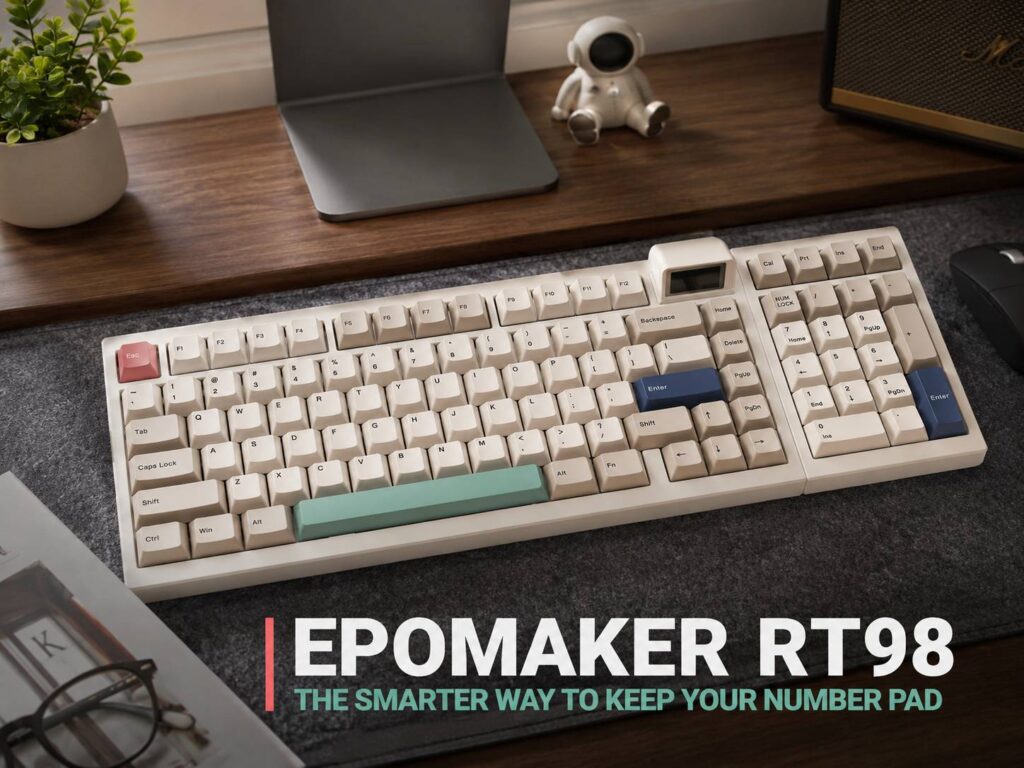
The Epomaker RT98 is one of those mechanical keyboards that looks playful at first, then starts to make more sense the longer you think about it. It has a retro style, a small magnetic Mini TV screen, wireless support, hot-swappable switches, and a compact 98% layout. The part that stands out most, though, is the way it treats the number pad.
For years, keyboard buyers have had a slightly awkward choice. Pick a full-size keyboard and keep the number pad, or go smaller and lose it. That works for some people, but not for everyone. A numpad still matters for spreadsheets, finance work, shortcuts, data entry, or even some games. At the same time, a full-size keyboard can take over a desk and push the mouse too far to the side.
The Epomaker RT98 tries to fix that problem with a smarter compromise. It keeps the number pad but places it inside a tighter, more desk-friendly design. It even comes in a Southpaw version, which moves the number pad to the left side. That small layout change gives right-handed mouse users more space, and honestly, it feels like the kind of idea more keyboard brands should have tried earlier.
Why the Epomaker RT98 Layout Is the Main Story
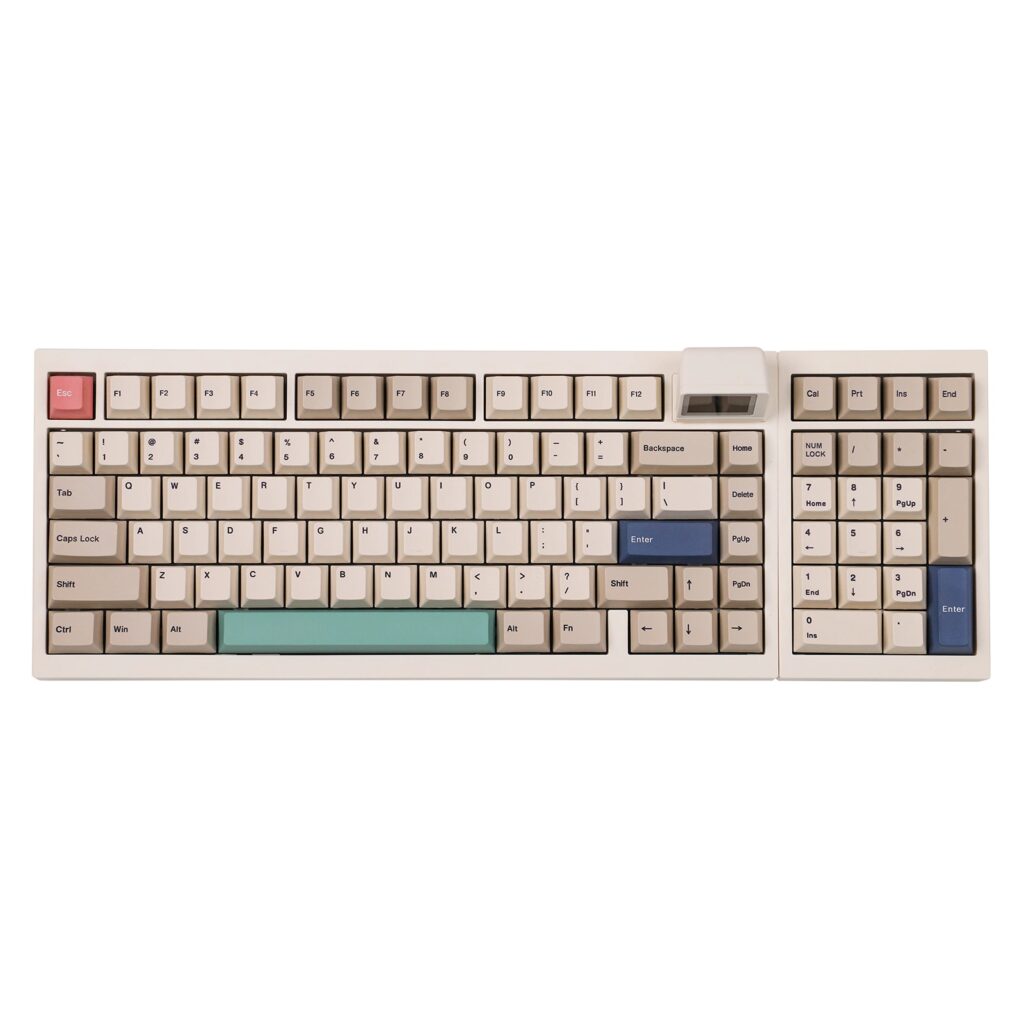
The Epomaker RT98 uses a compact 98% ANSI layout with 101 keys. In plain terms, it keeps most of what people expect from a full-size keyboard, including the function row, arrow keys, navigation keys, and number pad. It just squeezes everything into a smaller footprint.
That makes it different from a tenkeyless keyboard or a 75% keyboard. Those layouts save space, but they remove the numpad. The RT98 is aimed at people who like the cleaner desk setup of a smaller board but still type numbers often enough to miss the extra keys.
The right-handed model has the familiar layout. The Southpaw version is the more interesting one. With the number pad on the left, your right hand gets more room for the mouse. This can help with long office sessions, spreadsheet work, photo editing, and gaming setups where mouse space matters.
For users comparing layouts, the RT98 fits into the same conversation as compact full-size boards and 96% keyboards. If you want a deeper look at how this size works, this 96 keyboard size guide explains why these layouts appeal to people who want more keys without the full-size bulk.
A Better Middle Ground for Number Pad Fans
A lot of compact mechanical keyboards ask users to give up too much. A 60% board looks clean, but it hides many common keys behind shortcuts. A 75% board feels more practical, but it still drops the number pad. A tenkeyless board gives the mouse more room, but it leaves spreadsheet users reaching for a separate numpad.
The Epomaker RT98 sits in a more practical spot. It keeps the keys that productivity users still use every day. At the same time, it avoids the wide frame of a classic 104-key office keyboard.
The Southpaw layout makes the strongest case. It lets you enter numbers with your left hand, then keep your right hand on the mouse. That setup may feel odd at first, especially if you have used right-side numpads for years. After a little time, though, it can feel surprisingly natural.
This is where the RT98 feels more useful than trendy. The small screen is fun, and the retro styling is cute, but the keyboard earns attention through its layout. The number pad is not just there. It has been rethought in a way that solves a real desk problem.
The Mini TV Screen Gives It Personality
The Epomaker RT98 includes a detachable magnetic Mini TV-style display. It adds a playful retro touch and helps the keyboard stand out from other compact mechanical keyboards in the same price range.
Users can add custom GIFs, images, or stickers through Epomaker’s online driver. The keyboard can store up to three GIFs, and users can switch between them with shortcuts. That gives the RT98 a little more personal charm than a basic office keyboard.
Is the screen necessary? No. It will not improve typing speed, and it will not turn the keyboard into a productivity dashboard. Still, it gives the board a fun desk presence without making it look too aggressive.
The overall look helps too. The RT98 has a retro-inspired design that feels closer to an old computer setup than a flashy gaming keyboard. For a home office or creator desk, that is a nice balance.
Typing Feel and Switch Options
The RT98 uses a gasket-mounted structure with five layers of sound-dampening material. This type of design aims to make typing feel softer and reduce harsh case noise. It is a common feature now in enthusiast-style keyboards, but it still makes a clear difference compared with many basic office boards.
The keyboard comes with a PC plate, PBT keycaps, and plate-mounted stabilizers. It supports both 3-pin and 5-pin hot-swappable mechanical switches. That means users can replace the switches later without soldering.
Current switch options include Epomaker Creamy Jade switches and Epomaker Sea Salt Silent V2 switches. The Creamy Jade option suits users who want a fuller sound and a more expressive typing feel. The Sea Salt Silent V2 option makes more sense for shared rooms, office desks, late-night typing, or anyone who wants a quieter board.
The case uses ABS plastic rather than aluminum. That is worth knowing before buying. The RT98 is a feature-packed keyboard, but it is not trying to be a heavy metal custom build. For the price range, the trade-off makes sense, especially since the layout and wireless features carry much of the value.
Wireless Support and Battery Life
The Epomaker RT98 supports three connection modes: wired USB-C, 2.4GHz wireless, and Bluetooth. That gives users plenty of flexibility.
Wired mode is still the safest choice for gaming or low-latency use. The 2.4GHz mode is likely the best fit for most desk setups, since it gives a cleaner workspace without the usual Bluetooth delay. Bluetooth is handy for users who switch between a laptop, tablet, and desktop.
The keyboard includes an 8000mAh battery. Epomaker lists up to 45 days of typical use or more than 300 hours of continuous typing. Real battery life will depend on lighting, screen use, connection mode, and daily typing time.
For most users, battery life should not be a major concern. The one thing to watch is the Mini TV screen. Animated visuals can draw more power, so heavy screen use may shorten the time between charges.
Who the Epomaker RT98 Is Really For
The Epomaker RT98 is best for users who want a compact mechanical keyboard but still need a number pad. It is not aimed at minimalists who love tiny 60% keyboards. It is not a plain office keyboard either.
It makes the most sense for:
- Spreadsheet users who enter numbers often
- Office workers who want more mouse space
- Mechanical keyboard fans who like compact full-size layouts
- Users who want a left-side number pad
- People who want hot-swappable switches
- Desk setup fans who like retro accessories
- Users who switch between wired, Bluetooth, and 2.4GHz wireless
It is less suited to people who want a simple, cheap keyboard with no learning curve. The Southpaw version, in particular, takes a little adjustment. The screen and software features may feel unnecessary to users who only want a basic typing tool.
What Makes the RT98 Feel Different
The keyboard market is crowded, and many models now offer gasket mounts, wireless support, PBT keycaps, and hot-swappable switches. Those features are good, but they are no longer rare.
The Epomaker RT98 feels different because its layout gives it a clear reason to exist. It is not just a smaller keyboard with a screen added on top. It gives number pad users a better way to manage desk space.
That matters. A keyboard can have great sound and nice switches, but if it forces your mouse too far away, it can still feel wrong after long use. The RT98 looks at the desk as a full setup, not just a place to put keys.
The Southpaw option is the version I would pay the most attention to. It may not be for everyone, but it solves the biggest full-size keyboard complaint in a simple way. You keep the numpad, but your mouse hand gets room to move.
Epomaker RT98 Brings a Smart Twist to Compact Keyboards
The Epomaker RT98 is a smart keyboard for people who still care about the number pad. It keeps the practical keys that many compact layouts remove, then gives users a better way to fit them on a desk.
The Mini TV screen adds charm, and the retro look gives the board personality. Still, the layout is the real reason to care. The RT98 makes the number pad feel less like a bulky leftover from old office keyboards and more like a flexible part of a modern setup.
For users who want a compact mechanical keyboard with a numpad, wireless modes, hot-swappable switches, and a bit of retro fun, the Epomaker RT98 is one of the more interesting keyboard releases to watch.