Buying a printer feels easy until the ink runs out. The box price may look cheap, but the real cost often starts after the first refill. That is why a $79 printer can become more expensive than a $299 model after a year or two.
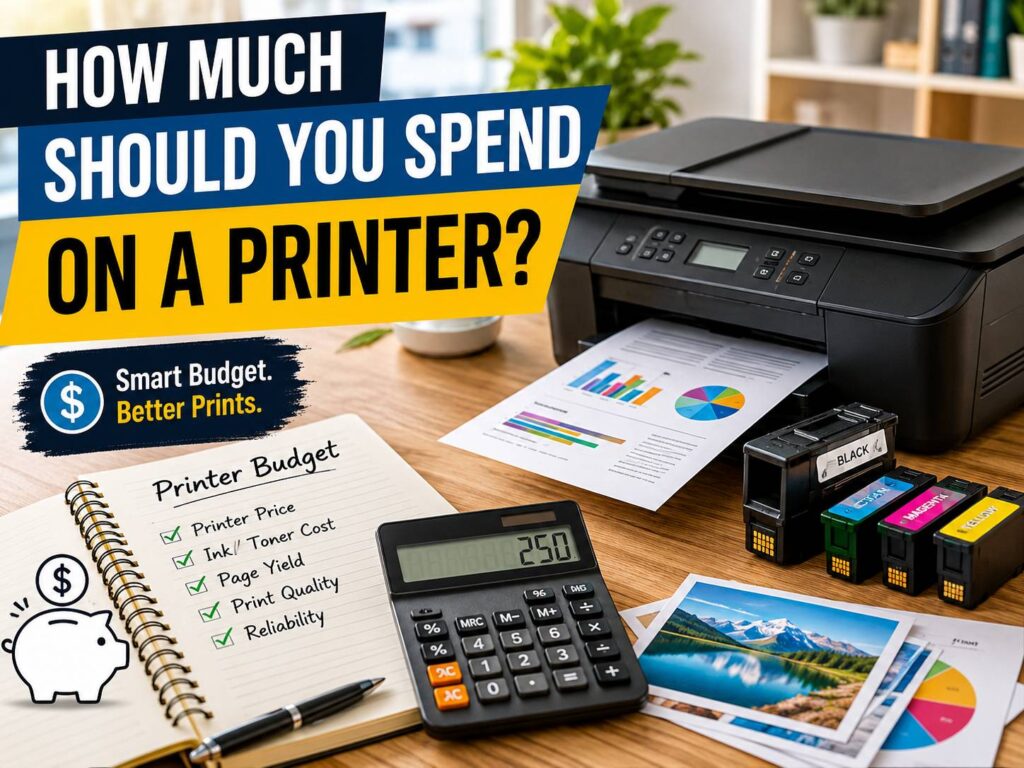
So, how much should you spend on a printer? For most homes, the best budget sits between $150 and $350. Light users can spend less. Families, students, remote workers, and small offices often get better value by spending more upfront. The trick is simple: do not shop by printer price alone. Look at ink cost, toner cost, page yield, print volume, scanner features, and how often you print.
A printer should save time, not create another small headache on your desk. Before choosing one, it helps to understand what each price range actually gives you.
The Quick Answer: How Much Should a Good Printer Cost?
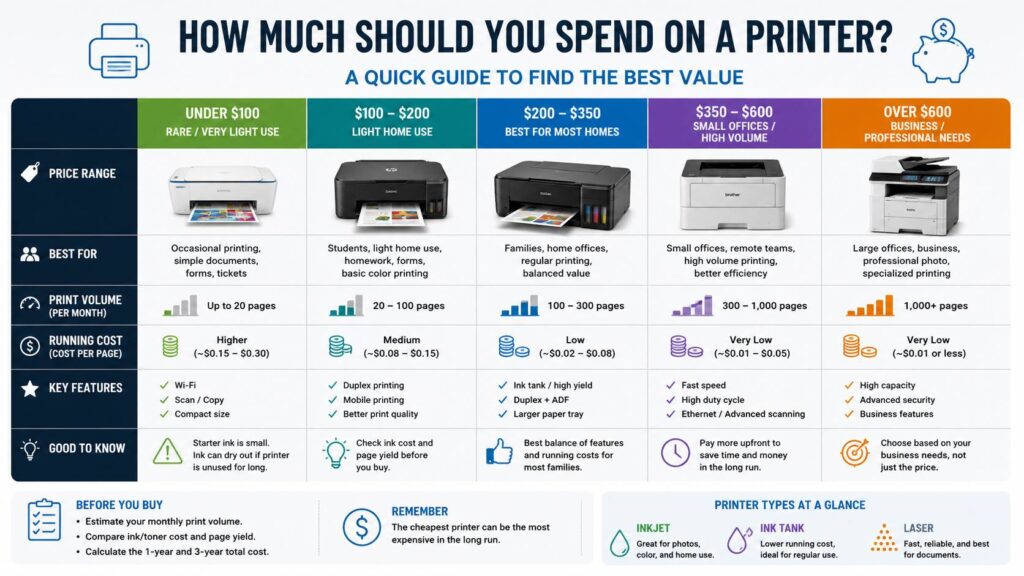
A good printer budget depends on how much you print. Here is a practical guide:
- Under $100: fine for rare printing and basic forms
- $100 to $200: good for light home use, schoolwork, and occasional color pages
- $200 to $350: the best range for families and home offices
- $350 to $600: better for small offices and regular high-volume printing
- Over $600: best for business use, premium photo printing, or wide-format work
For the average buyer, I would not chase the cheapest printer. It often comes with small starter cartridges, basic paper handling, slower print speed, and higher refill costs. Spending a bit more can give you lower running costs, better reliability, and fewer frustrating moments.
That said, an expensive printer is not always the right move. Someone who prints two pages per month does not need a large office machine. The smartest budget comes from your real print habits.
Why the Printer Price Is Only Half the Story
The sticker price tells you what the printer costs today. It does not tell you what the printer will cost over three years.
Ink and toner are the other half. A cheap cartridge printer may need expensive replacements after a small number of pages. Some starter cartridges run out quickly, so the first refill arrives sooner than expected. That is one of the most common issues buyers complain about.
Use this simple calculation:
Cartridge or toner price divided by page yield equals cost per page.
For example, a $40 cartridge with a 200-page yield costs about $0.20 per page. Print 500 pages, and you could spend about $100 on ink.
Now compare that with an ink tank printer. A $60 bottle set with a 6,000-page yield costs about $0.01 per page. Print 500 pages, and the ink cost sits near $5.
Real results vary by printer model, print settings, page coverage, and paper type. Still, the pattern is clear. A cheap printer can become expensive fast.
Under $100: Only Good for Very Light Use
Printers under $100 can work for people who print rarely. Think return labels, boarding passes, homework sheets, simple forms, and the occasional recipe. Many models in this range include scan and copy, which is useful for home tasks.
This budget works best for:
- Rare printing
- Basic black text
- Occasional color pages
- Small spaces
- Simple scanning
Still, there are trade-offs. Ink cartridges are often small. Print speed can feel slow. Paper trays may hold fewer pages. Wi-Fi setup can be hit or miss.
The biggest issue is dried ink. Inkjet printers need regular use. Leave them untouched for weeks, and the printhead can clog. Then the printer runs cleaning cycles, wastes ink, and still may not print cleanly.
For rare black-and-white printing, a small mono laser printer may be better. Toner does not dry out like liquid ink, so it handles long idle periods with less drama.
$100 to $200: A Fair Budget for Light Home Printing
This is a common price range for home printers. You can find basic all-in-one inkjets, compact laser printers, and entry-level models with Wi-Fi and mobile printing.
Spend in this range if you print:
- School pages
- Shipping labels
- Tax forms
- Travel documents
- Simple color graphics
- Scanned copies
At this level, look for automatic double-sided printing. It saves paper and makes longer documents easier to manage. A flatbed scanner is useful too, especially for IDs, forms, receipts, and school papers.
Still, watch the ink cost. Many printers in this price band still use cartridges. High-yield cartridge support makes a big difference. Without it, you may replace ink more often than expected.
A mono laser printer in this range can be a great buy for students or remote workers. It prints sharp text, starts quickly, and handles documents better than most cheap inkjets.
$200 to $350: The Best Range for Most Buyers
This is where printers start to feel more sensible. You get better features, stronger build quality, and more choices with lower running costs.
If you print for a family, this is the sweet spot. A printer in this range can handle schoolwork, forms, labels, recipes, home office documents, and occasional color printing without feeling too limited.
This range often includes:
- Ink tank printers
- Better all-in-one inkjets
- Stronger mono laser printers
- Entry-level color laser printers
- Faster print speeds
- Larger paper trays
- Better mobile printing support
Ink tank printers deserve serious attention here. They cost more at checkout, but they use refill bottles instead of small cartridges. For regular color printing, this can save real money over time.
A buyer who prints every week should look closely at ink tank models. They are especially useful for families with school-age children or people who print worksheets, recipes, labels, and mixed color pages.
For a deeper buying checklist, this guide on how to choose the right printer without wasting money on the wrong one is a good next read.
$350 to $600: Better for Small Offices and Heavy Home Use
A printer in this range makes sense for people who print often. It can also suit a small office, side business, or shared family workspace.
You should spend this much if you need:
- Faster printing
- Larger paper capacity
- Automatic document feeder
- Duplex printing
- Better scanner features
- Lower cost per page
- Ethernet support
- More reliable daily use
A cheap printer can waste time in a small office. Paper jams, empty cartridges, weak Wi-Fi, and slow scans all add friction. A better printer costs more upfront, but it can save time every week.
Laser printers become more attractive in this range. A mono laser printer is excellent for text-heavy work. A color laser printer suits reports, invoices, charts, and business documents. For color-heavy home use, an ink tank printer may still cost less to run.
The choice between color laser and inkjet matters here. Each type has real strengths, so compare print quality, toner cost, ink cost, speed, and photo needs before you buy. This breakdown of color laser vs inkjet printer explains the difference in a practical way.
Over $600: Worth It Only for Specific Needs
Most home users do not need to spend more than $600 on a printer. This higher range is best for people with clear needs.
Spend this much for:
- High-volume office printing
- Premium photo printing
- Wide-format printing
- Business-grade scanning
- Heavy color documents
- Better paper handling
- Team use
Photo printers can cost a lot to run. Good ink and photo paper are not cheap. The results can look great, but only if you print photos often enough to justify the cost.
Business printers in this price range focus on speed, duty cycle, paper capacity, and lower running costs. They are not always pretty or compact, but they are built for work.
Inkjet, Ink Tank, or Laser: Which Type Should You Pay For?
The right printer type has a big effect on your budget.
Inkjet Printers
Inkjet printers are common, affordable, and good with color. They work well for casual home use, photos, school projects, and mixed documents.
They are best for:
- Occasional color printing
- Photos
- Creative projects
- Low upfront budgets
- Small desks
The downside is ink cost. Cartridges can be expensive, and printheads can clog after long idle periods. A cheap inkjet is not a great choice for someone who prints lots of text every week.
Ink Tank Printers
Ink tank printers cost more upfront, but they can be much cheaper to run. Instead of replacing cartridges, you refill the tanks with ink bottles.
They are best for:
- Families
- Regular color printing
- School worksheets
- Home offices
- Buyers who hate frequent ink purchases
The downside is speed. Some ink tank models print slower than laser printers. Refilling can get messy too, especially the first time. Still, for families and home offices, ink tank printers offer the best long-term value.
Laser Printers
Laser printers use toner instead of ink. They are great for text, speed, and reliability.
They are best for:
- Black-and-white documents
- Long reports
- Invoices
- Shipping labels
- Students
- Small offices
Toner does not dry out like liquid ink. That makes laser printers a smart choice for people who print rarely but still want reliable output.
Color laser printers cost more than mono models. They are good for charts and business graphics, but they are not ideal for glossy photo printing.
Features Worth Paying Extra For
Some printer features are genuinely useful. Others sound nice but rarely matter.
Worth paying extra for:
- Automatic double-sided printing
- Automatic document feeder
- High-yield ink or toner support
- Larger paper tray
- Easy-to-buy supplies
- Good mobile printing support
- Ethernet for office use
- Strong warranty
- Replaceable maintenance parts
Usually not worth paying extra for:
- Fax
- Large touchscreen controls
- Voice assistant features
- Premium photo tools for basic documents
- Wide-format printing for normal home use
- Extra cloud features you will never use
A printer should be simple. It should connect, print, scan, and stay ready without constant attention.
Common Issues Buyers Notice After Purchase
Many printer problems appear after the return period ends. That is why it pays to think beyond the box price.
Common issues include:
- Ink runs out faster than expected
- Replacement cartridges cost too much
- Wi-Fi disconnects after router updates
- Paper jams with cheap paper
- The scanner feels slow
- Printheads clog after long idle periods
- Starter ink does not last long
- Brand apps push account sign-ins or subscriptions
- Firmware updates create cartridge problems
- Color pages cost more than expected
The most annoying printer is not always the one with the worst print quality. Often, it is the one that refuses to print when you need one simple document.
Should You Pay for an Ink Subscription?
Ink subscriptions can be useful, but they are not right for everyone. They work best for people who print a steady number of pages each month.
A subscription can make sense for:
- Regular color printing
- Families with predictable print volume
- People who print photos
- Buyers who want automatic ink delivery
- Users who dislike shopping for cartridges
Skip the subscription if:
- You print rarely
- Your monthly page count changes a lot
- You want full control over supplies
- You dislike monthly fees
- You prefer a printer that works without extra account rules
One thing to watch: many plans charge by page count, not by how much ink is used. A full-page color image and a short text page can count the same. That can be great for photos, but poor value for simple black text.
How to Choose the Right Printer Budget
Use this simple process before buying:
- Count your pages
Estimate how many pages you print per month. Be honest. A printer for 20 pages per month is different from one for 300 pages. - Check black-and-white vs color
Text-heavy users should look at laser printers. Color-heavy users should compare ink tank models. - Search the refill cost
Check the exact ink, toner, or bottle price for the model you want. - Look at page yield
Page yield is not perfect, but it helps compare models. - Calculate one-year cost
Add the printer price and expected supply cost for one year. - Calculate three-year cost
This is where cheap printers often lose.
Example:
Printer A costs $90. Ink costs $160 per year. Three-year cost: $90 plus $480 equals $570.
Printer B costs $280. Ink costs $40 per year. Three-year cost: $280 plus $120 equals $400.
Printer B costs more on day one, but it saves $170 over three years in this example.
Final Buying Advice: Spend for Your Real Printing Habits
For most people, the best printer budget is $150 to $350. This range gives you better features, lower running costs, and fewer compromises than the cheapest models.
Spend under $150 only for rare printing. Pick a mono laser printer if you mostly print text.
Spend $200 to $350 for a family printer, student printer, or home office printer. Ink tank models are strong choices in this range.
Spend $350 to $600 for small office use, faster printing, better scanning, and heavier workloads.
Spend over $600 only for clear business needs, serious photo printing, wide-format pages, or high-volume printing.
My honest view: the best printer is rarely the cheapest one. It is the model that fits your page volume, refill budget, and patience. A printer should not make you think about ink every week. It should sit quietly, work when needed, and cost less over time.