Smart Air Purifier vs Basic Air Purifier: Quick Answer
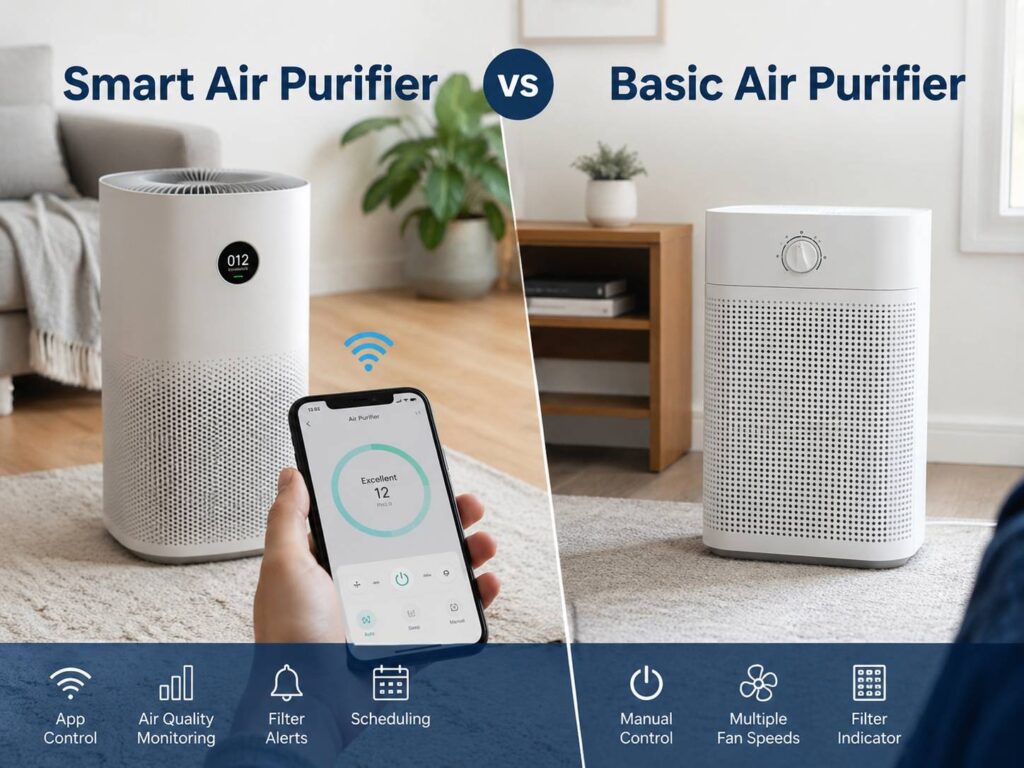
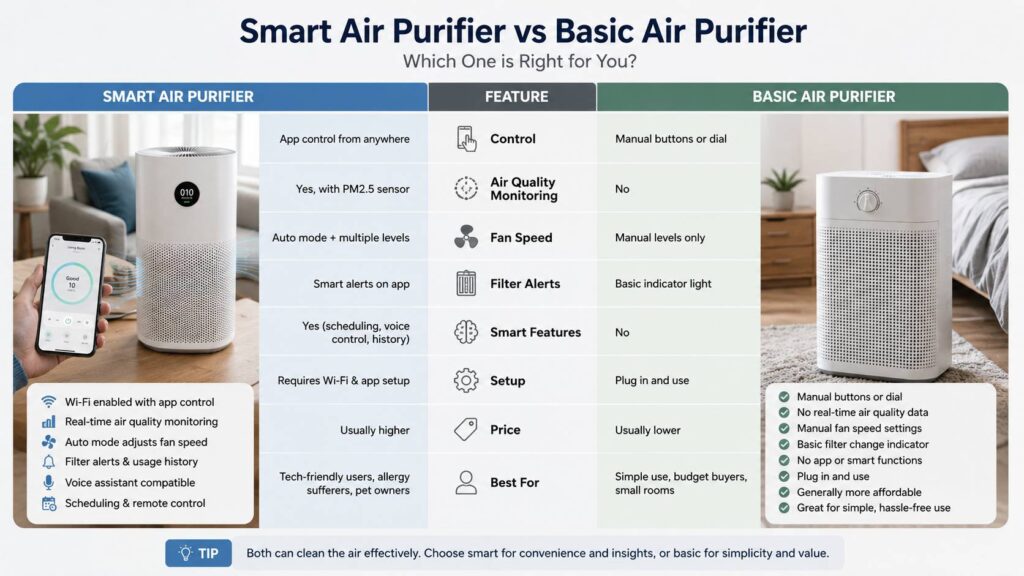
A smart air purifier is the better choice if you want app control, air quality tracking, automatic fan changes, schedules, filter alerts, and voice assistant support. A basic air purifier is better if you want clean air without Wi-Fi, apps, accounts, or a higher price.
Both types do the same main job. They pull indoor air through filters, trap airborne particles, and push cleaner air back into the room. The smart model simply gives you more control and more feedback.
That extra control can be useful, but it is not magic. A smart air purifier with weak airflow will not beat a basic air purifier with strong CADR and a good HEPA filter. For that reason, the best choice starts with performance, not the app.
For most bedrooms, nurseries, offices, and living rooms, a basic air purifier can work very well. Still, a smart model makes more sense if you like automatic settings, want to check air quality from your phone, or often forget to adjust the fan speed.
What Is a Basic Air Purifier?
A basic air purifier is a simple machine with manual controls. Most models have a power button, fan speeds, a sleep mode, and a filter replacement light. Some include a timer too.
The best basic air purifiers focus on the parts that matter most:
- True HEPA or high-grade particle filter
- Pre-filter for large dust and pet hair
- Activated carbon filter for light odors
- Good CADR for the room size
- Quiet low-speed operation
- Simple filter replacement
- Fair filter prices
- Low daily running cost
This type of purifier does not need Wi-Fi to clean the air. It does not need an app to reduce dust, pollen, pet dander, mold spores, smoke particles, or fine airborne particles. The fan and filters do the real work.
In daily use, basic purifiers feel easy. You plug the unit in, choose a fan speed, and let it run. That makes them a good fit for bedrooms, guest rooms, children’s rooms, and homes where nobody wants another connected device.
The downside is manual control. You have to raise or lower the fan speed yourself. You do not get live PM2.5 readings, air quality history, phone alerts, or remote control. So, if air quality changes fast, the purifier will not react unless you adjust it.
What Is a Smart Air Purifier?
A smart air purifier adds connected features to the same cleaning process. It usually connects to your home Wi-Fi and works through a mobile app. Many models also support voice control through Google Assistant, Alexa, or other smart home platforms.
Common smart air purifier features include:
- Phone app control
- Real-time air quality readings
- PM2.5 particle sensor
- Automatic fan speed changes
- Filter life tracking
- Schedules and timers
- Voice assistant support
- Child lock
- Sleep mode settings
- Usage history
- Poor air quality alerts
- Remote control away from home
These features can make the purifier easier to use. For example, you can turn it on before you arrive home. You can check if cooking, vacuuming, candles, pets, or open windows made the air worse. After that, you can adjust the fan speed without walking to the unit.
Still, smart features do not clean the air by themselves. A nice app does not replace strong airflow, sealed filters, and correct room sizing. That is the trap. It is easy to pay more for Wi-Fi, then accept weaker air cleaning.
My honest take: smart features are worth paying for only after the purifier already has strong filtration and a good CADR rating.
The Real Difference Is Convenience
The biggest difference between a smart air purifier and a basic air purifier is convenience. A basic model waits for you to press buttons. A smart model gives you more ways to control it and, in many cases, reacts on its own.
This matters in homes where air quality changes often. Think about a living room near a kitchen, a bedroom close to a busy road, or a house with pets. During the day, particles can rise after cooking, cleaning, opening windows, or shaking out bedding. A smart purifier with auto mode can detect that change and raise the fan speed.
Then, once the air improves, it can slow down again. That saves noise and power. It also means you do not have to keep checking the purifier.
At the same time, not all smart sensors work equally well. Some react fast. Others lag behind. Some show real particle numbers, and others only show a color light. A few apps feel clean and simple, yet others feel slow, crowded, or too dependent on accounts and permissions.
So, the smart label alone should not decide the purchase. Convenience is useful, but performance still comes first.
Filtration Matters More Than Wi-Fi
A smart air purifier is not always better at cleaning the air. The filter system matters more than the app.
A good purifier should have a true HEPA filter or a high-performance particle filter from a trusted brand. This filter targets fine airborne particles such as dust, pollen, pet dander, mold spores, and smoke particles. A pre-filter catches larger debris before it reaches the main filter. An activated carbon filter helps with light odors, though small carbon sheets have clear limits.
Watch out for vague claims such as “HEPA-like,” “HEPA-style,” or “99% filtration” without clear test details. Those phrases sound strong, but they do not always mean true HEPA-level performance.
Before you buy, check these details:
- Filter type
- CADR rating
- Room-size rating
- Noise level
- Filter replacement cost
- Filter availability
- Power use
- Warranty
- Safety certifications
- Ozone-related claims
For a deeper buying checklist, this guide on how to choose the right air purifier is a useful next read.
The main point is simple: a purifier with weak filters and a fancy app is still a weak purifier. A basic purifier with strong airflow and good filters can be the better long-term purchase.
CADR and Room Size Matter a Lot
CADR stands for Clean Air Delivery Rate. It tells you how much filtered air the purifier can deliver. Many brands list separate CADR ratings for smoke, dust, and pollen.
This number matters more than large “room coverage” claims on the box. A purifier that is too small for the room will struggle. It may run loudly, clean slowly, and fail to keep up with new particles entering the space.
A useful rule is to choose a smoke CADR that is at least two-thirds of the room’s floor area in square feet. For example, a 180-square-foot bedroom should have a smoke CADR of at least 120. For smoke-heavy situations, a higher CADR is better.
Room coverage claims can be tricky. Some brands use one air change per hour to advertise large coverage. That sounds impressive, but it cleans the room slowly. For bedrooms, allergies, pet dander, dust, and smoke particles, more air changes per hour work better.
In practice, CADR tells you more than the front of the box. Do not buy based only on “covers up to 1,000 sq ft.” Check the actual airflow rating first.
Smart Air Purifier Pros
A smart air purifier can be a better fit for busy homes. The extra features can help you use the unit more often and adjust it at the right time.
Main advantages include:
- App control from your phone
- Automatic fan speed changes
- Real-time air quality feedback
- Filter alerts
- Schedules for night and work hours
- Voice control
- Remote control away from home
- Air quality history
- Better control for pet homes and city apartments
The strongest benefit is daily convenience. For example, the purifier can raise the fan speed after cooking or cleaning. Then it can slow down once the air gets better. That kind of automation can be useful during allergy season or in homes with pets.
Smart models also help people who like data. You can see how the air changes after closing a window, vacuuming, changing a filter, or moving the purifier to another part of the room.
Still, data is only useful if you act on it. If you never open the app after setup, the smart features add little value.
Smart Air Purifier Cons
Smart air purifiers have real drawbacks. The first one is price. You often pay more for Wi-Fi, sensors, app support, and voice assistant features.
Common issues include:
- Higher purchase price
- More setup steps
- App account requirements
- Wi-Fi connection problems
- App bugs
- Sensor readings that vary by model
- More parts that can fail
- Privacy concerns
- Features tied to long-term brand support
If you stop opening the app after the first week, the purifier becomes a regular machine with a higher price tag.
Sensor accuracy can be another issue. Built-in sensors are useful, but they are not lab-grade monitors. Placement, dust buildup, humidity, and airflow can affect readings. The purifier may show “good” air near the unit, yet a far corner of the room can still feel dusty.
For that reason, a smart model should still have strong CADR, good filters, and quiet operation. Without those basics, the app becomes a distraction.
Basic Air Purifier Pros
A basic air purifier wins on simplicity. That is a real strength.
Main advantages include:
- Lower price in many cases
- Simple controls
- No Wi-Fi setup
- No app account
- Fewer software issues
- Easy use for any family member
- Good reliability for daily use
- Better value if CADR is strong
For a bedroom, a basic purifier often makes sense. You can set it to low or medium and let it run for hours. Clean air does not require a dashboard.
Basic models also suit people who dislike connected devices. There is no app to update, no password to manage, and no smart home setup to fix. That makes them easier for parents, grandparents, renters, and anyone who wants a simple machine.
A strong basic purifier can be one of the best value picks for everyday dust, pollen, pet hair, and general indoor air cleaning.
Basic Air Purifier Cons
The biggest weakness is control. A basic purifier will not adjust itself as air quality changes. After cooking, vacuuming, opening windows, or lighting candles, you need to raise the fan speed yourself.
Other downsides include:
- No live air quality readings
- No remote control
- No app scheduling
- Less detailed filter tracking
- No usage history
- No voice control
- Less feedback about room air quality
A basic model can also feel less satisfying. You may wonder if the purifier is doing anything, since there is no number or air quality graph. That does not mean the purifier is failing. It only means the machine is not giving you feedback.
That feedback can change how you use the purifier. If seeing the air improve makes you run the purifier more often, a smart model may be worth the higher price.
Which One Is Better for Allergies?
For allergies, filtration and airflow matter more than smart features. Choose a purifier with a true HEPA filter, strong CADR, and a noise level you can tolerate every day.
A smart purifier can help during allergy season. Auto mode can raise the fan speed after pollen enters through a window or dust gets stirred up. Filter alerts can also help you avoid using an old, clogged filter.
A basic purifier can work just as well if you size it correctly and run it long enough. For a bedroom, keep the door closed and run the purifier at a steady speed. This often works better than short bursts on high.
Pet owners should pay close attention to the pre-filter. Pet hair can clog it faster than normal dust. Clean it often, and place the purifier near the area where the pet spends time. Keep the intake and outlet clear so air can move freely.
Which One Is Better for Smoke, Dust, and Odors?
For smoke particles, CADR is the key spec. Look at smoke CADR, not just room coverage. Smoke particles are very fine, and weak purifiers struggle with them.
For dust, both smart and basic purifiers can help. The purifier removes airborne dust, not dust already sitting on furniture. So, regular cleaning still matters.
For odors, activated carbon is the part to check. A thin carbon layer can reduce light smells, but it will not handle strong cooking odors, chemical smells, or heavy smoke well. Larger carbon filters perform better, but they cost more to replace.
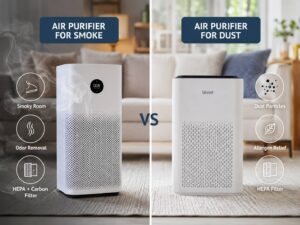
If you are choosing mainly for smoke, this guide on air purifier for smoke vs dust can help you compare the features that matter most.
One more issue deserves attention: ozone. Avoid ozone generators in occupied rooms. Some electronic air cleaning features can produce ozone, which can irritate the lungs. If a purifier has an ionizer, UV, plasma, or similar feature, check the safety details and look for a way to turn that feature off.
Noise, Filter Cost, and Daily Running Cost
Noise can decide whether you actually use the purifier. A model with strong CADR is not helpful if it annoys you all day.
For bedrooms, check the noise level on low and sleep mode. It is easy to choose a purifier based on maximum power, then run it only on the lowest setting. That means the real cleaning rate may be lower than expected.
Filter cost matters too. Some smart purifiers look affordable at first, then become expensive after a few filter changes. Before buying, check the replacement filter price and how often the brand recommends changing it.
Watch for these costs:
- Main HEPA filter
- Carbon filter
- Pre-filter
- Electricity use
- Brand-only filter lock-in
- Shipping cost for filters
A purifier that runs for many hours per day should use power carefully. A more power-conscious model can save money over time, especially in a bedroom or home office where it runs daily.
Best Choice for Different Buyers
Choose a smart air purifier if:
- You want app control.
- You like air quality data.
- You want automatic fan changes.
- You use voice assistants.
- You often forget to turn devices on or off.
- You want better filter tracking.
- You live with pets, smoke, pollen, or city pollution.
- You want remote control from another room.
Choose a basic air purifier if:
- You want a lower price.
- You prefer simple controls.
- You dislike apps and Wi-Fi devices.
- You plan to leave it running on one speed.
- You want fewer setup steps.
- You care more about CADR than smart features.
- You need a purifier for a guest room, child’s room, or small office.
For many buyers, the best value is not the smartest model. It is the purifier with the right CADR, good filters, low noise, and fair filter prices.
Common Mistakes to Avoid
It is easy to focus on the wrong details. A glowing display, modern app, or stylish shell can distract from weak performance.
Avoid these mistakes:
- Buying based only on room coverage claims
- Ignoring CADR
- Choosing a tiny purifier for a large room
- Placing the purifier behind furniture
- Running it only for short periods
- Forgetting to clean the pre-filter
- Waiting too long to replace filters
- Trusting odor claims without checking the carbon filter
- Paying extra for smart features you will not use
- Choosing ozone-based devices for occupied rooms
Placement matters too. Put the purifier in the room where you spend the most time. Bedrooms, home offices, and living rooms usually give the best results. Leave clear space around the intake and outlet so the unit can move air properly.
Final Verdict: Smart Air Purifier or Basic Air Purifier?
A smart air purifier is worth buying if you care about convenience, app control, automatic mode, and real-time air quality readings. It can help you react faster to dust, smoke, pet dander, pollen, and cooking particles. It can also make daily use easier.
A basic air purifier is worth buying if you want reliable air cleaning without extra tech. It can deliver excellent results if it has strong CADR, good filters, low noise, and the right room-size rating. For many homes, this is the better value.
My honest opinion: do not pay more just to get Wi-Fi. Pay more for stronger airflow, better filtration, quieter operation, and lower filter costs. Smart features are helpful only after the purifier gets the basics right.
The best air purifier is the one you will run every day. Clean air comes from steady use, correct sizing, good filters, and smart placement. The app is a bonus. The airflow does the work.