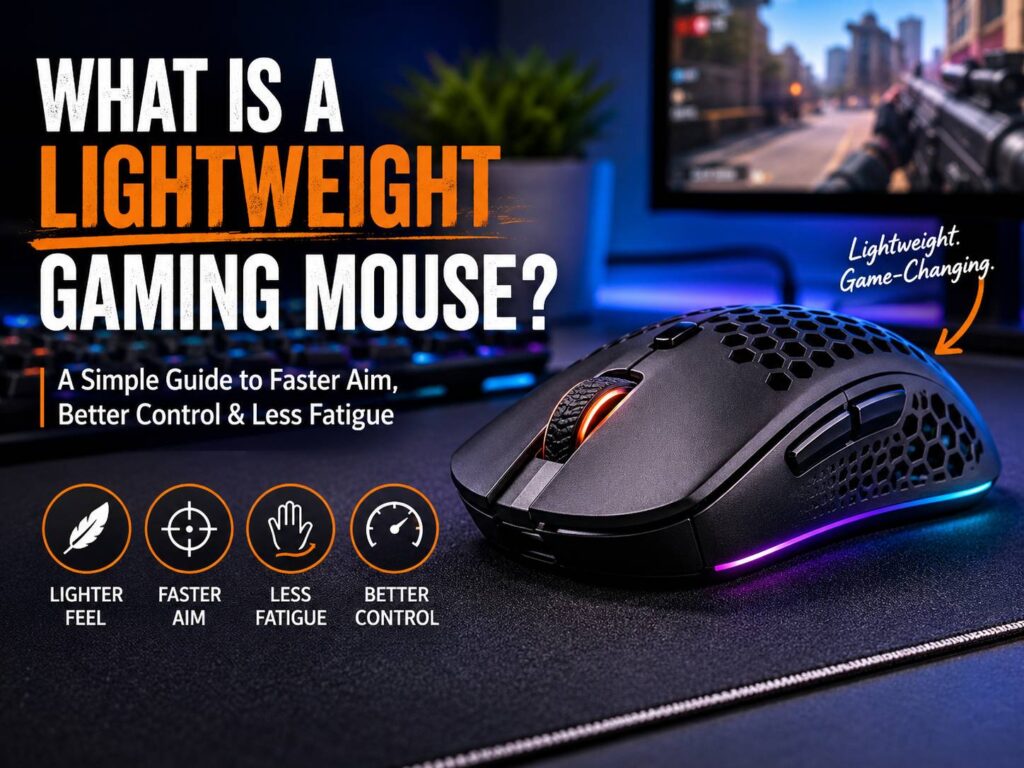
A lightweight gaming mouse is a gaming mouse built to feel faster, easier to move, and less tiring during long play sessions. A mouse under 80 grams usually counts as lightweight. Many newer gaming mice now sit between 50 and 70 grams, and some compact models go even lower.
That sounds simple, right? Less weight should mean better aim. The truth is close, but not quite that simple. A lighter mouse can help with speed, comfort, and control, but it still needs the right shape, sensor, buttons, feet, and grip feel.
A lightweight mouse can feel great in fast games like Valorant, Counter-Strike 2, Fortnite, Apex Legends, Call of Duty, and Overwatch 2. It can make quick flicks feel easier and can reduce strain across longer matches. Still, it can feel too quick at first if you are used to a heavier mouse.
This guide explains what a lightweight gaming mouse is, who should buy one, what problems to expect, and which features matter before you spend your money.
What Is a Lightweight Gaming Mouse?
A lightweight gaming mouse is designed to reduce weight without removing the core parts that make a gaming mouse feel accurate. It still needs a strong sensor, low click delay, smooth mouse feet, a comfortable shape, and reliable wired or wireless performance.
Older gaming mice often weighed around 90 to 120 grams. They felt solid, but they needed more effort to move and stop. Newer lightweight gaming mice reduce weight through thinner shells, smaller batteries, lighter internal parts, cleaner designs, and fewer extra buttons.
Some lightweight mice use a solid shell. Others use a honeycomb shell with small holes in the body. Honeycomb mice became popular because the holes reduce plastic weight. Still, many newer mice now reach very low weights with a solid shell, which feels cleaner and keeps dust out better.
A lightweight gaming mouse is not only for pro players. Casual gamers can enjoy one too, mainly if they play fast games or use a large mousepad. The main goal is simple: less effort, smoother movement, and better control during repeated actions.
How Light Is a Lightweight Gaming Mouse?
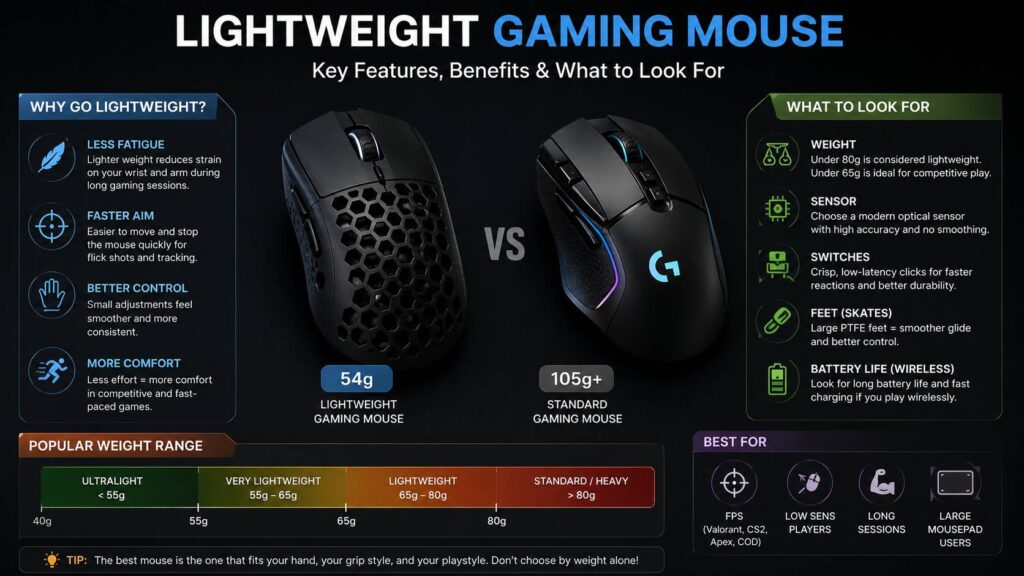
There is no official weight limit, but gamers usually follow a few common ranges.
A practical guide looks like this:
- Under 80g: lightweight
- Under 65g: very lightweight
- Under 55g: ultralight
- Around 90g or more: medium to heavy by current gaming standards
Weight matters, but it does not tell the whole story. A well-shaped 68g mouse can feel better than a 52g mouse that does not fit your hand. Balance matters too. If the back feels too heavy, the mouse can feel slow during small corrections. If the front feels too light, clicks can feel less stable.
This is why you should not buy a mouse only from a number on the box. The shape, grip, button feel, and glide matter every time you play.
Why Do Gamers Like Lightweight Mice?
The biggest reason is easier movement. A lighter mouse takes less force to move across the mousepad. It can stop faster too, which helps during quick aim corrections.
This can help in fast games where you need to react quickly. For example, a lightweight mouse can make flick shots feel snappier in Valorant or Counter-Strike 2. It can make tracking smoother in Apex Legends or Overwatch 2. It can also make long gaming sessions feel less tiring.
A lightweight gaming mouse can help with:
- Faster flick shots
- Smoother tracking
- Less wrist and forearm strain
- Easier micro-adjustments
- Better control on large mousepads
- Less fatigue during long sessions
The first difference is comfort. A lighter mouse feels less like something you have to push around. After a few days, movement can start to feel more natural.
Does Mouse Weight Really Matter?
Yes, mouse weight matters, but it is not the only thing that matters. A lighter mouse can help you move faster and stop with less effort. That can help in games where aim speed and correction matter.
Still, aim does not improve by magic. You still need practice, stable settings, good crosshair placement, and time to build muscle memory. A lightweight mouse gives you a better tool, but it does not do the work for you.
If you want a deeper breakdown, this guide on does mouse weight really matter is a good place to continue.
The biggest mistake is switching to a very light mouse and judging it after one match. Your aim may feel shaky at first. You may overshoot targets. Your hand is using old habits with a new weight. Give it several days, then adjust your sensitivity only if it still feels too fast.
Lightweight Gaming Mouse vs Standard Mouse
A lightweight gaming mouse focuses on speed, comfort, and fast movement. A standard mouse can feel heavier, more stable, and more familiar. Neither one is perfect for every person.
A lightweight mouse is a better fit if:
- You play FPS games often
- You use low or medium sensitivity
- You move the mouse across a large pad
- Your hand gets tired during long sessions
- You like fast flicks and quick tracking
- You want less cable drag or cleaner wireless movement
A standard mouse may suit you better if:
- You prefer a planted feel
- You play slower games
- You want more buttons
- You like a heavier body
- You use your mouse more for office work than gaming
For a more direct comparison, read this full guide on lightweight mouse vs standard mouse.
A heavy mouse can feel steady. A light mouse can feel quick. The right one is the one that matches your hand, your grip, and your games.
Wired vs Wireless Lightweight Gaming Mouse
A few years ago, wireless gaming mice had a reputation for lag, short battery life, and connection drops. Modern wireless gaming mice are much better now. A good 2.4GHz wireless gaming mouse can feel just as responsive as a wired mouse during normal play.
Wireless lightweight mice feel clean on the desk. There is no cable pull, and fast flicks feel more natural. The downside is price. Good wireless lightweight mice often cost more than wired models. You also need to charge them.
Wired lightweight mice are still great. They cost less, never need charging, and work well for competitive gaming. A soft cable helps reduce drag, but the cable can still get in the way during wide arm movements.
For most gamers, a good wireless mouse with 1,000Hz polling is already fast enough. Higher polling rates can feel nice on high-refresh monitors, but they can drain battery faster. Do not pay extra only for big polling-rate numbers if the shape is not right.
Mouse Shape Matters More Than Weight
Weight gets the attention, but shape decides comfort. A 55g mouse with the wrong shape can feel worse than a 70g mouse that fits your hand well.
The common grip styles are:
- Palm grip: Your palm rests on the mouse. A fuller shape often feels better.
- Claw grip: Your palm touches the rear, and your fingers arch forward. Rear support matters here.
- Fingertip grip: Your fingertips control the mouse. Smaller and lighter mice often work well.
Hand size matters too. A small ultralight mouse can feel cramped if you have large hands. A long mouse can feel hard to control if your hands are smaller.
A good rule is simple. Pick shape first, then weight. A comfortable mouse gives you more control than the lightest mouse that feels awkward.
Are Honeycomb Lightweight Mice Good?
Honeycomb mice can be good, but they are not for everyone. The holes reduce weight and can make the mouse feel very light. Some players like the texture too.
The downside is cleaning. Dust and skin oil can collect inside the shell. The holes can also feel strange if your palm rests on the mouse. Some people do not care. Others notice it right away.
Solid-shell lightweight mice are now common, so you no longer need a honeycomb mouse to get low weight. A solid-shell mouse usually feels cleaner, stronger, and easier to maintain.
Honeycomb mice still make sense if you want a very low weight at a lower price. Just check build quality before buying. Weak side walls, creaking, and button wobble can ruin the experience fast.
What DPI Should You Use With a Lightweight Gaming Mouse?
Most gaming mice advertise very high DPI numbers, but most players do not need extreme DPI. Start at 400, 800, or 1600 DPI, then set sensitivity inside the game.
A lightweight mouse can make high sensitivity feel too jumpy. If your aim feels shaky, lower your in-game sensitivity a little before changing everything else.
A simple setup works well:
- Start at 800 DPI.
- Use a large mousepad.
- Set your in-game sensitivity to a comfortable level.
- Test flicks and tracking in practice mode.
- Change settings in small steps.
Do not chase someone else’s settings too closely. Your desk space, grip style, arm movement, and game choice all matter. A good setup should feel controlled, not impressive on paper.
Common Problems With Lightweight Gaming Mice
Lightweight gaming mice can feel amazing, but some models make trade-offs to cut weight.
Common issues include:
- Thin shell feel: Some mice feel less solid than heavier models.
- Side flex: Weak shells can bend under pressure.
- Shorter battery life: Very light wireless mice often use smaller batteries.
- Fewer buttons: Many lightweight models skip extra controls.
- Slippery coating: Smooth shells can lose grip during long sessions.
- Higher price: Premium lightweight wireless mice can get expensive.
- Adjustment time: A very light mouse can feel too fast at first.
The slippery coating issue is real. Some mice feel fine for the first 20 minutes, then become harder to grip once your hand warms up. Grip tape can help, but it changes the feel and adds a little weight.
Battery life is another thing to check. Some ultralight wireless mice feel great, but high polling rates can drain them faster. If you hate charging devices, pick a model with strong battery life instead of chasing the lowest possible weight.
Is a Lightweight Gaming Mouse Good for Work?
Yes, a lightweight gaming mouse can work well for normal desk use. It can feel comfortable for browsing, writing, editing, and daily computer tasks. The low weight can reduce strain during long work sessions.
Still, gaming mice do not always have the best work features. Many lightweight models skip silent clicks, side scroll wheels, extra shortcut buttons, or a free-spin scroll wheel. A productivity mouse may feel better for spreadsheets, editing timelines, and office tools.
If you want one mouse for both gaming and work, look for a lightweight wireless model with a comfortable shape, good battery life, and simple software. Extra side buttons can help too, but too many buttons add weight and clutter.
Who Should Buy a Lightweight Gaming Mouse?
A lightweight gaming mouse is a strong choice for:
- FPS players
- Esports players
- Low-sensitivity users
- Gamers with wrist fatigue
- People who use large mousepads
- Players who want fast and easy movement
- Users who want a cleaner wireless setup
It may not be the best choice for:
- MMO players who need many side buttons
- People who prefer a heavy, solid feel
- Users with very large hands who need full palm support
- Buyers who hate charging wireless devices
- Gamers who want the cheapest mouse possible
For most PC gamers, a lightweight mouse is one of the easiest upgrades to feel right away. It changes how your setup feels every time you move your hand.
How to Choose the Best Lightweight Gaming Mouse
Start with your hand size and grip style. Then choose the weight range.
If you are new to lightweight mice, a 60g to 75g model is a safe starting point. It feels much lighter than older gaming mice, but it should not feel too extreme.
If you already like fast mouse movement, a 50g to 60g mouse can feel excellent. Just make sure the shape works for your hand. A very light mouse with a bad shape will still feel wrong.
Next, choose wired or wireless. Wired is cheaper and simple. Wireless feels cleaner and gives you more freedom during fast movements.
Then check the small details:
- Are the clicks crisp?
- Does the coating feel grippy?
- Are the mouse feet smooth?
- Does the shell creak?
- Does the battery last long enough?
- Is the software simple to use?
- Does the shape match your grip?
Do not pay extra only for huge DPI numbers, flashy branding, or extreme polling rates. Pay for comfort, control, glide, build quality, and a sensor that tracks well.
Final Verdict: Is a Lightweight Gaming Mouse Worth It?
A lightweight gaming mouse is worth it if you want quicker movement, less hand fatigue, and better control in fast games. It can make a heavy mouse feel outdated almost right away.
Still, the best lightweight gaming mouse is not always the lightest one. The best choice is the mouse that fits your hand, supports your grip, glides smoothly, and feels stable during long sessions.
For many players, the sweet spot is between 55g and 70g. That range feels fast without making the mouse feel fragile or too twitchy. Competitive FPS players may prefer even lighter models. Casual gamers may feel more comfortable closer to 70g or 80g.
If you play fast shooters, a lightweight gaming mouse is easy to recommend. If you play slower games or need many buttons, a standard mouse may still be the smarter pick. Focus on shape first, then weight, then features.