
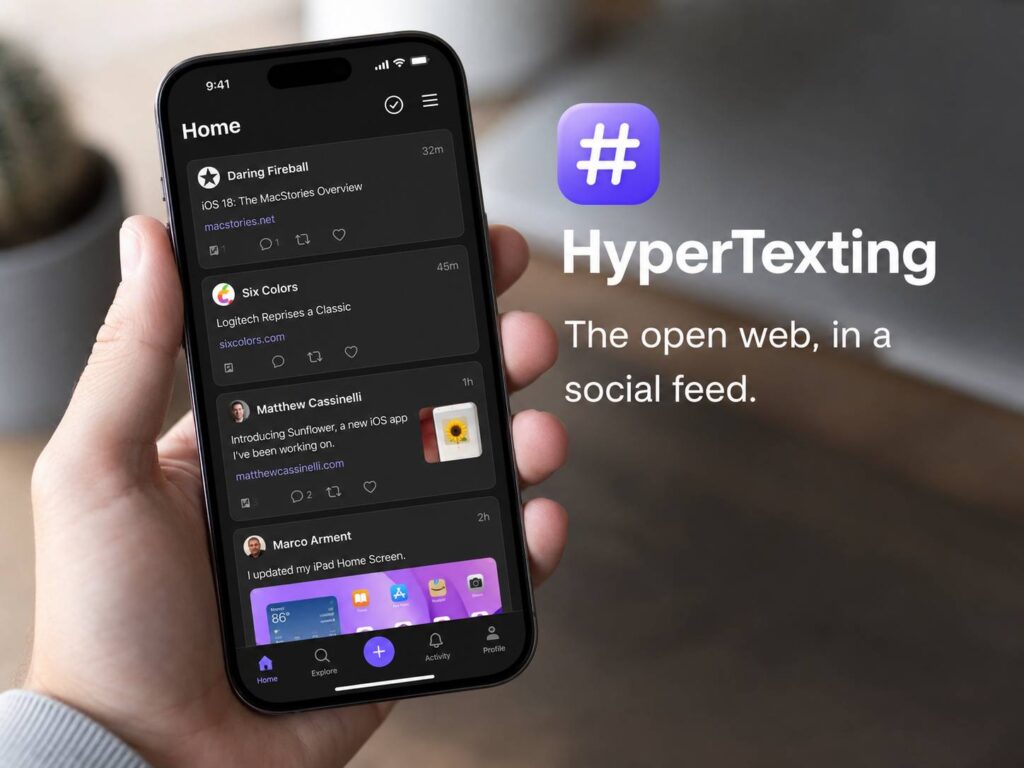
Social media made online content easy to follow. You open an app, scroll through a feed, and tap whatever catches your eye. Still, that convenience often comes with sponsored posts, engagement bait, tracking, and algorithms that decide what appears next.
HyperTexting takes the familiar social feed and connects it to the open web. Instead of following accounts locked inside one platform, users follow websites, blogs, news outlets, podcasts, and independent creators.
The result looks a little like a social network. Yet the content stays on the websites that published it. HyperTexting does not ask creators to rebuild their audience inside another closed platform. Instead, it treats the web itself as the social network.
That idea sounds simple. In practice, it could make RSS and independent publishing far easier for everyday readers to understand.
What Is HyperTexting?
HyperTexting is an iPhone app from Herd Works. It collects posts from websites and presents them in a vertical, scrollable timeline.
The app relies on open web feeds. These feeds usually use RSS, Atom, or similar formats that websites publish for readers and apps.
Users can follow several types of sources, including:
- News websites
- Independent journalists
- Personal blogs
- Podcasts
- Video feeds
- Creator websites
- Topic-based feeds
New posts appear in chronological order. So, the newest update sits at the top, followed by older posts from the websites you selected.
This design gives readers direct control. You choose what to follow, and the app displays those sources without inserting unrelated recommendations between them.
Many social apps claim to personalize the experience. Yet personalization can quickly turn into repetition. HyperTexting takes a calmer route by showing what the reader requested.
How HyperTexting Creates a Social Feed From Websites
HyperTexting turns website posts into cards that resemble updates from a social platform. Each card can contain text, images, links, audio, video, or other media supplied by the publisher.
Next, tapping a post opens a more detailed view. Some feeds include complete articles. Others show a headline, short excerpt, and link to the original website.
That difference comes from the publisher. HyperTexting displays the information included in the feed rather than copying restricted content or bypassing paid access.
The app can display several attachment types:
- Photos
- Animated images
- Audio recordings
- Podcast episodes
- Videos
- PDF documents
- Downloadable files
- Website previews
At the same time, its built-in player keeps audio and video running without losing your position in the feed. Podcast controls can appear on the iPhone Lock Screen, in Control Center, and through Dynamic Island.
As a result, HyperTexting feels broader than a standard text reader. It combines articles, podcasts, videos, and personal posts inside one timeline.
RSS Without the Usual Technical Setup
RSS has existed for decades. Still, many people have never used it.
Traditional RSS apps often ask users to locate feed URLs, copy addresses, create folders, and sort large subscription lists. That process works well for experienced readers, but it can feel dated or confusing to newcomers.
HyperTexting hides much of that setup behind familiar actions. Users search for a website or enter its address in the Discover section. The app then looks for any available feeds.
Meanwhile, a Safari extension can detect feeds from pages you visit. Those discoveries appear in the HyperTexting Activity tab, where you can review and follow them.
This is one of the app’s strongest ideas. HyperTexting does not expect people to understand RSS before they start. Instead, it asks them to follow websites in much the same way they follow people on social media.
In a similar way, other products turn complicated routines into simple steps. The Sourdough Sidekick smart bread-making tool follows that same basic idea by making a fiddly daily task easier to track.
HyperTexting applies that thinking to online reading. The technology stays in the background, and the user sees a clear feed.
A Chronological Timeline Gives Readers More Control
Large social networks rank posts with recommendation systems. Those systems decide which updates deserve attention, which subjects appear repeatedly, and how often users see content from accounts they already follow.
HyperTexting uses a reverse-chronological feed instead. The latest post appears first, then the timeline moves backward through older updates.
This format brings several practical benefits:
- Posts appear in a predictable order
- Websites do not compete for algorithmic reach
- Readers see updates from every followed source
- Viral posts do not repeatedly replace newer content
- The feed has a clear stopping point
For example, a reader can open HyperTexting in the morning, review everything published overnight, and stop after reaching yesterday’s posts.
That feels different from a conventional social feed. Many major platforms keep inserting recommended videos, popular discussions, and posts from unknown accounts. HyperTexting gives the timeline a natural end.
Still, the vertical feed creates one concern. Endless scrolling can remain habit-forming without an algorithm. The app removes recommendation pressure, but it cannot control how many websites a person follows or how long they keep scrolling.
So, HyperTexting feels calmer than many social networks, but users still need to manage their own reading habits.
Discovery Goes Beyond a Standard Feed Reader
HyperTexting includes an Explore area for finding websites and managing followed sources. It also offers a feature called Hot HyperLinks.
Hot HyperLinks ranks pages that receive frequent links from the sources inside your feed. In effect, it creates a personal trending page based on the websites you already trust.
For example, someone following software developers may see programming articles that several writers have linked to. A photography fan may see a camera guide shared across several independent blogs.
The feature does not rely on a global popularity list. Instead, it looks at links coming from the reader’s chosen corner of the web.
That still involves ranking, but the logic is easier to understand. The page becomes popular in your feed after several followed sources link to it.
By comparison, a typical “For You” feed uses a much larger set of private signals. Those signals can include viewing time, taps, likes, follows, location data, and past activity.
HyperTexting’s model feels less mysterious. Your subscriptions shape the discovery page, not an unknown audience or advertising profile.
Websites Become Social Profiles
Traditional feed readers often place every subscription inside a plain folder list. HyperTexting gives each website a profile page that feels more like a social account.
A website profile can contain:
- Recent posts
- Available feeds
- Media attachments
- Website details
- Verified links
- Following information
This structure works well for publishers with several feeds. A large publication may offer separate channels for technology, business, entertainment, and science. A creator may publish written posts, videos, and podcasts from the same domain.
HyperTexting groups those feeds around the website. So, readers can understand the publisher before choosing which updates to follow.
The app also uses hyperlinks to connect conversations. A response can appear after one website links back to another post.
That method resembles older blogging culture. Writers once responded to each other through articles, trackbacks, and linked posts rather than short replies under a social media update.
Of course, this model will not create hundreds of instant comments beneath every article. Yet that can be a strength. Publishing a linked response takes more effort than sending a quick reaction, and the writer keeps control of the finished post.
Privacy Is Built Around Local Data
HyperTexting does not require an account for reading feeds. According to the developer, subscriptions and timeline information stay on the device.
The Safari extension scans pages for feed links. It then stores discovered feeds in a local file that the main app can access.
Apple’s current privacy label for the app states that the developer does not collect data. Apple notes that developers provide these disclosures.
This local-first model fits the app’s open web focus. Readers do not need to create another public profile or submit personal details just to follow websites.
Still, opening an external article sends the reader to the publisher’s website. That site can use its own analytics, cookies, advertising systems, and privacy rules.
HyperTexting protects information handled inside its app. It does not change how every external website manages visitor data.
Readers can view the current listing for HyperTexting on the App Store.
Publishing From HyperTexting Is Part of the Larger Plan
Reading feeds is only one part of the HyperTexting concept. The developer also plans to make publishing to a personal website feel as easy as posting to a social network.
The planned Composer supports several familiar elements:
- Links
- Mentions
- Hashtags
- Photos
- Videos
- Audio
- Podcast episodes
- PDF attachments
The official guide currently lists direct publishing support as an upcoming feature. Planned integrations include WordPress, Ghost, Hugo, and HyperTemplates.
For now, early versions are being tested through TestFlight. So, HyperTexting already works as a feed reader and discovery app, but its wider publishing system has not reached its full public release.
Once that feature arrives, users could read a post, write a response on their own website, and link back to the original article.
Then, HyperTexting could display that connection as part of a public web conversation. The writer keeps the post on a personal domain, and readers can follow it through the same feed system.
That workflow is more interesting than a standard RSS reader. It could turn HyperTexting into a lightweight publishing network built on websites people already own.
Where HyperTexting Still Feels Early
HyperTexting is currently available as a free iPhone app. It requires iOS 18 or later and supports English.
At present, the App Store lists it as an iPhone-only app. There is no public Android version.
That limit matters. An app built around the open web needs access across more devices to reach a broad audience. Support for Android, iPad, Mac, and web browsers would make the service more practical.
Direct website publishing remains in testing too. The current experience centres on reading, following, and discovering feeds.
Feed quality creates another issue. Some websites publish full articles through RSS. Others include only a title and short preview. A few websites do not provide a discoverable feed at all.
HyperTexting cannot fix every missing or poorly configured feed. Publishers still need to support the open formats that make the app work.
The business model remains another open question. The developer has discussed possible paid features or a limited sponsored-post format, but no final plan has been confirmed.
A paid tier appears to fit the app’s privacy-focused design better than heavy advertising. Still, the final pricing and feature structure remain unknown.
The Strongest Parts of the HyperTexting Idea
HyperTexting does not invent a new internet protocol. Instead, it presents older open web tools through an interface that feels current.
That is the main reason the app matters.
RSS readers already collect website updates. Personal blogs already support linked discussions. Podcasts already publish open feeds. Yet these systems often feel disconnected from the habits that mobile users developed through social apps.
HyperTexting brings those pieces into one timeline.
Its strongest qualities include:
- A feed controlled by the reader
- Chronological post ordering
- No account requirement for reading
- Support for articles, audio, video, and documents
- Website-based identities
- Local subscription storage
- Direct links to original publishers
- Planned personal website publishing
The biggest weakness is reach. Social platforms became useful after millions of people joined the same network. HyperTexting takes a different path by connecting existing websites, but it still needs enough publishers, readers, and compatible feeds to feel active.
The app’s success will rest on simplicity. Feed discovery must work without technical knowledge. Website profiles need accurate information. Publishing tools need to work reliably across popular content systems.
At the same time, the interface needs to stay calm. Filling the timeline with ads, recommendations, or engagement prompts would weaken the reason many people might choose it.
Who Is HyperTexting For?
HyperTexting makes sense for people who want the convenience of social scrolling without giving a platform full control over their reading list.
It could appeal to:
- Readers who follow independent websites
- Podcast listeners who want one mixed timeline
- Writers who publish on personal blogs
- Journalists tracking several news sources
- Creators who want control over their work
- Former social media users seeking a quieter feed
- People who find classic RSS readers too complicated
Power users may still prefer tools with advanced filters, desktop syncing, tags, folders, automation, and research features.
Android users cannot install the current version. People using older iPhones face the same problem due to the iOS 18 requirement.
For casual reading, though, the concept is easy to understand. Follow websites, scroll through new posts, open what interests you, and stop after reaching the end.
Can HyperTexting Become a Real Social Media Alternative?
HyperTexting has a clear and appealing idea. The web already contains millions of articles, podcasts, videos, newsletters, blogs, and public discussions.
The app does not need every creator to join a new closed network. It needs to make existing web content easier to follow.
That goal feels realistic. Still, replacing a social network involves more than creating a better timeline.
Large platforms offer private messages, groups, live reactions, creator tools, moderation systems, and huge built-in audiences. HyperTexting does not match that full package.
Instead, it offers a different type of experience. Readers choose their own sources. Publishers keep their own websites. Posts appear in chronological order. Links remain central to the conversation.
For now, HyperTexting works best as a modern social-style feed reader with a larger publishing idea behind it.
That description may sound modest, but it addresses a real frustration. Many people like the convenience of social media yet dislike the tracking, noise, and opaque recommendation systems.
The open web already has the content. HyperTexting is trying to make that content feel easier to follow, one scroll at a time.