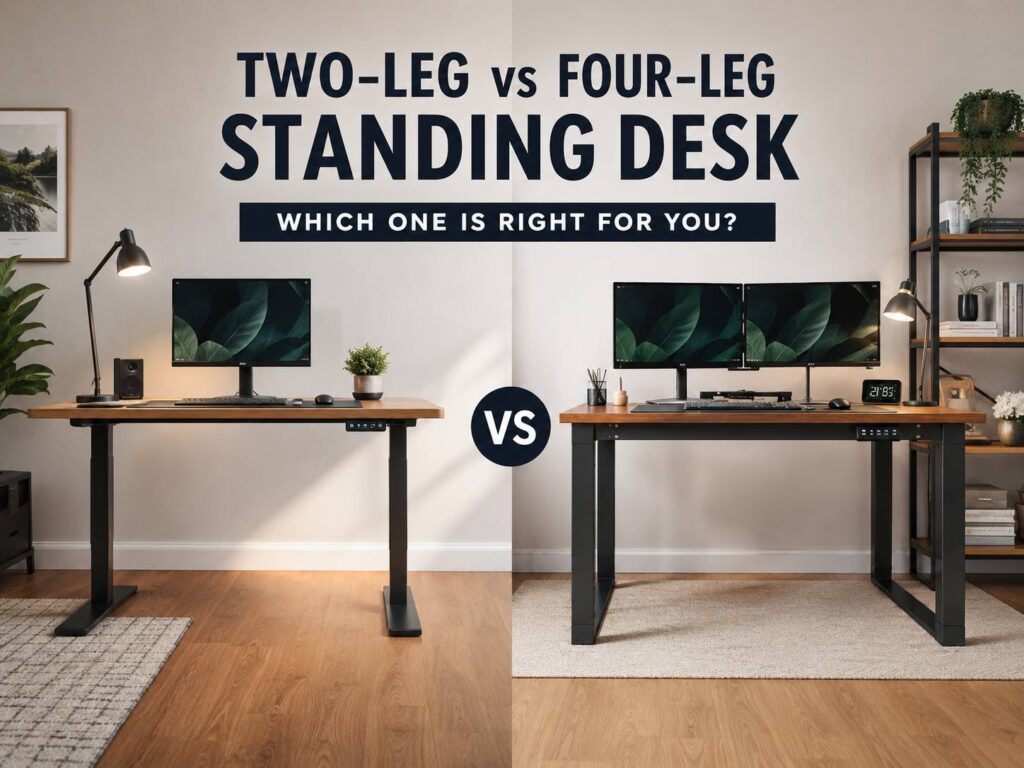
Choosing between a two-leg and a four-leg standing desk sounds simple at first. One has two support columns, the other has four. Still, the real difference shows up after you build the desk, load it with monitors, raise it to standing height, and start typing.
A two-leg standing desk is the common choice for most home offices. It costs less, fits into smaller rooms, and works well for normal setups. A laptop, monitor, keyboard, mouse, lamp, and docking station are not too much for a good two-leg frame.
A four-leg standing desk feels closer to a fixed desk. It has more support points, better weight spread, and stronger stability at taller heights. That matters more if you use a wide desktop, heavy monitor arms, large speakers, a desktop PC, or several screens.
So, which one is better? For most people, a good two-leg standing desk is the smarter buy. For heavier setups, a four-leg standing desk is worth the extra money. The right choice depends on your desk size, gear weight, budget, and how much wobble bothers you during work.
What Is a Two-Leg Standing Desk?
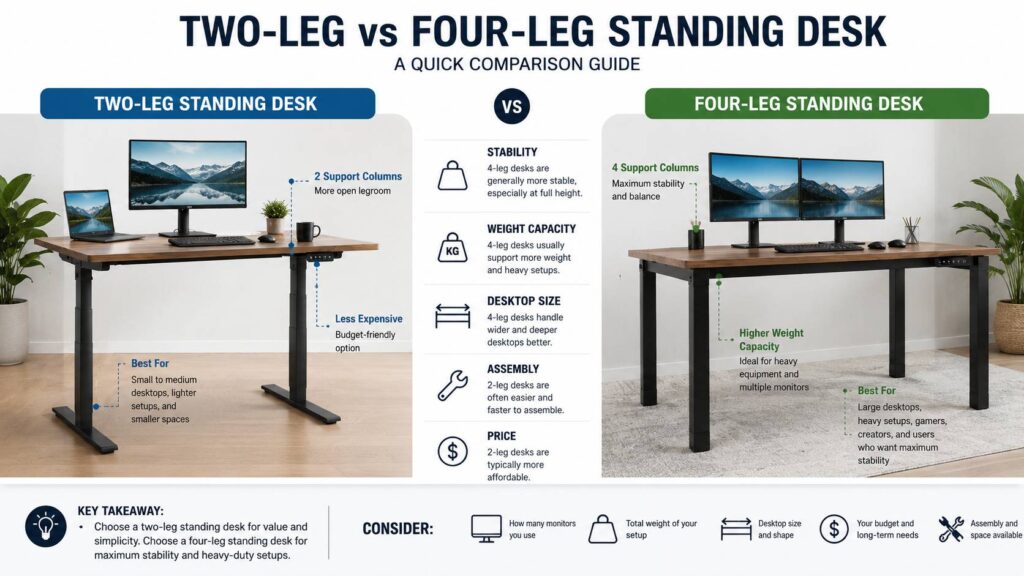
A two-leg standing desk uses one lifting column on the left side and one on the right side. Most electric models have either one motor or two motors. The better ones usually use dual motors, so each leg moves smoothly and supports the desk more evenly.
This design is popular in home offices, bedrooms, study rooms, small apartments, and shared workspaces. It gives you the main benefit of a standing desk without taking over the room. The frame is lighter, the setup is usually easier, and the price is often more reasonable.
For everyday office work, a two-leg desk can be perfectly fine. It can handle emails, writing, coding, browsing, video calls, spreadsheets, and light creative work. If you use one or two monitors, you will not need more than this.
Still, the design has limits. The whole desktop rests on two main support points. At sitting height, this may feel solid. At standing height, small movements become easier to notice. The desk can shake a little when you type hard, lean on the front edge, or use a heavy monitor arm.
That does not mean every two-leg desk feels cheap. Frame quality matters a lot. A strong two-leg frame can feel better than a weak four-leg frame. Look at the leg thickness, motor quality, foot length, crossbar design, height range, and warranty before you judge it.
For a deeper buying breakdown, this guide on how to choose the right standing desk can help you compare the key features before spending money.
What Is a Four-Leg Standing Desk?
A four-leg standing desk uses four lifting columns instead of two. The layout looks more like a traditional table, but the height still adjusts with motors. Some premium versions use four motors. Others use a different system, depending on the brand and frame design.
The biggest benefit is stability. Four legs spread the desk’s weight across more points. As a result, the desktop usually feels more planted, especially at standing height. This can make a big difference with wide desks and heavy equipment.
For example, a four-leg desk makes sense for a setup with two 32-inch monitors, a monitor arm, speakers, a docking station, and a desktop PC. It also works well for creators who use audio gear, camera gear, drawing tablets, or a large solid wood desktop.
At the same time, a four-leg desk is not automatically the best choice for everyone. It costs more, weighs more, and takes longer to assemble. It can also be harder to move later. If your setup is simple, you may pay extra for strength you never really use.
My honest opinion: a four-leg standing desk feels better if you care deeply about stability. But for a basic home office, it is often more desk than you need.
Stability: Where the Difference Really Shows
Stability is the main reason people compare a two-leg vs four-leg standing desk. At lower heights, both designs can feel steady if the frame is well built. Once the desk rises, weak points become easier to feel.
A two-leg desk can move a little from front to back or side to side. This is more common on wide desktops, light desktops, soft floors, or setups with heavy monitor arms. The movement may be small, but it can annoy you if your monitor shakes during typing.
A four-leg desk usually handles this better. The extra support columns reduce flex and give the desktop a stronger base. It will not feel like a concrete table, but it often feels much closer to a fixed desk than a two-leg model.
For daily work, the question is simple: does a little movement bother you? Some people barely notice it. Others find it distracting within minutes. If you use a monitor arm, the shake can look worse than it feels at the desk surface.
Here is the practical split:
- Pick a two-leg desk for a laptop and one or two normal monitors.
- Pick a four-leg desk for large monitors, heavy arms, and wide desktops.
- Pick a two-leg desk if price and room space matter more.
- Pick a four-leg desk if stability matters more than cost.
In real use, stability often matters more than lifting speed, app controls, or fancy keypad features.
Weight Capacity: Don’t Look at the Number Alone
Weight capacity can be misleading. The listed limit includes the desktop and everything you put on it. A thick solid wood top can weigh a lot before you add any gear.
A two-leg standing desk can handle a normal work setup without trouble. Many quality models support a desktop, two monitors, a laptop, and accessories. Budget models vary more, so you need to check the weight rating carefully.
A four-leg standing desk usually gives you more lifting power. More support also means the frame can feel calmer under load. This matters if you move the desk up and down several times a day with heavy equipment on top.
Think about the total load like this:
- Desktop: often 40 to 100 pounds, depending on size and material
- Large monitor: often 15 to 30 pounds
- Monitor arm: often 10 to 25 pounds
- Desktop PC: often 20 to 40 pounds
- Speakers, lamp, dock, and extras: often 10 to 30 pounds combined
A clean home office setup can stay well inside the limit of a two-leg desk. A loaded creator or gaming setup can get heavy faster than expected.
Still, do not buy only by the biggest weight number. A desk can lift a lot and still wobble. Stability, frame design, warranty, and real user feedback matter just as much.
Desktop Size and Shape
Desktop size changes the whole decision. A two-leg frame usually works best with small and medium desktops. A 48-inch, 55-inch, or 60-inch top is a comfortable match for many two-leg standing desks.
Once you move to a 72-inch desktop, the frame has more work to do. The wider the surface, the more movement you may feel at the edges. This is where a four-leg desk starts to make more sense.
Depth matters too. A shallow desktop can push your monitor too close to your face. It can also leave too little room for a keyboard, mouse, notebook, and desk mat. A depth around 27 to 30 inches is a comfortable target.
For corner desks, the choice changes again. Many L-shaped standing desks use three legs. That extra leg supports the return side and spreads the load better than a basic two-leg desk.
In practice, match the frame to the desktop first. A strong motor system cannot fully fix a desktop that is too wide, too heavy, or poorly supported.
Comfort and Ergonomics
A standing desk should help your posture, not just raise your laptop higher. The number of legs will not fix a bad ergonomic setup.
Your elbows should stay close to your body when typing. Your shoulders should feel relaxed. Your wrists should stay straight. Your screen should sit in front of you, not off to the side. Your feet should rest flat on the floor when seated.
The height range matters too. Shorter users need a desk that goes low enough for comfortable seated typing. Taller users need enough standing height without raising their shoulders.
A stable desk helps, but it is only one part of comfort. Your chair, monitor height, keyboard position, mouse reach, and standing routine all matter.
Standing all day is not the goal. A better routine is to switch between sitting and standing. Then add short walks when you can. That routine also shapes whether a standing desk is worth buying. For a deeper look at the value side, read this guide on are standing desks worth it in 2026.
Two-Leg Standing Desk Pros and Cons
A two-leg standing desk is the best fit for many home offices. It gives you height adjustment without the bulk and price of a four-leg frame.
Pros:
- Lower price than most four-leg desks
- Easier assembly
- Lighter frame
- Better fit for small rooms
- Good match for one or two monitors
- More choices across budget ranges
- Easier cable management on many models
- Simple, clean look
Cons:
- More likely to wobble at tall heights
- Less ideal for very wide desktops
- Less stable with heavy monitor arms
- Weight placement matters more
- Some budget models have weaker motors
- Large screens can show more shake
On balance, the pros outweigh the cons. A good two-leg frame can feel stable enough for serious work. The key is to avoid the cheapest weak frames if you plan to use the desk every day.
Four-Leg Standing Desk Pros and Cons
A four-leg standing desk is built for heavier and wider setups. It feels stronger, and the extra legs make the desktop feel more planted.
Pros:
- Better stability at standing height
- Stronger support for large desktops
- Better fit for heavy workstations
- Less screen shake with monitor arms
- More premium desk feel
- Better support for solid wood tops
- Good choice for gaming, editing, and studio setups
Cons:
- Higher price
- Heavier frame
- Longer assembly time
- Harder to move after setup
- More parts under the desktop
- Not needed for simple setups
- Fewer budget-friendly options
A four-leg desk makes the most sense if your desk is a daily work station, not just a place for a laptop. It is a good fit for creators, gamers, designers, editors, traders, and anyone using large displays.
Common Issues People Notice After Buying
A standing desk can look perfect online and feel different in real life. The most common issue is wobble. Buyers often expect an electric desk to feel exactly like a fixed desk. That is not always realistic, especially with a tall two-leg frame.
Soft flooring can make the desk feel less stable too. A desk on thick carpet will usually move more than the same desk on hard flooring. Leveling feet help, but they cannot fix every floor problem.
Monitor arms create another issue. A heavy monitor mounted far from the desk surface adds leverage. That can make the screen shake more during typing. A stronger frame helps, but the monitor arm and mounting position matter too.
Cable drag is another common mistake. Power cables, display cables, and charging cables need enough slack for the full height range. If the cables are too tight, they can pull when the desk rises.
Assembly can create problems as well. Loose bolts, uneven legs, or a misaligned frame can make a good desk feel bad. After one week of use, it is smart to check the screws and leveling feet again.
Noise can happen too. A normal electric desk makes some sound during movement. Grinding, clicking, or uneven lifting is different. That can point to poor alignment, too much weight, or a motor issue.
Which Standing Desk Is Better for Gaming?
A four-leg standing desk is usually better for a heavy gaming setup. Large monitors, desktop PCs, speaker systems, RGB gear, and monitor arms can add a lot of weight. Stability also matters more if you play fast games and notice screen shake.
Still, a two-leg desk can work well for gaming if the setup is not too heavy. A 55-inch or 60-inch desktop with one monitor, a PC, and normal accessories should be fine on a strong frame.
For a wide gaming battlestation, a four-leg frame is the safer pick. For a simple gaming desk, a quality two-leg model saves money and space.
Which Standing Desk Is Better for Work From Home?
For work from home, a two-leg standing desk is usually the better value. Most remote workers use a laptop, one external monitor, a keyboard, a mouse, and a webcam. That setup does not need a four-leg frame.
A four-leg desk becomes more useful if your work setup includes dual large monitors, a heavy monitor arm, print equipment, studio gear, or a very wide desktop. It also makes sense if you type hard and dislike any movement.
For normal office tasks, spend your money on a better chair, monitor arm, cable tray, and larger desktop before jumping straight to a four-leg frame.
Buying Checklist Before You Choose
Before ordering, check these details:
- Height range: The desk should fit both your seated and standing posture.
- Weight capacity: Count the desktop and all gear together.
- Desktop width support: Match the frame to your planned desktop size.
- Stability feedback: Pay close attention to comments about full-height use.
- Motor setup: Dual motors or four-motor systems usually handle heavier loads better.
- Warranty: Motors, control boxes, and keypads should have solid coverage.
- Cable management: Look for space under the desk for trays and power strips.
- Anti-collision feature: This helps protect furniture, drawers, chairs, and pets.
- Noise level: Quiet movement matters in shared rooms.
- Return policy: Stability is hard to judge until the desk is assembled.
Do not judge the desk only by product photos. A thin frame can look modern but feel weak. A heavier frame can look plain but feel much better every day.
Final Verdict: Two-Leg vs Four-Leg Standing Desk
A two-leg standing desk is the right choice for most people. It costs less, fits more rooms, and handles normal office setups well. If you use one or two monitors and keep your desk fairly simple, you probably do not need four legs.
A four-leg standing desk is the better choice for heavy, wide, or wobble-sensitive setups. It gives better stability at standing height and feels more like a fixed desk. The higher price makes sense if your setup includes large monitors, heavy arms, a solid wood top, or expensive work gear.
My real opinion is simple: buy the best two-leg desk you can afford for a normal home office. Choose a four-leg standing desk when stability matters more than price.