
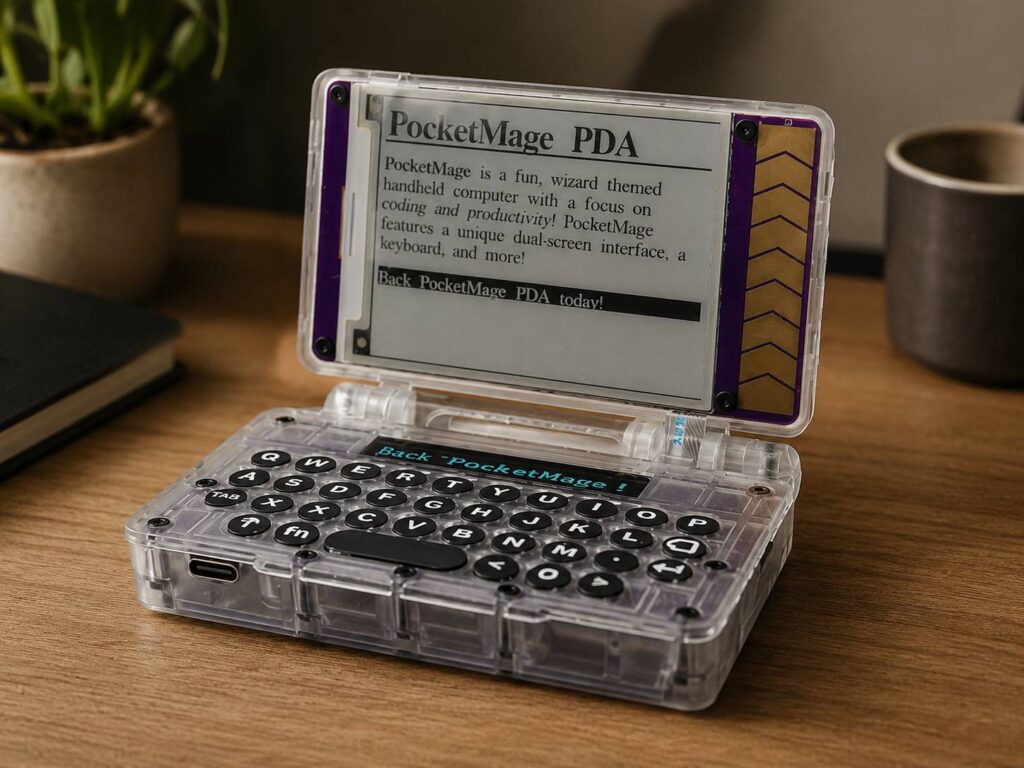
Smartphones replaced personal digital assistants years ago, yet they never fully copied the focused experience those devices offered. PocketMage aims to bring that idea back with an E Ink screen, a physical QWERTY keyboard, and open-source software built for writing, planning, and small computing projects.
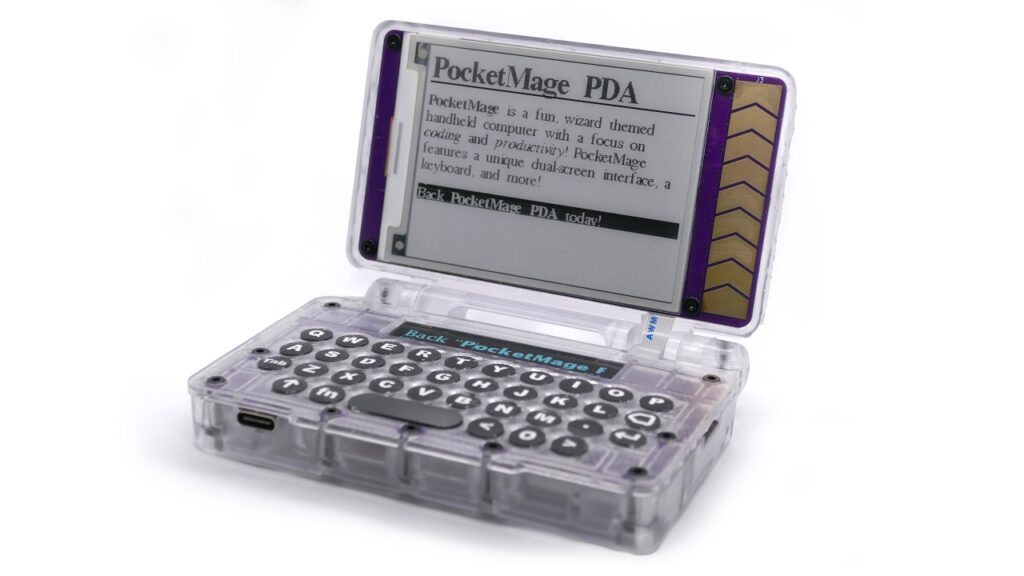
At first glance, PocketMage looks like a modern version of a classic pocket organizer. Open the clamshell body and you get a compact keyboard, a main E Ink display, and a narrow OLED screen for fast-changing controls. It feels familiar, but the design does not simply copy an old Palm, Psion, or BlackBerry.
Instead, PocketMage combines the best parts of those older devices with USB-C charging, removable storage, wireless connectivity, and an open software platform. The result is a small computer that focuses on text, notes, tasks, and experiments rather than social media or video.
That narrow focus may limit its audience. Still, it gives PocketMage a clear purpose in a market filled with devices that try to do everything.
A Modern PDA Built Around Focused Work
PocketMage uses a clamshell design that measures 100 x 73 x 21.7 mm. It is thicker than a phone, but it remains small enough to fit inside a jacket pocket or compact bag.
Once opened, the upper half reveals a 3.1-inch E Ink display with a 320 x 240 resolution. The lower section holds a physical QWERTY keyboard, a capacitive scroll bar, and a separate 1.8-inch OLED panel.
This layout creates an unusual mix. The device resembles a tiny laptop, yet its purpose feels closer to a digital notebook or classic PDA. It is built for short writing sessions, task management, journaling, scripts, and lightweight terminal work.
The idea may appeal to anyone who misses portable devices with real buttons. Modern phones offer large screens, but typing on glass still lacks the tactile feedback of physical keys.
PocketMage enters the same broad conversation as the return of keyboard-focused mobile hardware. For example, the Clicks Communicator brings back the BlackBerry keyboard in a more phone-like format. PocketMage takes a different route by using E Ink, open-source software, and a compact computer-style design.
Dual Displays Give Each Screen a Clear Job
E Ink works well for reading and static text. It remains visible in bright light and uses little battery power once the page appears. Yet it struggles with fast animation, scrolling, and constantly changing menus.
PocketMage deals with that weakness through a second display.
The main E Ink panel handles documents, notes, calendar pages, and other content that stays on screen for longer periods. Meanwhile, the narrow OLED strip manages status information, menus, commands, and quick feedback.
That split makes sense in daily use. A user can read or edit text on the larger screen, then view fast-changing controls on the OLED panel. As a result, the device does not need to refresh the E Ink display every time a menu changes.
In theory, this should make PocketMage feel quicker than a single-screen E Ink device. The design still needs testing in a finished production unit, but the reasoning behind it is solid.
The 3.1-inch main display remains small, so long documents may require frequent page changes. Even so, the screen size matches the device’s pocket-friendly purpose. PocketMage is not trying to replace a laptop or full-size E Ink tablet.
The Physical QWERTY Keyboard Is the Main Attraction
For many buyers, the keyboard will be PocketMage’s most interesting feature.
Every key uses a physical switch, which gives users real feedback with each press. Shift and Function layers provide access to symbols, shortcuts, and extra commands without making the keyboard wider.
The layout is designed for thumb typing rather than ten-finger desktop typing. In practice, it should suit quick notes, journal entries, task lists, Markdown files, and short scripts.
Long writing sessions may feel cramped. Then again, PocketMage supports external USB keyboards, so users can connect a larger board for extended work.
This flexibility helps the device cover two different roles. On the move, the built-in keyboard handles short bursts of writing. At a desk, a USB keyboard turns it into a small text-focused workstation.
The concept brings back something smartphones gradually removed. A physical keyboard lets users type without looking at every key. It can feel more direct, and it does not cover half of the screen during use.
PocketMage OS Includes Writing and Planning Tools
PocketMage runs its own open-source operating system built on FreeRTOS. The software includes hardware drivers, file management, built-in applications, and support for third-party programs.
Its standard app collection focuses on practical tasks:
- A plain-text and Markdown editor
- A file manager
- A calendar
- A task manager
- A daily journal
- A dictionary
- A terminal
- A scripting environment
- A USB file-transfer tool
- An application loader
The text editor works with files stored on the microSD card. Users can open, edit, and save plain-text or Markdown documents without relying on a cloud service.
Meanwhile, the journal app creates dated entries with help from the built-in real-time clock. The calendar handles lightweight planning, and the task manager stores to-do lists between restarts.
PocketMage includes a terminal too. That feature gives developers and technical users a way to run commands, test scripts, and work with the device at a deeper level.
Third-party programs can be installed through the app loader and the PocketMage Bazaar. Since the project publishes templates and documentation, developers can create their own tools without starting from scratch.
This open model gives PocketMage more potential than its initial app list suggests. The community may build new editors, utilities, communication tools, or hardware controls after the device reaches users.
ESP32-S3 Hardware Keeps the System Lightweight
PocketMage uses an ESP32-S3 microcontroller with built-in Wi-Fi and Bluetooth. This chip appears in many development boards, embedded products, and connected hardware projects.
The system includes 16 MB of quad SPI flash and 2 MB of quad SPI SRAM. Those figures look tiny next to a phone or laptop, but PocketMage does not run Android, Windows, or large desktop applications.
Instead, its software targets simple text-based tasks and embedded computing. That lighter workload lets the hardware stay compact and use less power.
A microSD card slot provides removable storage for files and applications. Users can transfer documents through USB-C, so they do not need to remove the card each time.
Other hardware features include:
- A 1,200 mAh lithium-polymer battery
- USB-C charging
- Wi-Fi and Bluetooth
- An integrated real-time clock
- A capacitive scroll bar
- A piezo buzzer
- USB keyboard support
- An expansion port
The expansion port exposes power, GPIO, I2C, SPI, and UART connections. For hardware enthusiasts, that may be one of the device’s strongest features.
Users can connect sensors, communication modules, custom controls, or other accessories. PocketMage can serve as a personal organizer one day and a portable electronics platform the next.
The campaign estimates around seven days of battery life. Real usage will vary based on screen refreshes, OLED brightness, wireless activity, processor load, and attached hardware.
Open-Source Hardware Adds Long-Term Value
PocketMage publishes its software, hardware files, and documentation under an open-source model. That gives owners more control than they usually get from a small consumer gadget.
A user can inspect the code, modify the operating system, build new applications, or design an accessory for the expansion port. Repair work may be easier too, since the product is not designed as a sealed black box.
The kit version strengthens that idea. It arrives as separate parts and can be assembled with a screwdriver. No soldering is required.
Inside the kit, buyers receive the circuit boards, case components, battery, keyboard matrix, microSD card, cable, screws, and assembly guide.
This hands-on setup will appeal to makers and developers. By contrast, buyers who only want a polished appliance will probably prefer the fully assembled version.
Open-source access does not guarantee a large app library or long-term community support. Still, it gives the device room to grow beyond the software included at launch.
PocketMage Price and Expected Release Date
The PocketMage crowdfunding campaign offers two main versions.
The unassembled kit costs $185. A fully assembled unit costs $235. Buyers can choose between a light Parchment finish and a Royal Purple option.
Current campaign orders list an estimated shipping date of March 25, 2027. The funding campaign is scheduled to close on September 3, 2026.
These orders are crowdfunding pledges, not standard retail purchases. Production plans, parts availability, certification, enclosure revisions, or manufacturing issues can affect the final shipping date.
For that reason, buyers should treat PocketMage as early hardware. Backing the campaign provides access to an unusual product, but it carries more risk than purchasing a finished device from regular stock.
People who prefer lower risk can wait for production models and independent user feedback. Early adopters, developers, and collectors may find the campaign more appealing.
Who Is PocketMage Designed For?
PocketMage makes the most sense for people who want a small, focused computer rather than a second smartphone.
Likely users include:
- Writers who want a portable drafting device
- Students who prefer physical keys for notes
- Journal users who want local text files
- Programmers who need a compact terminal
- Electronics enthusiasts working with ESP32 hardware
- Privacy-focused users who prefer offline storage
- Retro technology fans who miss classic PDAs
- Makers who want an open hardware platform
The device is less suitable for users who need video calls, rich websites, office suites, streaming services, or modern phone applications. A smartphone, tablet, or laptop handles those jobs far better.
PocketMage succeeds by refusing to compete directly with those products. It offers a simpler experience built around text, buttons, and local files.
A Niche Device With a Clear Identity
PocketMage does not need to replace anyone’s phone to feel useful. Its real value comes from creating a calmer place to write, plan, and experiment.
The dual-screen system gives E Ink and OLED separate roles. The keyboard supports focused typing. Open-source software gives developers room to add tools, and the expansion port turns the device into more than a digital notebook.
Price remains the biggest obstacle. At $185 for the kit, PocketMage costs more than many ESP32 projects and some used keyboard phones. Yet those alternatives rarely combine a clamshell body, E Ink display, OLED control screen, built-in keyboard, and ready-made productivity software.
Some buyers will see an expensive niche gadget. Others will see the portable writing and computing device they have wanted for years.
Either way, PocketMage stands out. It does not chase faster processors, larger screens, or more notifications. Instead, it brings the PDA idea back with modern hardware and a refreshingly clear purpose.