
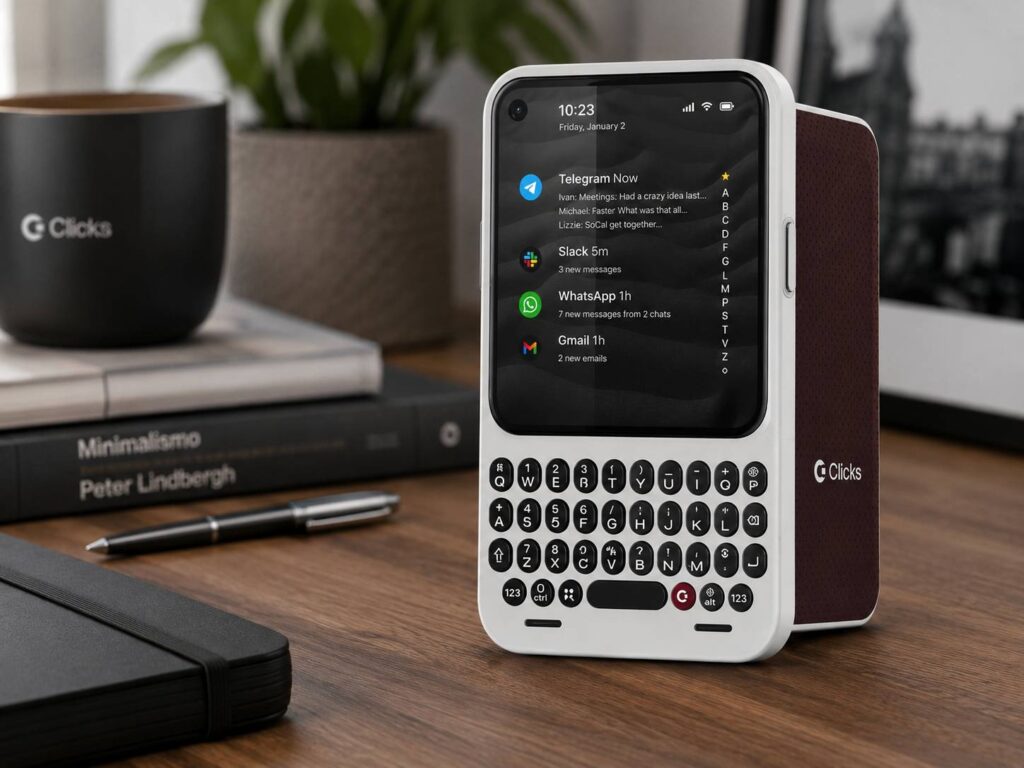
The Clicks Communicator is one of those phone ideas that instantly makes people stop and look twice. It brings back the physical keyboard many BlackBerry fans still miss, but it does not feel like a simple throwback. This is a modern Android smartphone built for typing, messaging, calling, note-taking, and staying focused without giving up current phone features.
Most phones today are built around large screens, endless scrolling, and fast media consumption. The Communicator takes a different route. It gives users a compact screen, a real keyboard, Android apps, 5G support, expandable storage, wireless charging, and a design that puts communication first.
For anyone searching for a physical keyboard smartphone, QWERTY Android phone, BlackBerry-style phone, or productivity phone in 2026, the Clicks Communicator is one of the most interesting devices to watch.
A Real Keyboard Phone for People Who Type a Lot
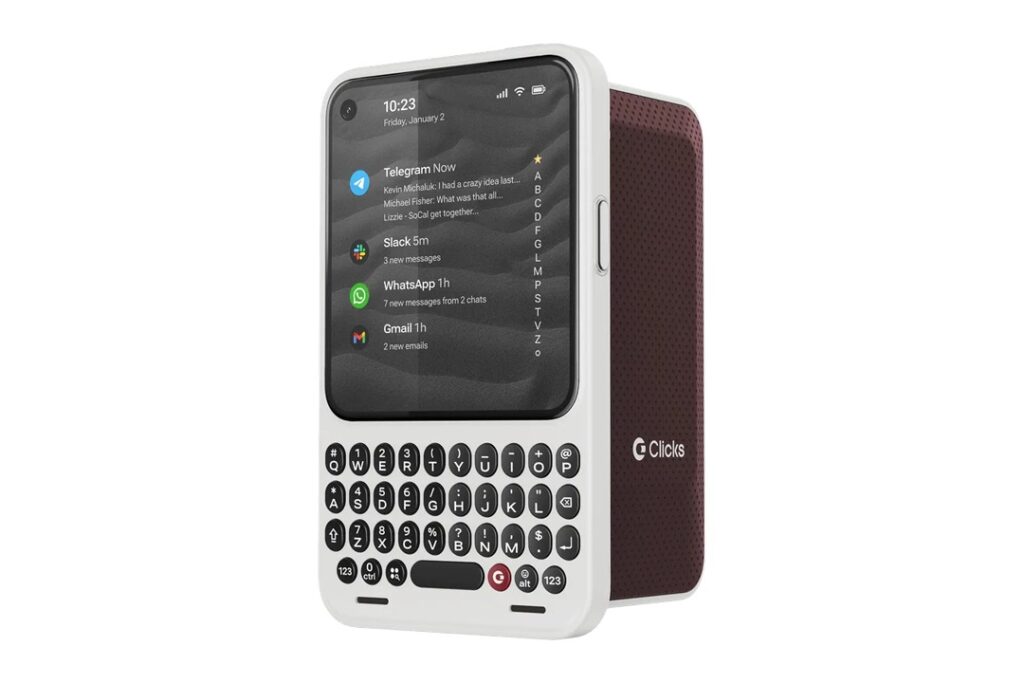
The main attraction is obvious: the keyboard. The Clicks Communicator has a built-in physical keyboard that gives the phone a familiar BlackBerry-style look. That alone will appeal to people who still prefer real buttons over tapping on glass.
Clicks did not stop at basic keys. The keyboard is touch-sensitive, so users can scroll through messages, inboxes, and pages without moving their thumb back to the display every few seconds. That small detail matters more than it sounds. A keyboard phone in 2026 needs to work smoothly with modern apps, not just look nostalgic.
This phone makes the most sense for people who write a lot from their phone. Emails, messages, notes, quick replies, meeting points, and longer texts all feel better when the typing experience is comfortable. My honest view is simple: the Communicator fills a gap that big-screen phones have ignored for years.
Why the Clicks Communicator Feels Fresh
The Communicator is not trying to compete only through specs. Its biggest appeal comes from how it changes phone behavior. It is built around getting things done, not losing time in apps.
One of its key features is the Message Hub, which brings messages from favorite apps into one place on the home screen. That gives users a cleaner way to check conversations without jumping between apps all the time. Keyboard shortcuts can help with replies, triage, and faster app actions.
The Signal LED adds another useful layer. It lets users set visual alerts for selected people or apps. That means the phone does not need to be checked every time a notification appears. In a year where direct communication features are coming back across many platforms, including updates like YouTube DMs are back in 2026, the Clicks Communicator fits into a clear trend: people want faster, simpler ways to stay in touch.
There is a side key for voice input too. Users can hold it to turn speech into text, record a voice note, or transcribe a meeting. That feature fits the device well. Some thoughts are faster to say than type, and a communication phone needs both options.
Clicks Communicator Specs and Features
The Clicks Communicator has a 4.03-inch AMOLED display. That is small next to today’s giant flagship screens, but it matches the idea behind the phone. This is not meant to be a pocket cinema. It is meant to be a compact work and messaging device.
Key features include:
- 4.03-inch AMOLED display
- Physical touch-sensitive keyboard
- 4,450 mAh silicon-carbon battery
- 50MP rear camera with optical image stabilization
- 24MP front camera
- 256GB onboard storage
- MicroSD card support up to 2TB
- NanoSIM and eSIM support
- 5G, 4G LTE, 3G, and 2G support
- Bluetooth, NFC, and Wi-Fi 6
- USB-C charging
- Qi2 wireless charging with MagSafe compatibility
- 3.5mm headphone jack
- Android Strongbox ready secure storage
- 170g weight
- 130.5mm × 78.63mm × 12mm body
The battery is one of the strongest parts on paper. A 4,450 mAh battery paired with a smaller AMOLED screen sounds promising, at least for messaging, calls, notes, and lighter app use. Real battery life still needs hands-on testing.
The headphone jack is a welcome choice too. Many new phones dropped it years ago, yet wired audio still makes sense for calls, travel, voice notes, and users who do not want to depend on wireless earbuds.
Android Apps Make It More Than a Niche Gadget
A physical keyboard phone only works today if it supports the apps people already use. That is why Android support matters so much here.
The Clicks Communicator is designed to run modern Android apps, so users should be able to use messaging, email, maps, banking apps, password managers, productivity tools, and social apps. That gives it a real chance as a daily phone, not just a collector’s item.
Clicks has talked about long software support too. The company has mentioned several years of Android version updates and security updates. That is good to see, since niche phones often fail when software support feels uncertain.
There is still one detail buyers should check before ordering. Public Clicks material has shown different wording around the Android version at launch. Anyone interested in the device should review the latest product page before paying.
Keyboard Layouts Give It Wider Appeal
Clicks is preparing several keyboard layouts for the Communicator. The listed options include English QWERTY, French AZERTY, German QWERTZ, Korean, and Arabic.
That decision matters. Physical keyboards are personal. Layout, spacing, language support, and typing habits all shape the experience. A QWERTY layout works for many users, but not everyone. More layout choices give the Communicator a better chance outside one market.
The phone also supports many system languages, which makes it more practical for international buyers. That is especially useful for a product aimed at people who write often.
Primary Phone or Companion Phone?
The Clicks Communicator can work as a main phone, but it may also appeal as a companion device. Some users may keep a flagship iPhone, Galaxy, or Pixel for photos, video, gaming, and large-screen browsing. Then they can use the Communicator for typing, email, messages, calls, and notes.
That second role makes a lot of sense. Many people want to spend less time scrolling, yet they still need to stay reachable. A compact keyboard phone with selected alerts gives them a way to stay connected without turning every break into app-hopping.
As a main phone, the Communicator will need to prove itself in daily use. Performance, camera quality, battery life, software polish, and carrier support will decide how well it holds up.
What Buyers Should Check Before Ordering
The Clicks Communicator looks promising, but buyers should be careful with a few details.
Production and shipping are still tied to the company’s rollout timeline. That means final reviews, long-term tests, and real customer feedback are not available yet. Specs tell part of the story, but actual use will matter more.
Carrier support is another area to check. The phone is listed as unlocked and supports many bands, but buyers should still confirm network support with their carrier before relying on it as a daily device.
People ordering from outside the main launch regions should read the payment, reservation, warranty, and shipping details closely. Niche phones can be exciting, but careful buying still matters.
Who Should Buy the Clicks Communicator?
The Communicator is not made for everyone, and that is part of its charm. It has a clear audience.
It makes the most sense for:
- Former BlackBerry users
- Heavy email and message users
- People who prefer real keys
- Writers who draft notes from their phone
- Professionals who use Slack, Gmail, WhatsApp, or Telegram often
- Users who want a compact Android phone
- Buyers who want fewer screen distractions
- Fans of unique productivity phones
It is not the best fit for people who want a huge display, top-tier mobile gaming, flagship camera zoom, or a phone built mostly for watching videos.
Final Thoughts
The Clicks Communicator brings back the physical keyboard in a way that feels current. It does not just copy an old BlackBerry formula. It adds Android apps, 5G, wireless charging, expandable storage, voice tools, a Signal LED, and a touch-sensitive keyboard.
The concept is strong. The phone has a real reason to exist, especially for people who type more than they swipe. It could become one of the most talked-about niche smartphones of 2026 if Clicks delivers good build quality, smooth software, and a keyboard that feels great every day.
The biggest unknowns are real battery life, camera quality, carrier behavior, and final software polish. Those answers will come once finished units reach buyers.
Still, the Communicator is refreshing. It gives keyboard fans something they have wanted for years: a modern smartphone that treats typing like a main feature again.