
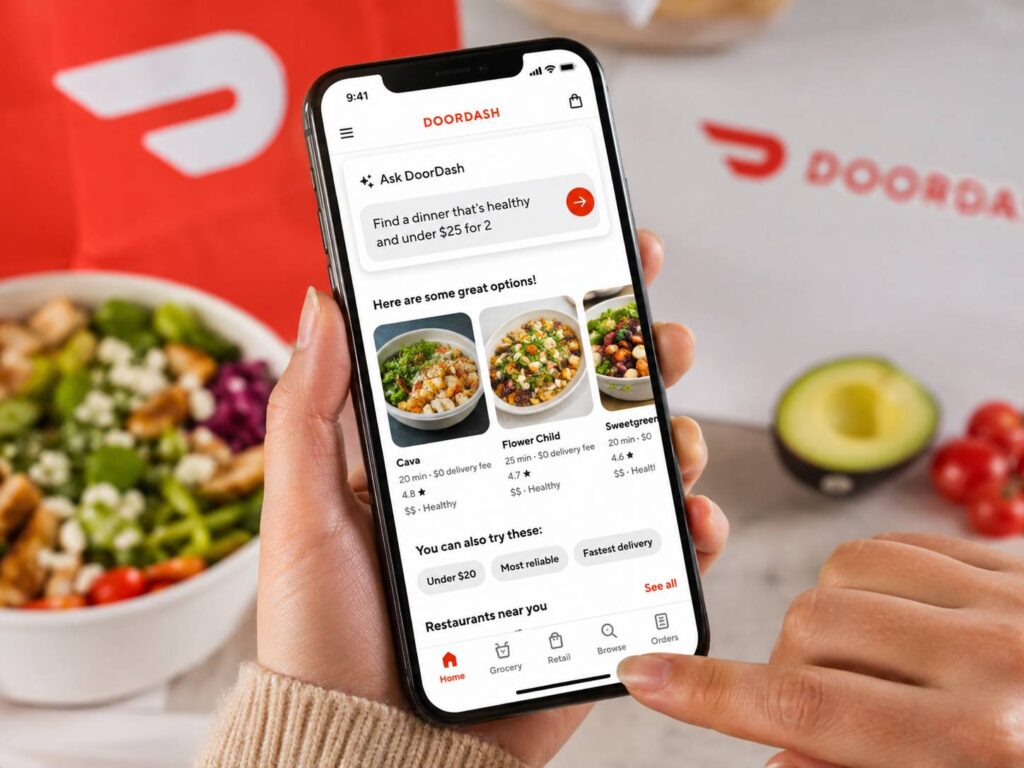
DoorDash wants to make ordering feel less like scrolling and more like asking for what you need. Its new Ask DoorDash feature lets users type a prompt, upload a photo, or paste a recipe link inside the app. From there, DoorDash can suggest restaurants, build a grocery cart, or turn a recipe into a list of items ready for checkout.
That sounds like a small change, but it could save real time. Food delivery apps can feel tiring after a long day. You open the app, search for dinner, compare menus, check prices, and still end up unsure. Grocery shopping takes even more effort, since every item needs a separate search.
Ask DoorDash tries to cut down that work. Instead of searching one item at a time, users can describe the full task. For example, they can ask for a quick family dinner, upload a grocery list, or share a cookbook photo. Then the app builds a starting point.
What Is DoorDash Ask AI?
Ask DoorDash is a new AI search feature inside the DoorDash app. It works through the search bar and lets users ask for food or groceries in plain language.
This matters, since most people do not think in exact menu names. They think in cravings, budgets, meal types, and time limits. Someone may search for “healthy dinner under $25,” “snacks for movie night,” or “ingredients for chicken tacos.” Ask DoorDash reads that kind of request and turns it into more useful results.
For restaurant orders, the feature can suggest places based on taste, price, delivery time, group size, and dietary needs. Then it can help build a cart, so the user does not start from an empty screen.
For groceries, the photo tools feel even more useful. Users can upload a handwritten grocery list, a cookbook page, or a recipe link. DoorDash can then add matching ingredients to the cart. After that, the user can review brands, quantities, and substitutions before placing the order.
How Ordering With Photos Works
The photo feature feels practical. People already take photos of grocery lists, recipes, fridge shelves, and notes from family members. DoorDash is turning those photos into shopping actions.
A cookbook page can become a grocery cart. A recipe link can become a list of ingredients. A handwritten note can become a set of search results. Then the user checks the cart and edits anything that looks wrong.
This can help parents, students, home cooks, and anyone who shops from a phone. It also helps users who dislike typing long grocery lists on a small screen.
The best part is control. DoorDash does not need to make the final choice for the user. Instead, it does the first draft of the order. Then the user changes items, removes things already at home, and checks the final price.
Why DoorDash Is Adding AI to Search
DoorDash now covers far more than restaurant delivery. The app includes groceries, convenience items, retail products, pet supplies, and more. More choice can help, but too many choices can slow people down.
Ask DoorDash gives the app a smarter search box. Rather than forcing users to type exact terms, it lets them explain what they want. That shift makes sense as shopping apps move toward task-based search.
People do not always want to search for “pasta,” “tomato sauce,” and “parmesan” one by one. Many users want the app to understand “ingredients for spaghetti night.” The same idea applies to restaurants. A user may not know the restaurant name, but they know they want a quick, warm meal under a set budget.
This change also connects to a bigger search trend. Google has been testing more AI-based search experiences too, and that shift is covered in this guide on how Chrome searches may go straight to AI Mode. DoorDash is taking a similar idea and applying it to food, groceries, and local shopping.
What Users Can Ask DoorDash to Do
Ask DoorDash can help with several common tasks:
- Find restaurants from natural prompts
- Suggest meals based on budget, taste, or group size
- Search for vegetarian, kid-friendly, high-protein, or low-spice meals
- Build a starter cart for restaurant orders
- Upload a grocery list photo
- Upload a cookbook page
- Paste a recipe link
- Add recipe ingredients to a grocery cart
- Suggest items based on past orders
- Remind users about common pantry staples
- Let users edit the cart before checkout
These features fit real search behavior. People will likely search for terms like DoorDash AI chatbot, Ask DoorDash, DoorDash photo ordering, DoorDash grocery AI, DoorDash recipe upload, and DoorDash order with prompts.
The Main Benefit Is Less Scrolling
Ask DoorDash solves a common problem: too much choice. Delivery apps often show many restaurants, many dishes, and many grocery items. That can help at first, but it can feel messy fast.
The new feature starts with intent. A user can say what they need, then DoorDash narrows the options. That makes the app feel closer to a helper than a long menu.
For dinner, this can mean faster picks. For groceries, it can mean fewer manual searches. For recipes, it can mean less back-and-forth between a browser, a notes app, and DoorDash.
Still, users need to review the cart. AI can misread handwriting, choose a different brand, or add a size that does not fit the recipe. So the feature works best as a time saver, not as a final decision maker.
What This Means for Restaurants and Stores
Ask DoorDash can help restaurants and stores reach shoppers in a new way. A user may ask for “comfort food for 3 people” instead of searching for a specific restaurant. A grocery shopper may upload a taco recipe instead of searching for each ingredient.
That gives merchants a chance to appear through needs, not just names. Clear menus, accurate item details, useful photos, and current prices now matter even more.
Restaurants with strong descriptions can benefit. Grocery stores with clean product data can benefit too. Better item details help DoorDash match the right product to the right request.
For small restaurants, this shift could be useful. Many customers do not know every local place nearby. If Ask DoorDash matches a restaurant to a craving, that business gets a better chance to win the order.
What Users Should Check Before Ordering
Ask DoorDash can speed up the first part of an order, but the final review still matters. Users should check:
- Item size
- Quantity
- Brand
- Price
- Delivery time
- Substitutions
- Allergy details
- Spice level
- Pantry items already at home
This step matters most for groceries. A recipe may call for one onion, but the app may show a bag. A cookbook photo may mention flour, but not the exact type. A handwritten list may be hard to read.
Food orders need a check too. A cart suggestion can look right, but users still need to confirm sides, drinks, sauces, and special notes.
Is DoorDash Ask AI Useful?
Yes, this looks like one of the more practical AI features in a shopping app. It does not ask people to learn a new habit. It lets them use photos, links, and plain requests, which people already use every day.
The feature also fits DoorDash well. Most orders start with a simple need: dinner, snacks, groceries, or ingredients. Ask DoorDash turns that need into a cart faster.
My opinion: this feature works best when it saves time without hiding choices. Users should still see what the app picked and change it before checkout. If DoorDash keeps that review step clear, Ask DoorDash can become a useful daily tool rather than a flashy extra.
DoorDash Ask AI Could Change How People Order
DoorDash Ask AI points to a simpler way to order food and groceries. Instead of typing exact items or scrolling through endless menus, users can start with a prompt, a photo, or a recipe link.
That makes the app feel more natural. A person can ask for dinner ideas, upload a grocery list, or turn a recipe into a cart. Then DoorDash gives them a starting point they can edit.
The rollout starts in select iOS areas, with wider U.S. availability planned. So not every user will see the feature right away. Still, the direction is clear. DoorDash wants search to feel more like a request and less like manual work.
For users, the value is speed. For merchants, the value is better matching. For DoorDash, the value is a smoother path from idea to checkout.
Ask DoorDash will not replace careful order review. Yet it can remove some of the boring steps that make delivery and grocery apps feel slow. That alone makes it a feature worth watching.