
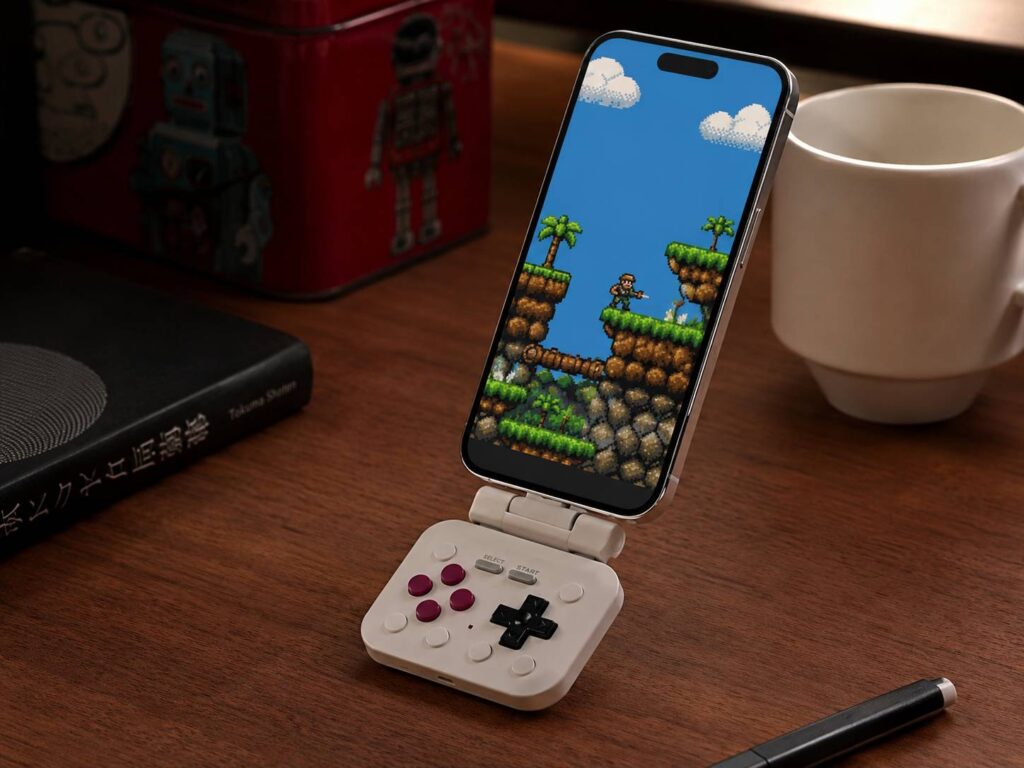
The 8BitDo FlipPad takes a familiar idea and shrinks it into a format that makes sense for daily travel. It connects to the bottom of a smartphone, adds real gaming buttons, and folds flat when playtime ends.
At first glance, it looks like a modern tribute to the original Game Boy. Yet the FlipPad is not a separate handheld console. Instead, it uses the screen and processing power already inside your phone.
That choice keeps the device small, light, and easy to carry. More to the point, it solves one of the biggest problems with mobile controllers. Many of them work well, but they are too bulky to keep in a pocket.
The FlipPad weighs only 31.5 grams and costs $29.99. Buyers can choose a gray G Classic model or a darker Black edition. Shipping is set to begin on July 30, 2026.
So, is this the phone controller retro gaming fans have been waiting for? For the right type of game, it looks surprisingly close.
A Mobile Controller Built for Portrait Gaming
Most smartphone controllers stretch across both sides of a phone. As a result, the device starts to feel like a small Nintendo Switch or handheld PC.
The 8BitDo FlipPad takes a very different path. Instead, it keeps the phone in portrait mode and places the controls below the display.
That layout gives it a clear Game Boy-style appearance. At the same time, it makes the controller a natural match for classic platform games, puzzle titles, arcade games, and older role-playing games.
The design feels focused rather than overloaded. There are no large grips, analogue sticks, or wide side panels. In fact, the whole point is to keep the controller small enough for a coat pocket, bag, or travel pouch.
That focus comes with limits. For example, modern shooters and racing games often need two analogue sticks. The FlipPad does not provide them.
Still, many retro games never used analogue controls in the first place. So, for those titles, the missing sticks should not feel like a major loss.
The Folding Design Is More Useful Than It Looks
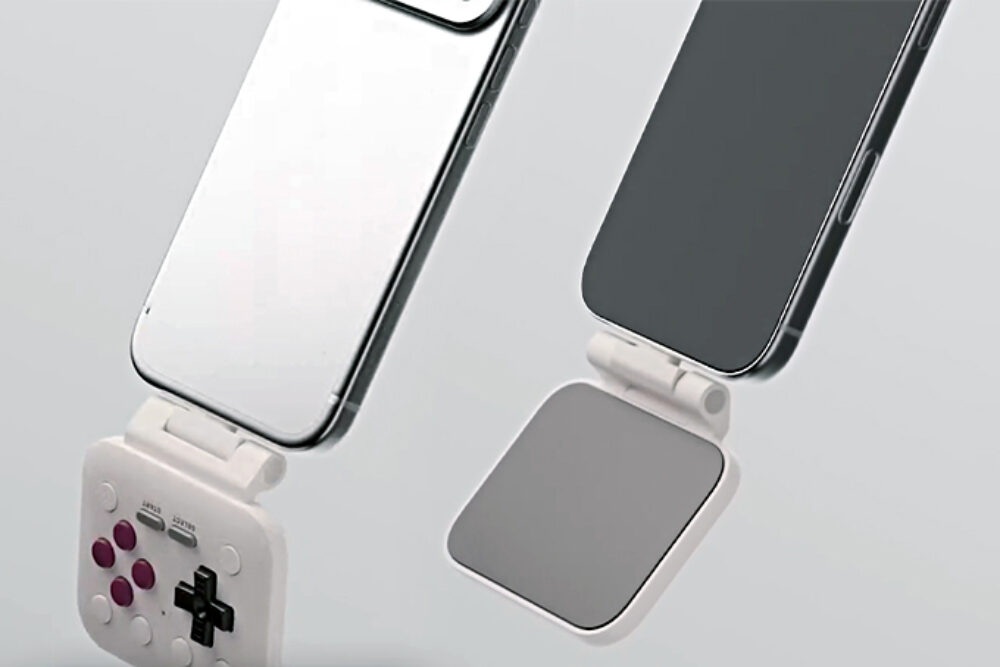
The FlipPad connects through the USB-C port at the bottom of the phone. Then, its button panel folds down into position below the screen.
Once you finish playing, the controls fold back behind the phone. As a result, you can check messages, browse apps, or take a call without removing the controller.
This small detail makes the FlipPad feel less like a traditional accessory and more like a temporary extension of the phone. You open it for a game, close it when you stop, and keep moving.
At the same time, the folding panel protects the buttons during transport. It should reduce accidental presses inside a pocket, too.
The hinge has been tested through more than 6,000 opening and closing cycles under laboratory conditions. Meanwhile, the USB-C connector carries a rating of more than 10,000 insertions.
Those figures do not guarantee a set lifespan for every unit. Still, they suggest that repeated daily use played a part in the design process.
In my view, this folding mechanism is the feature that makes the FlipPad genuinely interesting. Plenty of companies can make a tiny controller. Far fewer can make one that stays attached without getting in the way.
Real Buttons Make Retro Games Feel Better
Touchscreen controls are convenient, but they rarely feel precise. Your thumbs cover part of the screen, and there is no physical edge to guide each press.
The FlipPad replaces those flat virtual buttons with a directional pad, ABXY buttons, shoulder controls, and smaller function keys. As a result, games should feel more predictable and less slippery.
For example, platform games often require quick directional changes and accurate jumps. A physical D-pad gives your thumb a fixed point of reference.
Puzzle games benefit too. You can move through menus without staring at your fingers, and each button press provides clear tactile feedback.
In fact, this may be the strongest reason to buy the FlipPad. The retro styling gets attention, but the physical controls provide the lasting benefit.
Touch controls can work for slow games. Yet they become frustrating during faster sections. So, the FlipPad should offer a noticeable improvement for games built around short, precise inputs.
USB-C Keeps Setup Simple
The 8BitDo FlipPad uses a wired USB-C connection. That means there is no Bluetooth pairing process and no separate controller battery to charge.
You plug it in, open a supported game, and start playing. For that reason, setup should take only a few seconds.
A wired connection can provide steady input, too. There is no wireless link between the controller and phone, so players should not have to deal with pairing drops or controller sleep timers.
Still, the physical connector creates a few compatibility questions. Thick cases can block the USB-C plug or prevent it from sitting securely.
8BitDo says the FlipPad works with most phone cases. Yet rugged covers, folio cases, and cases with deep port openings may need to be removed.
So, buyers should check the space around their phone’s USB-C port before ordering. A slim case is more likely to fit without trouble.
The controller does not appear to include a pass-through charging port. For that reason, it makes sense to charge the phone before a longer session.
Compatibility Depends on the Phone and the Game
The FlipPad supports Apple devices running iOS 26.2 or newer. It supports Android phones running Android 13 or newer.
Still, phone compatibility is only one part of the equation. The game or app must support an external controller.
Some mobile games provide full gamepad support from the start. Others work only with touchscreen controls. Meanwhile, some emulators let users map each button manually.
For example, a retro emulator can assign the FlipPad’s D-pad to movement and the ABXY buttons to game actions. From there, the setup can feel close to a dedicated handheld.
Modern mobile games can be less predictable. Some titles support controllers in menus but not during gameplay. Others use fixed button layouts that cannot be changed.
So, players should check the controller settings inside their favourite games before buying.
Retro Games Are the Best Match
The FlipPad makes the most sense for games that rely on directional movement and a small group of action buttons.
Good matches include:
- Classic platform games
- Retro role-playing games
- Puzzle and arcade titles
- Turn-based strategy games
- Game Boy-style games
- Controller-supported portrait games
- Legal retro emulation
- Older console games that do not need analogue sticks
In particular, older games often use square or narrow screen layouts. As a result, they can sit above the controls without looking cramped.
Dual-screen emulation looks interesting too. A phone in portrait mode can display one screen above the other, with the FlipPad controls placed underneath.
That setup could make some dual-screen titles feel more natural on a phone. Still, results will vary by emulator, screen size, and game layout.
Cloud gaming is a weaker match. Most current console games rely on two analogue sticks, triggers, and a widescreen view.
So, the FlipPad should not be treated as a replacement for a full-size mobile controller. Instead, it fills a smaller and more focused role.
Its Small Size May Be the Main Selling Point
A mobile controller has little value when it stays at home. Many telescopic gamepads offer great controls, but they take up too much space for casual travel.
The FlipPad tackles that problem directly. At 31.5 grams, it is light enough to carry every day without much thought.
For comparison, many full-size phone controllers weigh several times more. They often need a case or a dedicated pocket, too.
The FlipPad should fit more easily beside a charger, cable, or pair of earbuds. In fact, it follows the same compact travel philosophy seen in accessories such as the Logitech Mobi Fold folding mouse, which aims to add useful physical controls without filling a bag.
That portability comes with a comfort trade-off. A narrow body cannot provide the deep grips found on larger gamepads.
So, long gaming sessions may place more pressure on the hands. The phone’s weight sits above the controls, too, which may feel top-heavy after some time.
Still, the FlipPad is designed for short bursts rather than long console sessions. Ten or twenty minutes on a bus, train, or lunch break feels like the ideal use case.
The $29.99 Price Feels Fair
The FlipPad costs $29.99, which places it below many premium mobile controllers.
That price makes sense for a device with a narrow purpose. Buyers do not need to spend $70 or more to add physical controls to retro games.
Both the G Classic and Black versions carry the same price. The Black edition is listed as an 8BitDo eShop exclusive.
At the same time, cheaper Bluetooth controllers do exist. Yet many of them require a phone stand, clip, or separate carrying case.
The FlipPad offers a cleaner all-in-one design. You connect it directly to the phone, fold it open, and play.
For that reason, the price feels reasonable rather than cheap. The value comes from portability and convenience, not from a huge number of controls.
Who Should Buy the 8BitDo FlipPad?
The FlipPad looks best for players who enjoy retro games and dislike touchscreen buttons.
It should suit people who want:
- A small controller for daily travel
- Physical buttons for classic games
- A portrait gaming layout
- Fast USB-C setup
- No Bluetooth pairing
- A controller priced below many larger models
- A Game Boy-style phone experience
Still, it will not fit every player.
It may disappoint people who need:
- Two analogue sticks
- Large hand grips
- Pass-through charging
- Wireless controls
- Landscape-only gaming
- Full console-style inputs
The 8BitDo FlipPad is not trying to compete with large mobile gamepads. Instead, it offers a more compact option for a very different type of play.
That narrow focus is a strength. Many accessories try to do everything and end up feeling awkward. The FlipPad seems to know exactly what it is.
A Clever Accessory for Short Retro Gaming Sessions
The 8BitDo FlipPad turns a modern smartphone into a pocket-size retro handheld without adding much weight.
More importantly, it gives players real controls in a format they can carry every day. The folding design keeps the phone usable, and the USB-C connection removes the usual pairing process.
There are clear limits. It lacks analogue sticks, it may not fit every phone case, and game support will vary.
Even so, those limits make sense for the size and price. The FlipPad is not built for every game. It is built for classic titles, emulators, puzzle games, and short gaming sessions.
At $29.99, it looks like a fun and practical accessory rather than an expensive experiment. For retro gaming fans, that may be more than enough.