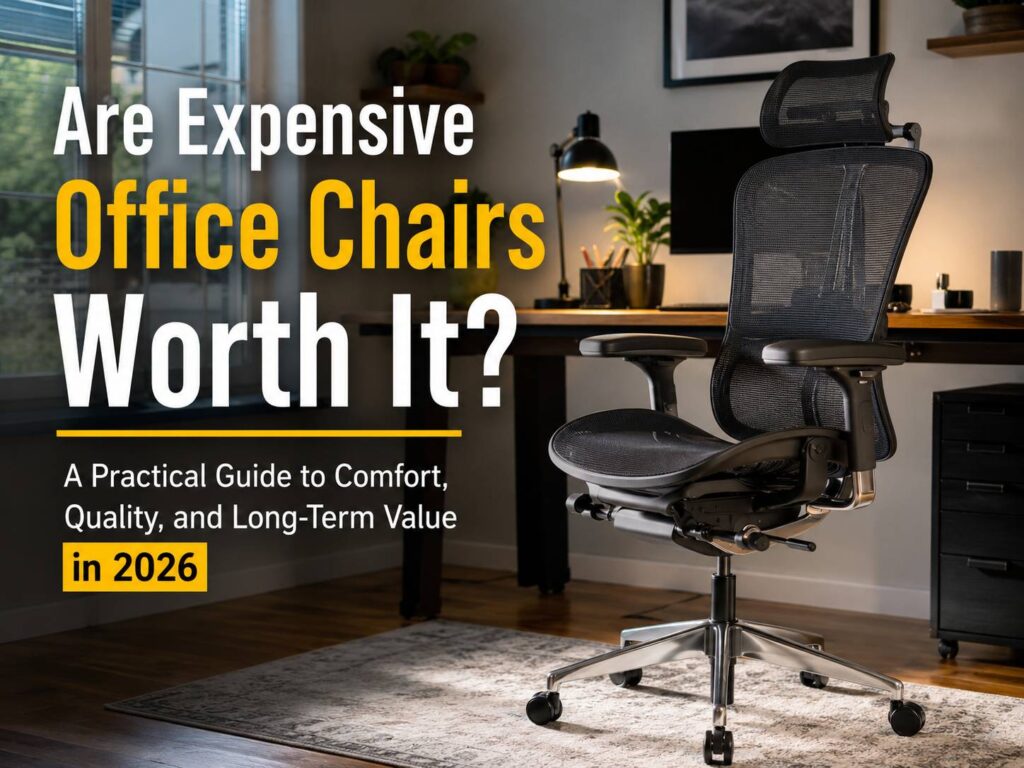
Are expensive office chairs worth it, or are you paying extra for a logo, a stylish frame, and clever marketing? For many people, a premium chair can make long workdays more comfortable. Still, a high price does not guarantee that a chair will suit your body.
The real value depends on fit, daily use, adjustment range, build quality, warranty coverage, and repair options. A $1,500 chair can feel terrible when the seat is too deep or the lumbar support presses too hard. At the same time, a well-designed $400 chair can remain comfortable for years.
So, the best choice is rarely the most expensive model in the shop. Instead, it is the chair that fits your body, desk, working habits, and budget.
This guide explains what premium office chairs offer, where budget chairs often fall short, what problems owners commonly report, and how much you should realistically spend.
What Counts as an Expensive Office Chair?
Office chairs cover a wide price range. Entry-level desk chairs often cost less than $200. Mid-range ergonomic models usually sit between $250 and $700. Premium office chairs can cost $800, $1,500, or more.
Yet price alone does not tell you much about comfort. Some expensive models focus on materials, design, and brand status. Others put the money into stronger mechanisms, longer warranties, replaceable parts, and a wider adjustment range.
In practice, premium chairs often include:
- Adjustable seat depth
- Adjustable lumbar support
- Multi-position armrests
- Recline tension control
- Several recline lock positions
- Synchronized seat and back movement
- Stronger bases and frames
- Higher-grade mesh or foam
- Replaceable casters, arm pads, and gas lifts
- Longer warranty coverage
- Several seat sizes or frame options
Some brands ship chairs fully assembled. Others sell through local dealers that help with fitting and repairs. For that reason, two chairs with similar prices can offer very different ownership experiences.
What Do You Get for the Extra Money?
At first glance, premium chairs can look surprisingly simple. The real differences often sit inside the frame, under the seat, or within the recline mechanism.
More ways to adjust the chair
A basic chair may offer seat-height control and a simple backrest lock. By comparison, a premium ergonomic model can let you change seat depth, lumbar position, recline tension, armrest width, armrest depth, and backrest resistance.
These controls help the chair fit a wider range of users. For example, a shorter person may need a shallow seat and a lower seat-height range. A taller person may need more seat depth and stronger back support.
Still, more controls do not always create better comfort. Loose armrests, confusing levers, and weak locks can make the chair frustrating to use. So, every adjustment should feel smooth, stable, and easy to reach.
Better movement during the day
A good office chair should not force you into one rigid position. Instead, it should support several postures during typing, reading, calls, and short breaks.
Many premium models use a synchronized recline system. The backrest moves as you lean back, and the seat changes angle at the same time. This can reduce the feeling of being pushed forward or trapped in one position.
At the same time, no chair cancels the effects of sitting for long periods. You still need to stand, walk, stretch, and change position during the day. The chair supports movement, but it does not replace it.
Stronger materials and moving parts
Budget chairs often feel comfortable during a short showroom test. Over time, though, the foam can flatten, the mesh can stretch, and the armrests can loosen.
Premium chairs often use denser foam, stronger frames, thicker bases, better-tested casters, and more durable recline parts. As a result, they can keep their shape and function for longer.
That does not mean an expensive chair will stay perfect. Fabric can stain. Arm pads can crack. Casters can collect hair and dust. Recline mechanisms can develop squeaks.
The main difference appears later. A premium chair often has replaceable parts and better service support. A cheap chair may need full replacement after one failed component.
Longer warranty coverage
Warranty length is one of the clearest differences between cheap and expensive office chairs. Some premium brands cover selected models for 10 or 12 years. Many low-cost chairs come with much shorter protection.
Still, the headline warranty period does not tell the full story. Check the actual terms before buying.
Look for answers to these questions:
- Does the warranty apply in your country?
- Are parts and labor covered?
- Does the upholstery have a shorter warranty?
- Are the gas lift, casters, arm pads, and recline mechanism included?
- Does the warranty apply to home-office use?
- Is the warranty limited to the first owner?
- Do you need the original invoice?
- Who pays shipping costs for repairs?
For example, a 12-year warranty offers little value when no local service center exists. Likewise, an inexpensive replacement part can become costly after international shipping and labor fees.
Can an Expensive Office Chair Help With Back Pain?
A well-fitted chair can support the lower back, reduce pressure behind the knees, and help the shoulders remain relaxed. That is why a better-fitted chair can feel more comfortable.
Yet no chair can promise to prevent or cure back pain. Pain can come from the desk height, monitor position, keyboard placement, sitting time, physical activity, sleep quality, old injuries, or medical conditions.
Poor chair fit can create problems too. For example, a seat that is too deep can press behind the knees. A seat that is too high can leave the feet hanging. Strong lumbar support can feel painful when it pushes into one small area.
So, treat the chair as one part of the workstation. Your desk, monitor, keyboard, mouse, foot support, and work routine matter as well.
Which Expensive Office Chair Features Matter Most?
Premium chairs often come with long feature lists. In daily use, only a few features have a major effect on fit and comfort.
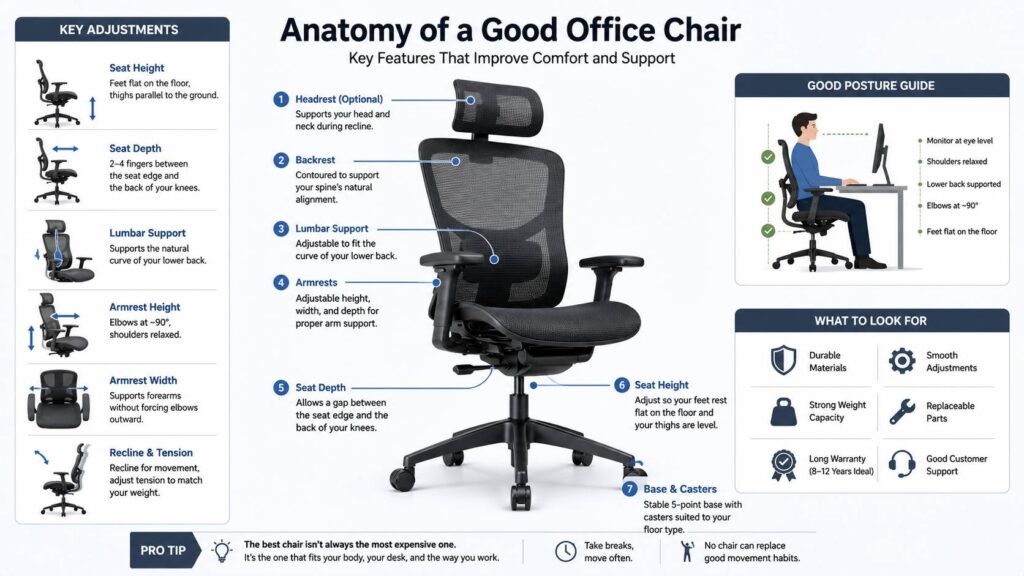
Seat height
Your feet should rest flat on the floor or on a stable footrest. Your thighs should feel supported, and the seat edge should not press sharply behind your knees.
The adjustment range matters more than the presence of a gas lift. A chair can move smoothly and still sit too high for a shorter user.
Before buying, compare the chair’s minimum seat height with your current setup. Then check whether your desk leaves enough space for your knees and thighs.
Seat depth
Seat-depth control changes the distance between the front of the seat and the backrest. This feature can make a major difference for shorter and taller users.
A small gap should remain between the seat edge and the back of your knees. Too much space reduces thigh support. Too little space can create pressure and numbness.
For shared home offices, adjustable seat depth becomes even more useful. Two people can use the same chair without accepting the same seat position.
Lumbar support
Lumbar support should follow the lower-back curve without pushing too hard. Some chairs use a fixed backrest shape. Others offer a sliding pad, adjustable tension, or flexible support panels.
At first, strong lumbar support can feel impressive. After several hours, though, that same pressure may become uncomfortable.
For that reason, do not assume that firmer support is better. The right setting should feel supportive without drawing your attention to one exact point.
Armrest adjustment
Armrests should support your forearms without lifting your shoulders. They should not force your elbows too far away from your body.
Height control is the most useful adjustment. Width, depth, and pivot controls can help people with narrow shoulders, broad shoulders, compact keyboards, or large desks.
Yet armrests often create desk-fit problems. Thick pads may hit the desktop and stop the chair from moving close enough. In that case, lower or removable armrests can work better.
Your chair is only one part of the desk setup. The same rule applies to other accessories. For example, paying more for a mouse makes sense only when the design, shape, and features suit your needs. Our guide on whether expensive mice are worth it in 2026 explains the same value-versus-fit problem.
Recline system
A good recline should feel smooth and controlled. It should support your weight without suddenly dropping backward or pulling you upright.
Some users prefer a free-moving backrest. Others prefer several locking positions. Neither choice is automatically better.
In practice, recline tension matters more than the number of lock points. A chair should let you lean back without a fight, but it should not feel loose or unstable.
Base and casters
A five-point base gives the chair a stable foundation. Casters should match your flooring.
Hard casters often work better on carpet. Softer casters are a safer choice for laminate, wood, and tile. A chair mat can protect the floor, though it can change how the chair rolls.
Check the weight rating too. A chair used near its maximum load can wear faster and feel less stable.
Common Problems People Report With Premium Office Chairs
Expensive office chairs still have flaws. In fact, premium features can create new frustrations when the chair does not match the user.
Common complaints include:
- The seat feels too firm
- The lumbar support presses too hard
- Mesh edges create thigh pressure
- Armrests move too easily
- The chair feels too wide
- The seat depth remains too long at its shortest setting
- The backrest pushes the shoulders forward
- The headrest does not sit in the right position
- The chair makes clicking or squeaking sounds
- Original replacement parts cost too much
- Local warranty service is hard to access
- The controls take time to understand
Many premium ergonomic chairs focus on support and movement rather than soft cushioning. So, buyers expecting a thick, sofa-like seat can feel disappointed.
Mesh creates another trade-off. It feels cooler and can flex with the body. Yet the texture may bother you, and the frame around the mesh can create pressure points.
Foam seats feel more familiar. Over time, though, low-quality foam can lose its shape. Dense foam lasts longer, but it often feels firm during the first weeks.
For that reason, a short test in a shop rarely tells the full story. Try to sit in the chair for at least 20 to 30 minutes. Better still, buy from a seller with a fair return period.
Expensive Office Chair Versus Cheap Office Chair
A cheap office chair can be a sensible purchase for light use. It may work well for checking email, paying bills, gaming for short sessions, or using a desk for one or two hours.
Long workdays place more pressure on the seat, gas lift, backrest, casters, and recline mechanism. Over time, stronger construction starts to matter more.
A budget chair can still be the better choice when:
- You sit at the desk for short periods
- You plan to move soon
- Your budget is limited
- You found a simple chair that fits well
- Replacement parts are easy to find
- You can test the chair before buying
A premium chair makes more sense when:
- You work from home most days
- You sit for six or more hours
- Several people share the chair
- Standard seats feel too deep or too high
- You need precise armrest control
- You want replaceable parts
- You plan to keep the chair for many years
- Warranty support matters to you
Still, price should never replace proper testing. A famous model can feel wrong after one hour. A less expensive model can feel natural from the first day.
How Much Should You Spend on an Office Chair?
Set the budget around your daily use, not around the most popular brand.
For occasional use, a well-built chair under $300 can be enough. For regular home-office work, the best value often sits in the middle of the market. Many chairs in this range offer seat-depth control, adjustable arms, lumbar support, and a stronger recline mechanism.
Premium chairs start to make more sense when you use them for many hours and plan to keep them for a long time.
Consider this example:
Premium chair
- Purchase price: $1,500
- Ownership period: 10 years
- Cost per year: $1,500 ÷ 10 = $150
- Cost per day: $150 ÷ 365 = about $0.41
Budget chair
- Purchase price: $300
- Ownership period: 3 years
- Cost per year: $300 ÷ 3 = $100
- Cost per day: $100 ÷ 365 = about $0.27
In this example, the premium chair costs about $0.14 more per day.
That extra cost can feel reasonable for better fit, stronger materials, and longer coverage. Yet the calculation only works when the premium chair lasts longer and remains comfortable.
Real service life varies. User weight, sitting time, materials, care, repairs, and daily movement all affect how long a chair lasts.
Should You Buy a Used Premium Office Chair?
A used premium chair can offer better value than a new budget model. Offices often sell high-quality furniture after moving, reducing staff, or changing layouts.
Still, used chairs require careful inspection.
Check these areas:
- Seat fabric, foam, or mesh
- Gas lift stability
- Recline movement
- Armrest movement
- Lumbar controls
- Casters and base
- Frame cracks
- Missing knobs or covers
- Grinding, clicking, or squeaking sounds
- Manufacturing date label
Then, sit in the chair for at least 15 to 20 minutes. Raise and lower the seat several times. Recline with your full weight against the backrest. Test every control.
Ask whether the warranty transfers to the second owner. Many premium warranties cover only the original buyer.
A refurbished chair can cost more than a private used model. Still, it may include a new gas lift, fresh fabric, replacement arm pads, or new casters. Ask the seller for a written list of replaced parts.
How to Test an Office Chair Before Buying
Wear the clothes you normally use for work. Then test the chair at a desk with a similar height to your home setup.
Follow these steps:
- Set the seat height so your feet rest flat.
- Check for pressure behind your knees.
- Adjust the seat depth.
- Rest your back fully against the backrest.
- Test the lumbar support at several settings.
- Place your hands in a normal typing position.
- Adjust the armrests without lifting your shoulders.
- Recline several times.
- Sit upright without holding tension in your back.
- Remain seated for at least 20 minutes.
During the test, pay attention to discomfort rather than softness. Pressure under the thighs, raised shoulders, a pushed-forward head, or sharp lumbar pressure can feel worse after a full workday.
For a broader selection of models and chair types, see our guide to the best office chairs for a home office. It can help narrow the options before you compare dimensions and prices.
Gaming Chair or Premium Office Chair?
Gaming chairs often use tall backrests, side bolsters, thick padding, and racing-style designs. Premium office chairs tend to focus more on movement, adjustable support, and long desk sessions.
A gaming chair can suit users who prefer a high back, padded seat, and included head pillow. Yet side bolsters can feel restrictive for people who change leg positions often.
An ergonomic office chair often offers better seat-depth control, armrest placement, and recline movement. The design may look simpler, but it can fit a desk setup more easily.
Judge both categories using the same questions:
- Does the seat fit your legs?
- Can your feet rest flat?
- Do the armrests fit under the desk?
- Does the backrest support you without sharp pressure?
- Can you change position easily?
- Are parts covered by a clear warranty?
The label matters less than the fit.
Are Headrests Worth Paying Extra For?
A headrest is not required for every desk task. Many premium office chairs leave it out.
During upright typing, your head should stay balanced over your torso. You should not need to press it against a support.
A headrest becomes more useful during reclining, reading, watching videos, or taking calls. Still, a poorly placed headrest can push the head forward and create neck discomfort.
Look for height and angle controls. Then test the headrest in several recline positions. It should support the upper neck without pushing the chin toward the chest.
Mistakes to Avoid When Buying an Expensive Office Chair
Do not buy a chair based only on photos, reviews, or brand reputation. A respected chair can still be wrong for your body.
Avoid these common mistakes:
- Choosing the chair mainly for its appearance
- Ignoring minimum and maximum seat height
- Skipping seat-depth measurements
- Assuming thick padding means better comfort
- Buying without checking return fees
- Treating strong lumbar pressure as proof of good support
- Ignoring desk and armrest clearance
- Paying for controls you will never use
- Assuming every warranty covers every part
- Buying a used chair without testing the gas lift
- Expecting the chair to fix pain by itself
Before shopping, measure your current chair. Record the seat height, seat width, and seat depth. Then write down what feels wrong.
This simple step gives you a clear starting point and helps you avoid paying more for the same problems.
Are Expensive Office Chairs Worth It?
Expensive office chairs are worth it for people who spend long hours at a desk, need a wide adjustment range, want stronger materials, and plan to keep the chair for years.
Still, they are not worth the extra cost when the fit is poor, the warranty lacks local support, or the chair includes controls you do not need. A good mid-range model can cover the needs of many home-office users.
So, buy the fit rather than the logo. Test the seat, backrest, armrests, and recline. Check the warranty. Measure the desk. Compare the cost across several years.
The best office chair is not always the most expensive one. It is the chair that fits your body, supports natural movement, works with your desk, and stays comfortable through a real workday.