A silent mouse is a computer mouse made to reduce click noise. It still clicks, moves, scrolls, and works like a regular mouse. The main difference is the sound. Instead of a sharp click every time you press the button, a silent mouse gives you a softer, more muted sound.
That small change can make daily computer use feel calmer. If you work in a shared office, study in a quiet room, use your laptop at night, or take calls at your desk, a silent mouse can make your setup much less distracting.
Still, the word “silent” can be a little confusing. These mice are not completely silent. You may still hear the scroll wheel, side buttons, or the mouse sliding across the desk. Even so, the main left and right clicks are much quieter than on a standard mouse. As a result, the mouse feels more polite in quiet spaces.
A silent mouse is not only for office workers. Students, remote workers, parents, content creators, and casual gamers can all benefit from one. After all, mouse clicks are small sounds, but they repeat all day. Once you notice them, they can become annoying fast.
What Does a Silent Mouse Actually Do?
A silent mouse reduces the noise made by the main click buttons. Most models use quieter switches, soft internal parts, or dampened button designs. These parts absorb part of the sound before it reaches the outside of the mouse.
A normal mouse click often has a sharp snap. Some users like that feel because it seems clear and direct. By comparison, a silent mouse feels softer under the finger. The click still registers, but the sound is lower and less harsh.
This does not mean every silent mouse feels the same. Some models feel firm and pleasant. Others feel too soft or almost mushy. That is one of the biggest issues with cheap silent mice. They may reduce noise, but they can lose the crisp feel that makes a mouse satisfying to use.
A good silent mouse should offer a clear click, smooth movement, reliable tracking, and a comfortable shape. Noise reduction matters, of course. Still, comfort and control matter just as much.
Silent Mouse vs Regular Mouse
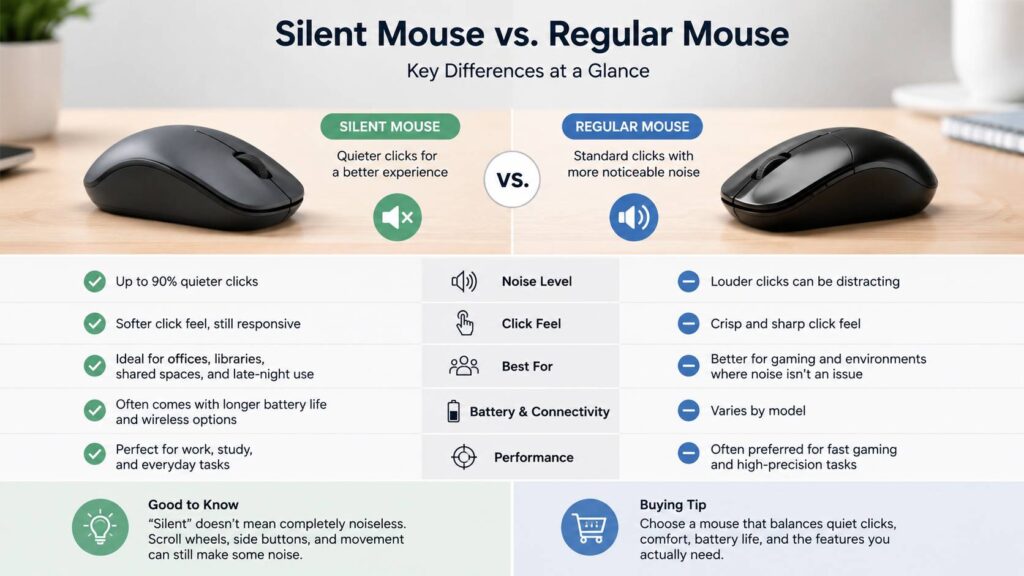
The main difference between a silent mouse and a regular mouse is click noise. A regular mouse uses standard switches that make a sharper sound. A silent mouse uses quieter parts that soften that sound.
Because of this, a regular mouse often feels more crisp. Some people prefer that stronger feedback, especially during gaming, editing, or fast spreadsheet work. A silent mouse, by contrast, feels gentler. For writing, browsing, schoolwork, and office tasks, that softer feel usually works very well.
Here is the simple difference:
- A regular mouse has a sharper click.
- A silent mouse has a softer click.
- A regular mouse may feel more tactile.
- A silent mouse feels calmer during long use.
- A regular mouse can bother people nearby.
- A silent mouse fits better in shared spaces.
For most home office users, a silent mouse makes sense. It reduces one of the most repeated desk sounds without changing the way you work. At the same time, people who love a loud, firm click may prefer a normal mouse.
The same idea applies to keyboards. Some switches sound loud and sharp, while others feel quieter and smoother. If desk noise bothers you, it is smart to avoid the wrong keyboard switches too, not just a loud mouse.
Are Silent Mice Really Quiet?
Yes, silent mice are quieter than regular mice. Still, they are not completely noiseless. The main buttons may sound soft, but other parts can still make noise.
You may still hear:
- The scroll wheel
- The mouse feet moving on a hard desk
- Side buttons
- A light tap from the plastic shell
- The mouse hitting the desk after you lift it
- Keyboard noise from your setup
For that reason, your desk surface matters. A silent mouse on a hard wooden desk can still make scraping or tapping sounds. A soft mouse pad helps a lot. It reduces movement noise and makes the whole setup feel smoother.
In real use, the biggest difference appears during repeated clicking. For example, if you edit photos, sort files, work in spreadsheets, browse product pages, or handle admin tasks, you may click hundreds of times in one session. A silent mouse makes those repeated clicks much less noticeable.
Who Should Buy a Silent Mouse?
A silent mouse is a smart buy for anyone who works near other people. It is useful in a shared office, bedroom, dorm room, library, classroom, meeting room, or small apartment.
You should consider one if:
- You work late at night.
- You share a room with a partner.
- You take video calls often.
- You work near children.
- You record audio near your desk.
- You study in quiet places.
- You get distracted by sharp clicking sounds.
- You use your mouse for many hours per day.
Parents can benefit from a silent mouse too. Late-night computer use can disturb a sleeping child or partner. A quieter mouse will not make the room silent, but it removes one common source of repeated noise.
It is also a good choice for people who are sensitive to sound. Some users do not mind keyboard or mouse noise. Others find it irritating after a few minutes. If clicks bother you, a silent mouse can make your workspace feel more relaxed.
Who Should Skip a Silent Mouse?
A silent mouse is not the best choice for everyone. If you like a sharp, mechanical click, you may not enjoy the softer feel. Some silent mice feel less direct, especially cheaper models.
Competitive gamers should also choose carefully. Many silent mice are built for office work, not fast gaming. They may have a basic sensor, lower polling rate, heavier body, or fewer tuning options. For casual gaming, that is usually fine. For fast shooters or competitive play, you may want a mouse made for gaming first.
There is also a quality gap between models. A good silent mouse can feel smooth and reliable. A poor one can feel dull, cheap, or uneven. So, it is better to look at comfort, tracking, battery life, and button feel before buying.
Main Types of Silent Mice
Silent mice come in several styles. Each one fits a different type of user.
Wireless silent mouse
A wireless silent mouse is the most common option. It connects through a USB receiver, Bluetooth, or both. Because there is no cable, your desk looks cleaner and feels easier to use.
This type works well for office desks, laptops, and travel. Many models last months on one battery, while others use built-in rechargeable batteries.
Bluetooth silent mouse
A Bluetooth silent mouse connects without a USB dongle. That makes it useful for laptops, tablets, and compact desks.
For normal work, Bluetooth is usually fine. Still, a 2.4 GHz USB receiver can feel more stable on some setups. If you switch between devices often, a mouse with both options gives you more flexibility.
Ergonomic silent mouse
An ergonomic silent mouse has a shape made for longer use. It may include a thumb rest, higher body, angled grip, or vertical design.
This type can feel more comfortable during long workdays. Still, shape is personal. A mouse that feels great for one hand may feel awkward for another. For that reason, size and grip style matter.
Compact silent mouse
A compact silent mouse is small and easy to carry. It fits well in a laptop bag and works nicely for travel.
The trade-off is comfort. Small mice can make your fingers curl more. After a few hours, that can feel tiring. So, compact mice are great for short sessions but not always ideal for full workdays.
Multi-device silent mouse
A multi-device silent mouse can switch between two or three devices. This is useful if you use a laptop, desktop, tablet, or work computer on the same desk.
Check where the device-switch button sits. A button on top or on the side is easier to use than one placed underneath the mouse.
Key Features to Check Before Buying
Quiet clicks are useful, but they should not be the only feature you check. A silent mouse still needs to feel good every day.
Click feel
The click should feel soft, but not dead. You should know when the button registers. If the click feels too flat, the mouse can become annoying during fast work.
Shape and size
Comfort matters more than extra features. A mouse that is too small can strain your fingers. A mouse that is too large can force your wrist into an awkward position.
Connectivity
Choose 2.4 GHz wireless if you want a simple and stable connection. Choose Bluetooth if you want fewer dongles. A mouse with both gives you the best mix.
Battery life
Some silent mice last for months on one battery. Others need regular charging. If you work all day at a desk, long battery life is a major advantage.
Sensor quality
Most silent mice use optical sensors. They work well on mouse pads and many desk surfaces. Still, glass surfaces can cause tracking problems for many models.
Scroll wheel noise
Do not forget the scroll wheel. A mouse can have quiet clicks but a noisy wheel. If you scroll a lot, look for a smooth and quiet wheel too.
Side buttons
Side buttons help with browser navigation, productivity, and shortcuts. Yet, not all side buttons are silent. On some mice, only the main left and right buttons are quiet.
Software support
Some brands let you change button actions, pointer speed, scrolling behavior, and device settings. This is useful, especially for productivity work. Still, many users will be fine without extra software.
Common Issues With Silent Mice
Silent mice solve a real problem, but they can bring a few small annoyances.
The most common issue is mushy clicking. Some models feel too soft. You press the button, but the feedback feels weak. That can make the mouse feel slower, even when it works correctly.
Another issue is uneven sound. The main buttons may be quiet, but the side buttons may sound normal. The scroll wheel may also be louder than expected.
Some silent mice focus on office use, so they may not have gaming-level sensors or very fast response features. That is not a problem for normal work. Still, it matters for users who play fast games.
Wireless range can also be an issue. If the USB receiver sits behind a desktop tower or far from the mouse, the connection may feel less stable. Moving the receiver closer often fixes this.
Is a Silent Mouse Good for Work?
Yes, a silent mouse is excellent for work. It makes your desk quieter and helps reduce repeated clicking sounds during the day.
It works well for:
- Writing
- Research
- Data entry
- Web browsing
- Spreadsheets
- Video calls
- Photo sorting
- Light design work
The benefit is simple. You click all day, but the sound feels softer. As a result, your desk feels less noisy and less distracting.
A silent mouse also works well with a quiet keyboard. If you are building a calm office setup, look at the difference between a gaming keyboard vs office keyboard. The keyboard often makes more noise than the mouse, so both choices matter.
Is a Silent Mouse Good for Gaming?
A silent mouse can work for casual gaming. It is fine for strategy games, simulation games, story games, role-playing games, and slower titles.
For competitive gaming, you need to check more than noise. Look at the sensor, weight, polling rate, feet, button feel, and shape. Some silent mice are too basic for serious gaming.
That said, a quiet mouse can still be useful for late-night gaming. If you share a room, the softer clicks can make your setup less annoying for others.
Silent Mouse Buying Advice
Buy a silent mouse based on your main use, not just the word “silent” on the box.
For office work, choose comfort first. A good shape, quiet buttons, long battery life, and a smooth scroll wheel matter more than high DPI numbers.
For travel, choose a compact Bluetooth model. It should fit easily in a bag and connect without taking up a USB port.
For shared desks, choose a model with quiet main buttons, quiet scrolling, and stable wireless connection.
For large hands, avoid tiny mice. They may look neat, but they can become uncomfortable after long sessions.
For multi-device setups, choose a mouse that switches between devices quickly. This saves time if you move between a laptop, desktop, and tablet.
For gaming, focus on gaming specs first. Quiet clicks are nice, but they should not replace good tracking and fast response.
Real Opinion: Is a Silent Mouse Worth It?
Yes, a silent mouse is worth it for most people who work near others or dislike click noise. It is a small upgrade, but it can change how your desk feels every day.
The best part is not total silence. The best part is the softer rhythm of work. Regular mouse clicks can feel harsh during long sessions. A silent mouse makes those clicks fade into the background.
The main downside is button feel. You may miss the crisp snap of a regular mouse. Also, cheap silent mice can feel flat. Better models avoid this issue and still give clear feedback.
For office users, students, remote workers, laptop users, and shared spaces, a silent mouse is easy to recommend. It costs less than many desk upgrades and helps every time you sit down to work.
Final Verdict
A silent mouse is a quieter computer mouse designed to reduce click noise during daily use. It is best for offices, shared rooms, late-night work, studying, video calls, and calm desk setups.
It is not fully silent, and the feel can vary from one model to another. Even so, a good silent mouse makes repeated clicking much less distracting. It can also make your workspace feel more comfortable and more respectful to the people around you.
Choose a model with a comfortable shape, reliable connection, good battery life, quiet buttons, and a smooth scroll wheel. Do not focus only on click noise. The best silent mouse is the one that still feels good after hours of real use.