Lubing keyboard switches is one of the best first mods for a mechanical keyboard. It can make each key press feel smoother, quieter, and less scratchy. It can also help reduce spring ping, sharp plastic noise, and that dry feeling you get from many budget switches.
At first, the process looks a bit much. You open each switch, handle tiny parts, brush lube on small plastic rails, and put everything back together. Still, after a few switches, the steps start to feel simple. The main trick is patience. The second trick is using less lube than you think.
This guide walks through the full process in plain language. You will learn what switch lube does, what tools you need, which parts to lube, and which mistakes to avoid. It also explains the difference between linear, tactile, and clicky switches, so you do not ruin the feel of your keyboard by using the wrong method.
What Does Lubing Switches Do?
A mechanical keyboard switch has a few small parts inside. The main parts are the top housing, bottom housing, stem, spring, and metal leaf. Every time you press a key, the stem moves inside the housing. That movement creates friction.
Some switches feel smooth from the factory. Many do not. Dry switches can feel scratchy, uneven, or loud. Switch lube adds a thin layer of grease or oil to the contact points inside the switch. Then the stem moves with less drag.
The result can be easy to feel. Keys glide better. The sound often becomes deeper. Typing can feel softer and more controlled. For this reason, switch lubing is one of the most common mechanical keyboard mods.
Still, lube is not magic. It will not fix a poor keyboard case, loose stabilizers, cheap keycaps, or a bad plate design. For a fuller sound change, you can pair switch lubing with other keyboard sound mods. This guide on how to make a keyboard sound better covers more of those upgrades.
Should Beginners Lube Keyboard Switches?
Yes, beginners can lube switches. The work is slow, but it does not require advanced skill. You need a steady hand, a clean desk, and a bit of patience.
A full-size keyboard has more than 100 switches. That can take several hours. A 60 percent keyboard has around 61 switches, so it takes less time. For a first try, do not start with the whole board. Start with 5 to 10 switches and test them.
That small test batch helps a lot. You can compare stock switches with lubed switches. Then you can decide if the feel is worth the time.
Switch lubing works best for:
- Scratchy linear switches
- Tactile switches that feel rough
- Switches with spring ping
- Budget mechanical keyboard switches
- Hot-swappable keyboards
- Barebones keyboard kits
- Custom keyboard builds
Clicky switches are different. They use a click jacket, click bar, or click leaf to create that sharp sound. Lube can weaken the click and make the switch feel strange. For that reason, beginners should avoid full lubing on clicky switches.
Linear, Tactile, or Clicky: Which Switches Should You Lube?
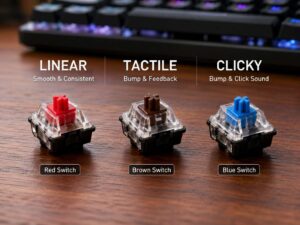
Linear switches are the easiest switches to lube. They move straight down with no tactile bump. Since the travel is simple, lube can smooth the stem without changing the core feel too much. Red, black, yellow, and silver-style switches often fall into this group.
Tactile switches need more care. They have a bump during the key press. That bump comes from the stem legs and the metal leaf. If you lube the wrong part, the bump can feel weaker. For this reason, use a lighter lube on tactile switches.
Clicky switches are the hardest to recommend for beginners. The click mechanism can lose its sharp sound after lubing. Some experienced users lube only the spring, but full lubing is risky.
If you are still choosing a switch type, read this guide on tactile, linear, or clicky switches first. It will help you pick the right switch before you spend time opening and lubing each one.
My honest view is simple. Start with linear switches. Then try tactile switches later. Leave clicky switches alone until you feel more confident.
Tools You Need to Lube Switches
You do not need a huge kit. Still, the right tools save time and prevent broken parts.
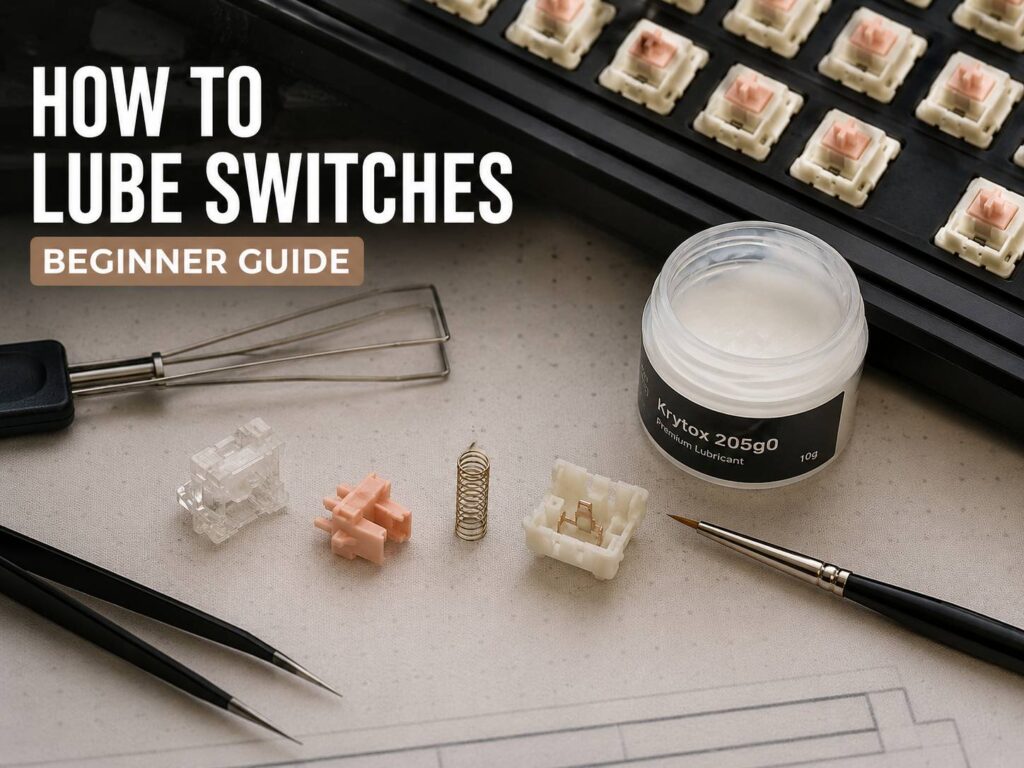
Here is a beginner-friendly switch lubing kit:
- Switch opener
- Keycap puller
- Switch puller
- Small brush, size 00 or 000
- Switch lube
- Tweezers
- Small tray or parts dish
- Clean desk mat
- Paper towel
- Optional stem holder
- Optional lube station
- Optional switch films
A switch opener is worth buying. It opens the housing clips without much effort. You can open switches with small screwdrivers, but that method can damage the housing fast.
A hot-swappable keyboard makes this job much easier. You can pull the switches out without soldering. If your keyboard has soldered switches, you need desoldering tools. That is not a beginner job for most people.
Best Lube for Mechanical Keyboard Switches
The most popular switch lube for linear switches is Krytox 205g0 or a similar 205 Grade 0 grease. It feels smooth, thick, and stable. It works well on many linear switches, but you still need a light hand.
For tactile switches, choose a thinner lube. Tribosys 3203 and Tribosys 3204 are common choices. 3203 feels lighter. 3204 feels a bit thicker. Both can work well if you avoid the tactile legs.
For springs, thin oil works better than thick grease in many cases. Krytox 105-style oil is a common pick for spring bag lubing. You can also brush lube the ends of each spring if you do not want to use the bag method.
A simple beginner setup looks like this:
- Linear switches: 205g0-style grease
- Tactile switches: 3203 or 3204-style lube
- Springs: 105-style oil
- Stabilizers: thicker grease, often 205g0 or a stabilizer grease
Do not use household oils. Avoid cooking oil, WD-40, lotion, petroleum jelly, or random garage grease. These products can damage plastics, dry out, collect dirt, or feel terrible after a short time.
How Much Lube Should You Use?
Use a tiny amount. This is the rule that saves most beginner lube jobs.
Your brush should look almost dry after you wipe it on the jar edge. The plastic should look lightly coated, not covered in thick grease. If you see white clumps or heavy streaks, you used too much.
A good lube job leaves a thin film on the contact points. The switch should still return fast. The key should not feel slow or sticky.
Here is a simple habit that works:
- Dip the brush lightly.
- Wipe most of the lube off.
- Brush one small area.
- Check the shine.
- Add more only if the part still looks dry.
Less lube gives you more control. Too much lube creates mushy keys and uneven sound.
How to Remove Switches From the Keyboard
Turn the keyboard off first. If it uses a cable, unplug it. If it is wireless, switch it off.
Next, take a quick photo of the layout. This helps when you put the keycaps back. It sounds minor, but it saves time.
Pull the keycaps with a keycap puller. Pull straight up and keep the motion gentle. Longer keys, like spacebar and shift, need extra care.
After that, use a switch puller. Press the top and bottom clips of the switch. Then pull straight up. If the switch does not move, check your grip and angle. Do not force it. Bent pins are one of the most common beginner problems.
Place the switches in a tray with the pins facing the same direction. This keeps the desk clean and makes the next steps faster.
How to Open a Switch
Place one switch into the switch opener. Press down until the clips release. Then lift the top housing away.
You should now see the stem and spring inside the bottom housing. Remove the stem with tweezers or a stem holder. Then remove the spring.
Keep the parts in order:
- Top housing
- Stem
- Spring
- Bottom housing
At first, open one switch at a time. Once you feel comfortable, open 10 to 20 switches in small batches. That keeps the work organized without turning your desk into a pile of tiny parts.
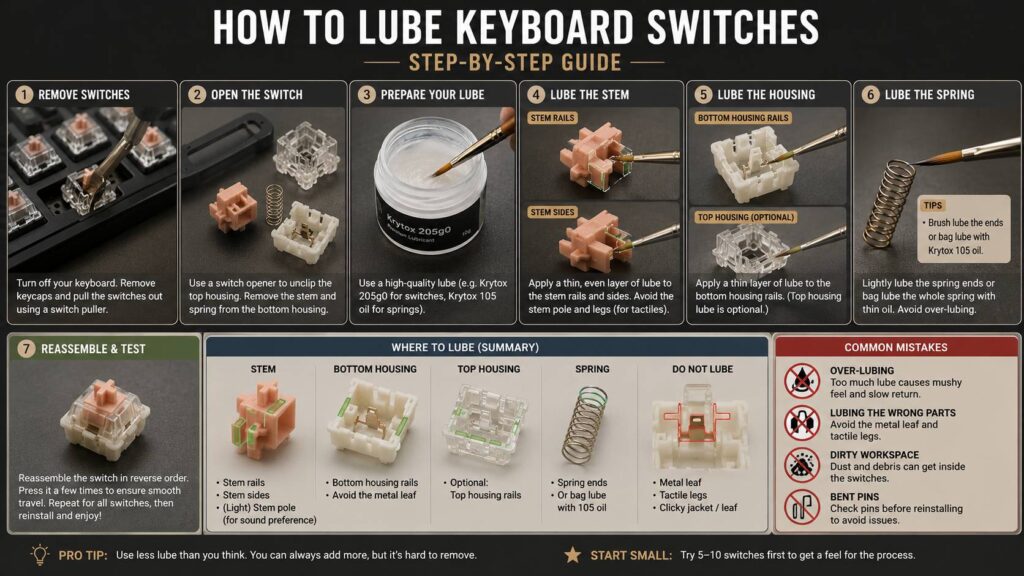
Where to Apply Lube
The main friction points are the stem rails and housing rails. These areas need the most care.
For linear switches, lube these parts:
- Stem rails
- Stem sides
- Bottom housing rails
- Spring ends
- Stem pole, with a very light coat
For tactile switches, lube these parts:
- Stem rails
- Stem sides
- Bottom housing rails
- Spring ends
Skip the tactile legs on tactile switches. Those legs help create the bump. Lube on that area can soften the feel too much.
Do not lube the metal leaf. The metal leaf handles contact and input. Lube on that part can cause chatter, missed key presses, or an uneven feel.
Step-by-Step Guide to Lubing Switches
Start with one open switch. Place the top housing, bottom housing, stem, and spring in front of you.
Dip the brush into the lube. Then wipe most of it off on the edge of the container. The brush should carry only a thin layer.
Brush the stem rails first. Use short, light strokes. The surface should look slightly shiny.
Next, brush the stem sides. Keep the layer thin. For linear switches, you can add a tiny amount to the stem pole if you want a deeper sound. Do not overdo this part.
Then brush the bottom housing rails. Stay away from the metal leaf. This area is small, so slow down.
After that, lube the spring. You can brush each end, or you can place springs in a small bag with a few drops of thin oil. Shake the bag gently until the springs get a light coat.
Place the spring back into the bottom housing. Set the stem on top in the correct direction. Then snap the top housing back into place.
Press the switch by hand 10 to 20 times. It should move freely. If it feels sticky, open it again and remove extra lube.
Bag Lubing Springs
Spring ping sounds like a small metallic ring after a key press. It can make a keyboard sound cheap, even if the switch feels smooth.
Bag lubing is a fast way to treat springs. Place the springs in a small plastic bag. Add a few drops of thin oil. Then shake the bag gently for 20 to 30 seconds.
After that, pour the springs onto a clean surface. Let them settle for a few minutes before rebuilding the switches.
Do not flood the bag with oil. A few drops are enough for many springs. Too much oil can drip into the switch housing and make the switch feel messy.
Common Beginner Mistakes
Over-lubing is the biggest mistake. It makes switches feel slow, heavy, or muted. If the key does not return cleanly, too much lube is often the reason.
Another common mistake is lubing the tactile legs. This can reduce the bump on tactile switches. If you bought tactile switches for the bump, that is the opposite of what you want.
Bent pins are common too. Before you reinstall a switch, check both pins. They should be straight. If one is bent, fix it gently with tweezers.
Some beginners mix switch parts without meaning to. This can create uneven feel across the keyboard. To avoid that, keep batches small and organized.
Dust is another problem. Lube attracts dirt. Clean your desk first, and keep food or drinks away from the work area.
How to Fix Over-Lubed Switches
An over-lubed switch feels sluggish. It can sound too dull, and it can return slower than the other keys.
Open the switch again. Use a clean brush to spread the lube thinner. If that does not fix it, wipe the stem and housing gently with a lint-free cloth or paper towel.
Do not use water. Water will not remove grease well, and it can cause problems inside the switch.
If the switch still feels bad, set it aside and use a fresh one. Cleaning every corner of a tiny switch can take more time than it is worth. Keep the bad switch for practice.
Should You Lube Factory-Lubed Switches?
Many new switches ship with factory lube. Some feel great. Others feel inconsistent. One switch can feel smooth, then the next one can feel dry or noisy.
Test a few switches before you open all of them. If they feel smooth and sound good, leave them alone. If the springs ping, lube the springs only. If the travel feels scratchy, open one switch and inspect the lube.
More lube does not always mean better sound. Factory-lubed switches can become worse if you add too much grease.
Should You Use Switch Films?
Switch films sit between the top and bottom housing. They reduce housing wobble on some switches. They can make the sound tighter, but they do not help every switch.
Use films only if the housing feels loose. Test one switch first. If the switch is already tight, a film can make it hard to close.
For most beginners, lube first. Films can wait. A clean lube job usually gives a bigger change than films on budget switches.
How Long Does It Take to Lube Switches?
A first full keyboard can take 3 to 6 hours. A smaller 60 percent keyboard can take 2 to 4 hours. A numpad can take less than an hour.
Speed comes with practice. Do not rush the first batch. Rushing leads to uneven lube, bent pins, sticky switches, and lost springs.
Work in small groups. Ten switches at a time feels manageable. Then test them before you continue.
How to Test the Keyboard After Lubing
Reinstall the switches carefully. Check the pins before pressing each switch into the plate. If a pin bends under the switch, the key will not work.
Put a few keycaps back on and type for a minute. Then test every key with a keyboard tester or a blank document.
Listen and feel for:
- Sticky return
- Missed key presses
- Double inputs
- Spring ping
- Scratchy travel
- Uneven sound
- Wobbly housings
If one key feels wrong, remove that switch and inspect it. Most issues come from too much lube, a bent pin, a misplaced spring, or lube near the metal leaf.
My Honest Beginner Advice
Do not chase the sound you hear in keyboard videos. Those clips depend on the desk, microphone, case, plate, foam, keycaps, switches, and recording setup. Your keyboard will sound different in real life.
A good first goal is simple. Reduce scratch. Reduce spring ping. Keep the switch fast. That is enough.
I prefer a light lube job over a heavy one. Light lube keeps the switch clean and lively. Heavy lube can make the keyboard feel tired, especially on tactile switches.
Test often. Type a paragraph. Play a game. Use the keyboard for an hour. Then decide if you like the change.
Final Tips Before You Start
Buy a few spare switches. Mistakes happen, and spare switches make the job less stressful.
Start with linear switches if you can. They are the easiest to learn on.
Use a clean brush. Keep the lube jar closed between batches.
Work under good light. Small parts are easier to handle when you can see the rails, legs, and spring clearly.
Most of all, slow down. Your first switch will not look perfect. Your tenth switch will look better. By the time you finish the first small batch, the process will feel much easier.
Final Thoughts
Lubing switches is one of the most useful beginner mechanical keyboard mods. It can smooth out scratchy travel, reduce spring noise, and make typing feel more pleasant. The job takes time, but the steps are simple once you learn the parts.
For a first project, use linear switches, a small brush, and a thin coat of lube. If you lube tactile switches, avoid the tactile legs. If you use clicky switches, leave them alone until you gain more experience.
A careful lube job does not need to be perfect. It needs to be clean, light, and consistent. That is what makes the keyboard feel better every time you type.