Rapid trigger on a keyboard is a feature that lets a key reset the moment you start lifting your finger. Then, the same key can activate again as soon as you press it back down. This makes repeated key presses feel faster, sharper, and more controlled.
That sounds like a small change. In real gameplay, it can feel big. Rapid trigger is most useful in fast games where movement timing matters, such as Valorant, Counter-Strike 2, Apex Legends, Fortnite, Overwatch, osu!, and other reaction-heavy titles.
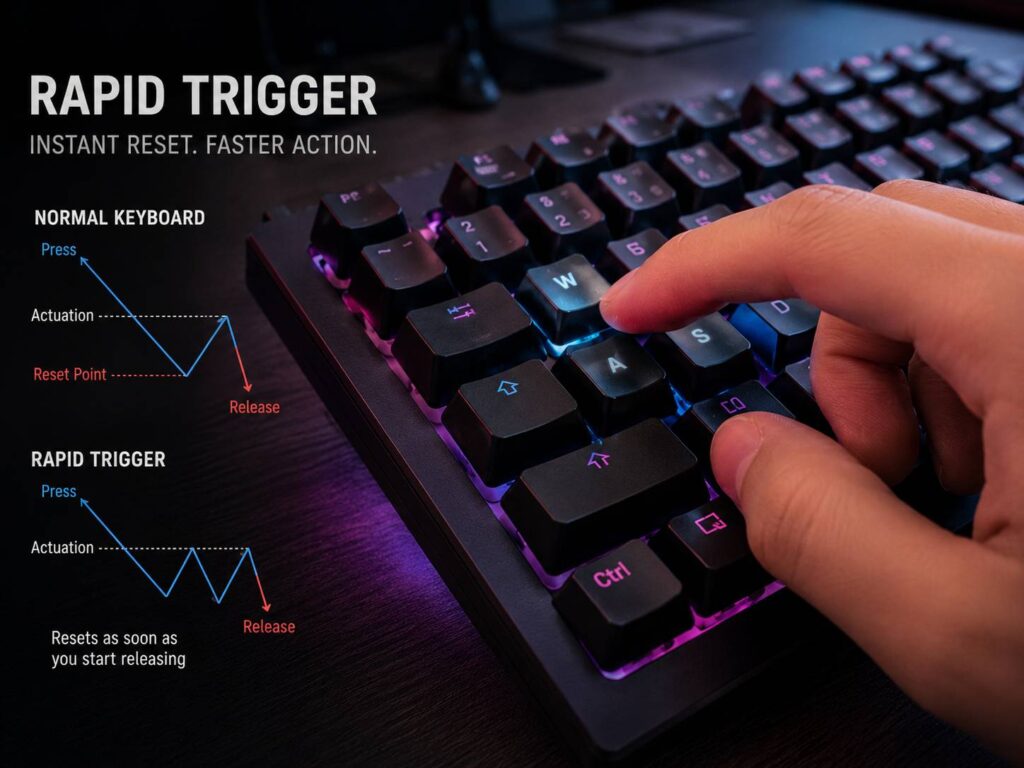
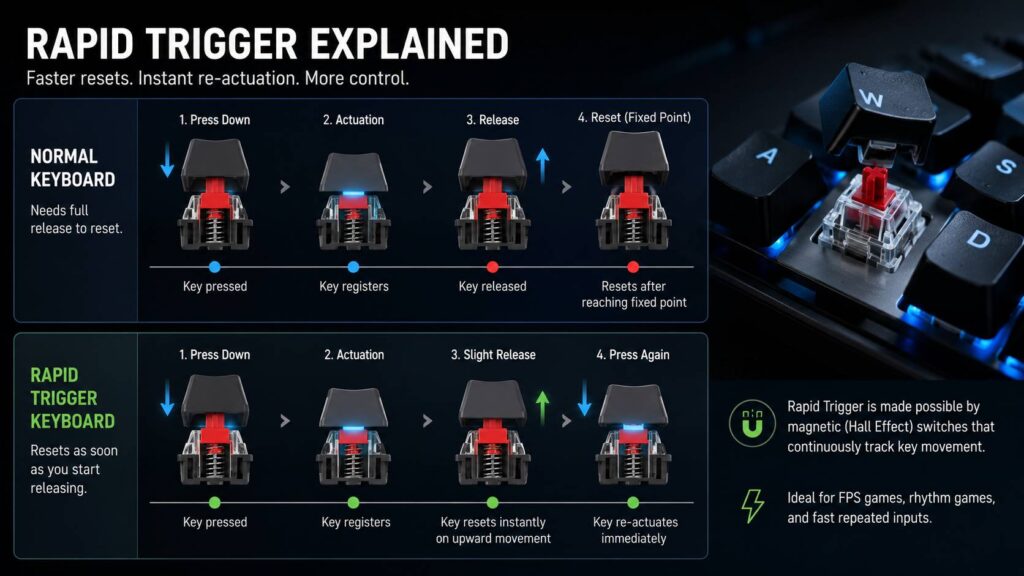
A normal mechanical keyboard has a fixed actuation point and a fixed reset point. You press the key down, it activates, then you need to release it far enough before the next press registers. Rapid trigger changes that. The key can reset as soon as it detects upward movement.
For this reason, rapid trigger keyboards are popular with competitive gamers. They help with quick strafing, counter-strafing, tapping, and repeated movement inputs. Still, the feature works best on the right type of keyboard. Most rapid trigger models use Hall effect switches, magnetic switches, or analog optical switches.
How Rapid Trigger Works
To understand rapid trigger, start with two simple terms: actuation point and reset point.
The actuation point is the depth where a key press registers. For example, a keyboard can activate at 0.4 mm, 1.0 mm, or 2.0 mm of travel. A shorter actuation point feels faster, but it can cause more accidental presses.
The reset point is where the key stops being active after you release it. On a standard mechanical switch, this reset point stays fixed. So, you need to lift the key past that point before the keyboard accepts another press.
Rapid trigger removes that fixed reset behavior. Instead, the keyboard tracks the movement of the key in real time. As soon as your finger moves upward, the key can reset. Then, as soon as your finger moves downward again, the key can activate.
In practice, this means you do not need to fully release a key before pressing it again. That gives you faster repeated inputs and cleaner movement control.
Rapid Trigger vs a Normal Mechanical Keyboard
A normal mechanical keyboard works well for typing, work, and casual gaming. It gives a clear key feel, and the sound and feedback are part of the appeal. Still, it has one limit for fast games: the switch reset point does not follow your finger movement.
Here is the simple difference:
- Normal keyboard: press down, activate, release past the reset point, then press again.
- Rapid trigger keyboard: press down, activate, lift slightly, reset, then press again right away.
This matters most with keys you tap often. For example, A and D are used for strafing in shooters. On a normal keyboard, your movement stops only after the key resets. With rapid trigger, your movement can stop closer to the exact moment your finger starts to lift.
That is why rapid trigger feels so direct. The keyboard follows your input more closely. It does not wait for the switch to return to a fixed position.
Why Gamers Like Rapid Trigger
Rapid trigger is not just a fancy name for a fast keyboard. It solves a real input issue in competitive games.
In shooters, movement affects accuracy. A small delay in stopping movement can throw off your shot. So, faster key release can help with counter-strafing, jiggle peeking, quick strafes, and fast direction changes.
For example, in Counter-Strike 2 and Valorant, players often tap the opposite movement key to stop faster. Rapid trigger can make that input feel cleaner. It does not aim for you, and it does not replace practice. Still, it reduces the keyboard-side delay between your finger movement and the game input.
Rhythm game players can benefit too. Fast repeated taps feel easier when keys reset with less travel. Action game players can feel the same advantage during dodges, quick turns, and repeated ability inputs.
My honest opinion: rapid trigger is one of the few keyboard features you can feel right away in fast games. It does not feel like a small spec sheet upgrade. It changes how movement keys respond under your fingers.
What Keyboards Support Rapid Trigger?
Rapid trigger needs a keyboard that can track key travel. For that reason, it usually appears on:
- Hall effect keyboards
- Magnetic switch keyboards
- Analog optical keyboards
- Adjustable actuation gaming keyboards
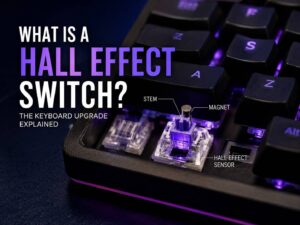
Hall effect switches use magnets and sensors to read key position. Since the keyboard knows how far each key moves, it can change actuation and reset behavior through software.
If you want to understand the switch technology behind many rapid trigger boards, this guide on what is a Hall effect switch explains the core idea in a simple way.
Standard mechanical switches usually cannot offer true rapid trigger. Most of them only know two states: pressed or not pressed. That makes them great for classic typing feel, but less flexible for advanced gaming features.
So, before buying, check the switch type. A keyboard with magnetic or analog switches has a much better chance of supporting true rapid trigger.
Rapid Trigger vs Adjustable Actuation
Rapid trigger and adjustable actuation are often mentioned together. They are related, but they are not the same feature.
Adjustable actuation lets you choose where the key activates. For example, you can set a key to register at 0.4 mm for gaming or 1.8 mm for safer typing. This changes the first press point.
Rapid trigger changes how the key resets after it activates. It reacts to movement direction. If your finger moves up, the key resets. If your finger moves down again, it activates again.
Here is the easy version:
- Adjustable actuation controls how deep you press before a key activates.
- Rapid trigger controls how fast the key resets and activates again.
- Together, they make movement feel faster and more personal.
For gaming, short actuation with rapid trigger on movement keys works well. For typing, deeper actuation often feels better.
Best Rapid Trigger Settings for Gaming
The best rapid trigger settings are not always the lowest numbers. A very sensitive setup can feel fast, but it can cause mistakes. Small finger movements can reset keys before you mean to release them.
A safer starting point is a balanced setup. Then, adjust it after a few matches.
Try this for FPS games:
- Turn on rapid trigger for W, A, S, and D.
- Set movement keys to a short actuation point.
- Use a medium rapid trigger sensitivity at first.
- Keep spacebar, shift, and control less sensitive if they feel unstable.
- Test the profile in practice mode before ranked games.
- Save a separate typing profile with slower settings.
The lowest possible rapid trigger value can feel too nervous. It can create accidental stops, repeated inputs, or uneven strafing. So, do not copy pro settings blindly. Use them as a starting point, then tune the keyboard to your hands.
Common Rapid Trigger Problems
Rapid trigger can feel amazing, but it is not perfect. The biggest problem is accidental input. If the reset distance is too short, a tiny finger movement can trigger or release a key.
This can make typing messy. You can see double letters, missed letters, or weird movement in games. For that reason, rapid trigger works best with profiles. Use one profile for gaming and one profile for writing.
Another issue is uneven key feel. One key can feel great, then another can feel too sensitive. This happens more often on cheaper boards with weaker software. The hardware matters, but the software matters just as much.
Firmware bugs can be annoying too. Some keyboards need updates before rapid trigger feels stable. In my view, this is the area where budget magnetic keyboards still need the most work. The switches can be smooth, but poor software makes tuning frustrating.
Tournament rules are another point to check. Rapid trigger is not the same as automated movement assistance, but some games place limits on advanced keyboard behavior. So, competitive players should check the rules for their game, event, or platform.
Is Rapid Trigger Good for Typing?
Rapid trigger is built for fast input, not relaxed typing. It can work for typing, but it can feel too sensitive.
If you type long articles, emails, or work documents, turn rapid trigger off for normal typing. Then, set a deeper actuation point for letter keys. This makes the keyboard feel calmer and reduces mistakes.
For gaming, switch back to your rapid trigger profile. Good software makes this easy. Some keyboards let you change profiles with shortcuts. Others can switch profiles per app.
This is the best setup for most users:
- Gaming profile: rapid trigger on, short actuation, tuned movement keys.
- Typing profile: rapid trigger off, deeper actuation, stable key feel.
That split gives you speed in games and comfort during work.
Rapid Trigger and Hall Effect Keyboards
Rapid trigger became popular mainly through Hall effect keyboards. These boards use magnetic sensing, so they can read key position with more detail than a normal switch.
That extra sensing allows features like rapid trigger, adjustable actuation, analog input, and per-key tuning. For gamers who like to fine-tune gear, this is a major reason to consider a magnetic keyboard.
Still, Hall effect boards are not all equal. Some feel smooth and precise. Others feel hollow, loud, or rough. Software quality can change the whole experience too.
If you are comparing models, read this guide on are Hall effect keyboards worth buying in 2026. It gives more context on the strengths, downsides, and real value of this keyboard type.
Is Rapid Trigger the Same as Low Latency?
No. Rapid trigger and low latency are different things.
Rapid trigger controls how a key resets and activates based on movement. Low latency measures how fast the keyboard sends input to your PC and how quickly that input reaches the game.
A keyboard can have rapid trigger but still feel average if its firmware is weak. A keyboard can have low latency without rapid trigger too.
For the best gaming feel, you want both. Look for strong rapid trigger settings, low input delay, stable firmware, and good software. Polling rate can help, but it does not tell the full story by itself.
A keyboard with 8,000 Hz polling sounds impressive. Still, poor tuning can make it feel worse than a well-made 1,000 Hz board. The full design matters more than one number.
Who Should Buy a Rapid Trigger Keyboard?
A rapid trigger keyboard makes the most sense for competitive players. It is especially useful for:
- Valorant players
- Counter-Strike 2 players
- Apex Legends players
- Fortnite players
- Overwatch players
- osu! players
- Fighting game players using keyboard
- Speed-focused action game players
It also suits users who like to tune their setup. If you already care about DPI, polling rate, monitor refresh rate, and mouse lift-off distance, rapid trigger gives you another control point.
Casual users do not need it. If you mostly type, browse, watch videos, or play slower games, a normal mechanical keyboard is still a great choice. Rapid trigger is a performance feature, not a must-have for everyone.
What to Check Before Buying
Before you buy a rapid trigger keyboard, check more than the product title. Some keyboards use big claims, but the real experience depends on the details.
Look for these features:
- Magnetic, Hall effect, or analog optical switches
- Per-key adjustable actuation
- Per-key rapid trigger settings
- Stable software
- Onboard memory
- Clean profile switching
- Solid build quality
- Good stabilizers
- Clear firmware update support
- Layout that fits your desk and game style
Price matters too. Rapid trigger keyboards often cost more than standard mechanical keyboards. The higher price makes sense only if you play games where the feature helps.
A cheap rapid trigger keyboard with bad software can feel worse than a normal mechanical keyboard. So, check real user feedback before buying.
Final Verdict: Is Rapid Trigger Worth It?
Rapid trigger is worth it if you play fast competitive games and want sharper movement control. It helps keys reset faster, which makes strafing, tapping, and repeated inputs feel more direct.
It will not make you a better player overnight. Aim, timing, map knowledge, and practice still matter more. Still, rapid trigger removes a small input delay from your keyboard. For serious players, that small change can feel meaningful.
For typing, rapid trigger is less useful. It can feel too sensitive, and it can cause mistakes. A separate typing profile fixes most of that.
My real take: rapid trigger is not hype if you play the right games. It is one of the few keyboard features that changes the actual feel of movement. Once you get used to it, a normal keyboard can feel slower during fast direction changes.