
What Is a Mouse Dock?
A mouse dock is a small desktop accessory that charges, stores, or connects a wireless mouse. The term usually means a charging station that holds the mouse between work or gaming sessions. Some docks do more than charge. They can act as a wireless receiver, improve cable placement, add lighting, or simply keep the mouse in one clean spot on your desk.
The basic idea is easy to understand. Instead of plugging a cable into your mouse every few days, you place the mouse on a dock. The dock gives the battery power, so the mouse stays ready for your next work session or gaming session.
A mouse dock is most common with gaming mice. Gamers like wireless mice since they remove cable drag and give more freedom during fast movement. Still, battery life can become annoying during long sessions. A dock solves that by giving the mouse a fixed charging spot.
Office users can benefit too. A dock can make a desk look cleaner, reduce cable clutter, and remove one small daily task. If you use a wireless mouse every day, a charging dock can feel more useful than it looks at first.
How Does a Mouse Dock Work?
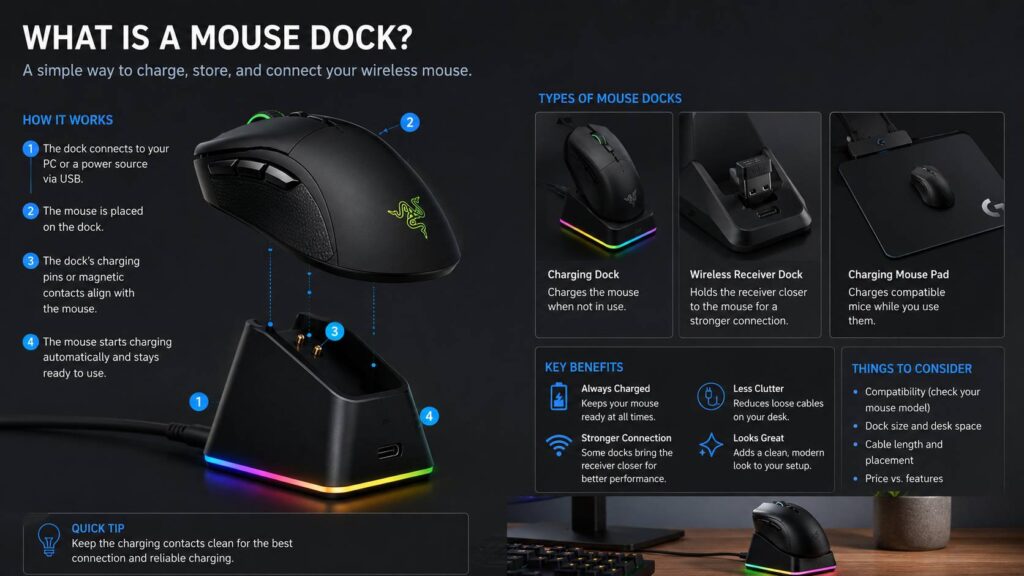
A mouse dock usually connects to a PC, laptop, USB hub, or wall charger with a USB cable. The mouse then sits on the dock and charges through contact pins, magnets, or a charging puck.
Many docks use small metal contact points. These points touch matching points on the mouse and transfer power to the battery. Some models use magnetic alignment, which helps the mouse sit correctly without much effort.
That detail matters in daily use. A dock that needs perfect placement can get annoying fast. A good one should guide the mouse into place and start charging without making you adjust it again and again.
Some gaming docks include a wireless receiver. This means the dock can charge the mouse and act as the connection point between the mouse and computer. That can help keep the wireless receiver closer to the mouse, which is useful on crowded desks with many cables and devices.
Other systems use a charging mouse pad instead of a small stand. This type can charge the mouse during use, not only after you place it down. It costs more, but it removes the need to dock the mouse at the end of the day.
Mouse Dock vs Charging Cable
A charging cable is the simplest way to charge a wireless mouse. It is cheap, easy to replace, and works with many models. A mouse dock is more convenient, but it usually works only with selected mice.
Here is the practical difference:
- A cable charges many rechargeable wireless mice.
- A dock gives your mouse a fixed charging place.
- A cable can create clutter on the desk.
- A dock looks cleaner and feels more organized.
- A cable works better for travel.
- A dock works better for a permanent desk setup.
The dock wins on habit. You finish work, place the mouse on the dock, and forget about battery life. That feels better than searching for a cable after the mouse shows a low-battery warning.
The cable still has value. It is small, light, and easy to pack. If you travel with your mouse, a cable is more practical than a dock. For a fixed desk, though, the dock feels nicer.
Main Types of Mouse Docks
Charging Mouse Dock
This is the most common type. It charges the mouse through pins, magnets, or a charging puck. The mouse usually sits upright or at a slight angle.
A charging mouse dock works best for people who use the same desk every day. It gives the mouse a home, keeps the battery topped up, and reduces loose cables.
The main issue is compatibility. Many charging docks work only with one brand or a short list of supported mice. Before buying one, check the exact mouse model, not just the brand name.
Wireless Receiver Dock
Some docks include the wireless receiver inside the base. This can move the receiver closer to the mouse and reduce signal problems. It can also make the desk look cleaner since the receiver no longer sticks out from the back of the PC.
This type makes the most sense for gaming setups. A nearby receiver can help with consistency, mainly on desks full of USB devices, monitors, speakers, and charging cables.
Most modern wireless mice already perform well with a standard dongle. Still, a receiver dock can make the setup cleaner and more stable.
Charging Mouse Pad
A charging mouse pad is not a classic dock, but it solves the same charging problem. Instead of placing the mouse on a small stand, you use the mouse on a pad that can provide power.
This setup is useful for gamers who never want to think about charging. The mouse stays on the pad during normal use and keeps receiving power.
The downside is space and price. A charging mouse pad takes more room than a small dock. It can also lock you into one brand or one mouse family.
Display or Storage Dock
Some docks mainly work as stands. They hold the mouse but do not charge it. These are less useful for most people, but they can still make sense for collectors, streamers, or clean desk setups.
A simple storage dock can help if you use two mice. For example, you might keep one mouse for gaming and another for work. A stand keeps the spare mouse off the desk surface and makes the setup look more intentional.
Why Use a Mouse Dock?
A mouse dock removes a small but common annoyance. You no longer need to plug in a cable every time the battery runs low. You just place the mouse on the dock when you finish using it.
The main benefits are easy to see:
- It keeps your wireless mouse charged.
- It gives the mouse a fixed place on the desk.
- It reduces visible cable clutter.
- It can make a gaming setup look cleaner.
- It can move the receiver closer to the mouse.
- It reduces battery anxiety before long work or gaming sessions.
The biggest benefit is routine. A dock turns charging into a habit that takes no effort. You stop thinking about battery percentage, and the mouse stays ready.
This is why docks work well in many tech categories, not just desktop accessories. For example, a self-empty robot vacuum vs standard dock comparison shows the same idea in a home cleaning setup. A better dock can reduce daily maintenance and make the device easier to live with.
Common Mouse Dock Problems
A mouse dock can be useful, but it is not perfect. Some issues show up only after a few days or weeks of use.
The first problem is poor alignment. Some docks need the mouse to sit exactly on the charging pins. If the mouse rests slightly off-center, charging may stop. Magnetic docks usually fix part of this problem, but not always.
Dirty contacts can cause trouble too. Dust, skin oil, and desk grime can build up on the charging points. The dock may charge slowly, or it may stop working until you clean the contacts.
Cable placement can be another issue. A dock still needs power, so it still uses a cable. If the cable is too short or stiff, it can push the dock out of place.
Brand lock-in is a real concern. Many docks work with only a small group of mice. If you change brands later, the dock may become useless.
Price can feel hard to justify. A cable costs very little and does the same basic job. A dock is about comfort, desk style, and convenience, not raw necessity.
My honest view: a mouse dock is worth it if your mouse lives on one desk. It is much less useful if you travel often or switch mice regularly.
Mouse Dock for Gaming
A mouse dock makes the most sense in a gaming setup. Wireless gaming mice are popular because they remove cable drag. Fast flicks feel cleaner, and the desk has less clutter.
The only tradeoff is charging. A dock solves that problem in a simple way. After each session, you place the mouse on the dock. Next time, it is ready.
Some gaming docks include lighting. This does not improve performance, but it can match a keyboard, headset stand, or PC case. Some users like that. Others will see it as extra cost.
A receiver dock can matter more than lighting. It can place the wireless receiver near the mouse pad, which may help with signal consistency. This matters most for competitive players who care about every small delay or signal drop.
For gaming, the best feature is still simple charging. A dock keeps the mouse ready, and that matters more than fancy effects.
Mouse Dock for Office Work
A mouse dock can improve an office setup too. It keeps the desk tidy and gives your mouse a clear place to rest.
It works well for:
- Remote work desks
- Dual-monitor setups
- Video editing desks
- Design workstations
- Shared home offices
- Minimal desk setups
The value is highest if you already care about desk organization. A dock makes the mouse feel like part of the setup instead of another loose gadget.
Still, many productivity mice have excellent battery life. Some can run for weeks or months before needing a charge. In that case, a dock feels less necessary. A short cable may be enough.
Is a Mouse Dock Universal?
Most mouse docks are not universal. This is one of the easiest mistakes to make.
A dock must match the mouse shape, charging contacts, charging puck, or wireless charging system. Even mice from the same brand can use different dock designs.
Before buying, check:
- Exact mouse model
- Dock compatibility list
- Charging method
- USB connector type
- Included cable
- Need for a charging puck
- Software requirements
- Desk space
Do not buy a dock based only on the brand. Match the exact product name. This can save money and prevent a return.
What to Look For Before Buying a Mouse Dock
A good mouse dock should make your setup easier, not more annoying. Use this checklist before you buy one.
Check compatibility first. This is the most important step.
Look at the charging design. Magnetic placement usually feels better than loose contact pins.
Check the base grip. A dock with weak rubber feet can slide around the desk.
Check cable length. A short cable limits where you can place the dock.
Look at the size. Some docks are small, but charging mouse pads take much more space.
Think about software. RGB lighting and advanced receiver settings may need brand software.
Compare the price with the mouse. Spending too much on a dock for a budget mouse rarely makes sense.
Think about your daily habits. If you already charge your mouse without any frustration, the dock may not add much.
Mouse Dock vs Other Smart Docks
The word dock can mean different things depending on the device. A mouse dock usually charges and stores a mouse. A laptop dock can connect monitors and accessories. A robot vacuum dock can charge the robot, empty dust, wash mop pads, or refill water.
The common idea is simple. A good dock reduces manual work. It gives the device a place to return, recharge, and stay ready.
That same logic applies to cleaning devices. If you are comparing smart home products, this guide on whether you need a robot vacuum with mopping can help explain how dock features can change daily maintenance.
For a mouse, the dock is smaller and simpler. It will not clean or empty anything. Still, the benefit feels similar: less effort, fewer cables, and less daily friction.
Is a Mouse Dock Worth It?
A mouse dock is worth it if you use a compatible wireless mouse every day and want a cleaner desk setup. It is especially useful for gaming desks, work-from-home setups, and users who dislike loose cables.
It is not a must-have accessory. Your mouse will still work with a normal charging cable.
The best case is clear. You own a compatible wireless mouse, use it on one desk, and want charging to feel automatic. In that situation, a dock feels like a smart upgrade.
The worst case is also clear. You buy a dock without checking compatibility, then discover your mouse does not fit. Always check the exact model first.
Mouse Dock vs Charging Mouse Pad: Which Is Better?
A mouse dock is better for smaller desks and lower cost. It gives the mouse a charging spot without taking over your desk.
A charging mouse pad is better if you want the mouse to charge during use. It feels more hands-off, but it costs more and needs more space.
Choose a mouse dock if you want a simple charging station.
Choose a charging mouse pad if you want the most automatic setup and already use a compatible gaming mouse.
Most people will find a standard dock more practical. It fixes the main charging problem without adding much size or cost.
Final Verdict
A mouse dock is a useful desk accessory for charging and organizing a wireless mouse. It is not required, but it can make a wireless setup feel cleaner and easier to manage.
The main benefits are simple: less cable clutter, easier charging, a tidier desk, and fewer battery surprises.
The best mouse dock is the one made for your exact mouse. Compatibility matters more than lighting, shape, or extra features. A cable can charge your mouse, but a good dock makes charging feel automatic.
If you use your wireless mouse every day, a dock can be a smart upgrade. If your mouse rarely needs charging, save the money and use the cable that came in the box.